
WBS
- Created
- 8
- 3
8 replies
Oldest first- 0BMBian Mutang Tagal ·
Hi Moutaz,Could you clarify
Hi Moutaz,
Could you clarify in what sense is the PDF unreadable? If it is the case of your Gantt Chart being truncated, perhaps printing as PDF on a larger paper size would work.
Here the default paper size is Letter
And I changed the paper size to A3 (if you do not see A3 as an option, you will have to choose your PDF printer in Page Setup first e.g. Microsoft Print to PDF, Foxit PDF)
- 0RDRafael Davila ·
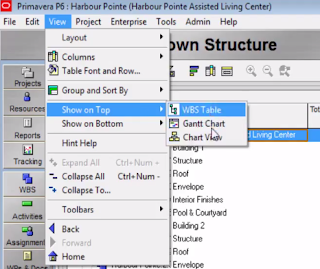
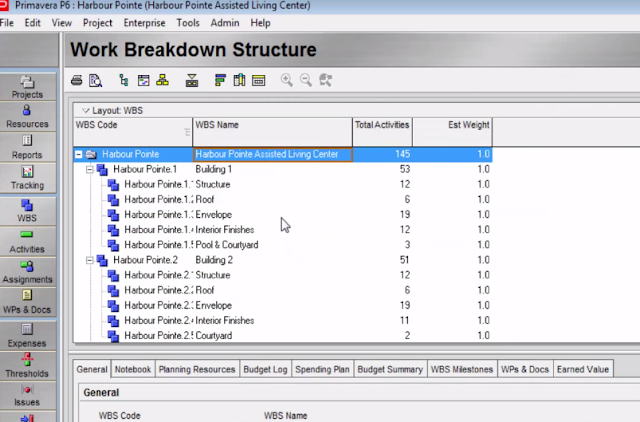
Try WBS Table, it might fit
Try WBS Table, it might fit your needs. I am not a P6 user (I was) but it might be you can select columns to display and export to Excel, or print it to PDF for distribution.
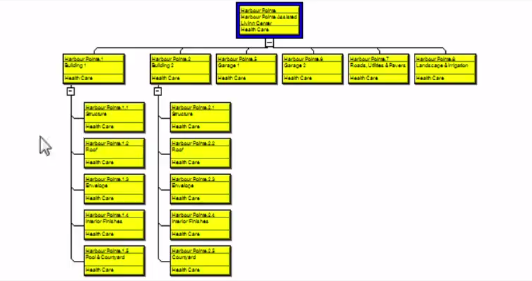
Primavera P6 Tutorial : Chapter 2.4 : Work Breakdown Structure (WBS)
Table
Chart
- 0AFAlexandre Faulx-Briole ·
Hi Mountaz,In French, we have
Hi Mountaz,
In French, we have a saying: "la plus belle fille du monde ne peut donner que ce qu'ele a":
"the most beautiful girl in the world can only give what she has"
Unfortunately, it is not possible to insert a page break in the WBS Group and sort dialog, as you can do in the activity's
- 0RDRafael Davila ·
In this case we are talking
In this case we are talking about a features in P6 that work, just that you have to use them for their best fit, it is your choice.
Take for example the PERT charts. Impossible to follow it the job have thousands of activities but good to show/trace logic of some segments some call “fragnets”. I very rarely use them, almost never, but when brainstorming a schedule these charts are hand drawn to communicate the logic. In this piece of paper it is easy to include parameters such as link calendars, float if a function of time or volume of work, difficult/impossible to display in software diagrams. These hand drawn diagrams are very useful, we use them frequently.
For a PERT chart be legible for a full large schedule a football size piece of paper might still fall short. To show all links a links table would be better, this is not about fancy Picasso drawings but about communication among the stakeholders.

Maybe by knowing what Moutaz want to print we might be able to make practical suggestions.
- 0RDRafael Davila ·
moutazThere are many ways to
moutaz
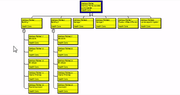
There are many ways to show WBS: please click the thumbnails for a better view.
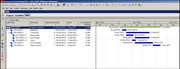
 WBS TABLE - You can also choose to display a Gantt chart to the right of the WBS table. Click the Display Options bar, choose Show on Top and select Gantt chart to get the following.
 WBS CHART
- WBS TABLE alone does not have issues with print size; the remaining options might have issues.
- The WBS GANTT CHART VIEW might have issues with printing if the timescale is big. Also if you show the activities level when fitting it to a single page the problem might be the many lines to fit a single page. If this is what you want to print try reducing timescale and collapsing the activities.
- The WBS CHART might yield very little boxes impossible to read when reduced for printing in a single page.
I do not know which one is your issue; can you please post a figure of what you get? What do you want to show?
Maybe by knowing what you want to print we might be able to make better suggestions.
- 0JOJerome Odeh ·
Copy and paste the WBS to
Copy and paste the WBS to Excel and play around with the font size and scale to fit on 1 page before printing.
===
jerome
https://www.plannersplace.com/
Log in or join to reply
ProjectControls.com is free to join. Members can post questions, reply, vote and follow discussions.
Existing members: your original username and password still work. Forgot password?