
Skip to content

P6 Baseline removed but data exists

Vikas KulkarniMember for 6 years 7 months
Created
13
6
0

Dear Sir,

I have un-assigned the baseline & then deleted the baseline for a Project using the Assign Baselines & Maintain Baselines functions respectively. There are no baselines now in the current Project. But still the BL fields are populated, the Gantt Chart shows the Baseline Bars & Primavera schedules the activities considering these baseline values !!! I also tried using the F5 & F9 keys but these values remain populated.

For example there is a milestone in the Project which I have changed to start on 15 November 2021 - Inspite of deleting the baselines P6 re-schedules it to start on 20 December 2021 as soon as we press F9 key. This date of 20 December 2021 is displayed in the BL Fields & neither I can delete it nor I can change it to 15 November 2021.

How to delete the complete baseline data in P6 - It seems even after deleting the baseline, P6 does not delete the baseline data.

Thanks & Regards,

Vikas Kulkarni.


13 replies

Oldest first
  1. 0
    Vikas Kulkarni ·

    Added Point - If I change the

    Added Point - If I change the Actual Start of the milestone to 15 November 2021 then P6 does not consider the BL fields but still displays a value of 20 December 2021 in the BL fields (BL & BL1).

  2. 0
    Rodel Marasigan ·

    Hi Vikas,If you removed the

    Hi Vikas,

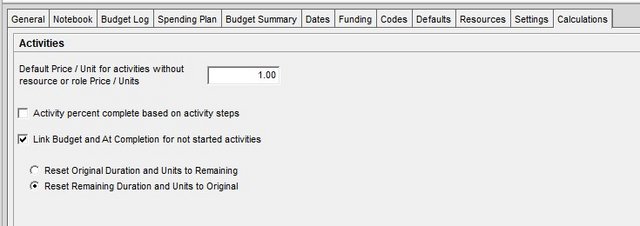
    If you removed the baseline (un-assigned and deleted or restore) the current project will be using the Planned Date of the project. If you are using an update project (having actual), the Planned Date will be de-link to Start Date, Early Start Date and will use original planned date before you tick the start date or update the actual date. If you wanted to link the Planned Date to non-started activities, you must change the settings in Calculation Tab under Project window. You must tick “Link Budget and At Completion for not started Activities" and select "Reset Remaining duration and Units to Original". See below.

    Project-Calculation-tab

    Note: This is for not started activities only or removing the actual to activate the link to planned dates.

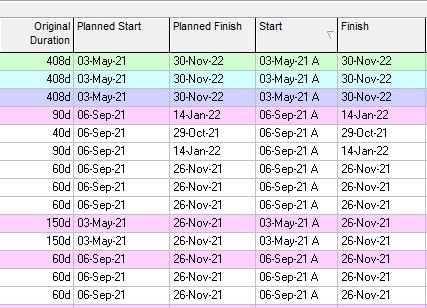
    To make sure the you understand what am I talking about, you can customised your column on activity window and show the Planned Start and Planned Finish Date. You can directly edit the activity planned date (<current project> baseline). See below

    Planned-Date-columns

  3. 0
    Vikas Kulkarni ·

    Dear Rodel Marasigan,Thanks

    Dear Rodel Marasigan,

    Thanks for your reply.

    I tried what you have suggested - I changed the Planned Start of Activity P1000 (START MILESTONE P PHASE) to 15 November 2021 - Then Rescheduled the Project but Primavera again reverts the date to 20 December 2021. 

    The Calculation Settings for the Project are the same as you have sugggested.

    Activity A1060 is the Predecessor to Activity P1000 (P Phase Start Milestone)

    2 Screen-shots Attached - Before & After Rescheduling.

    Thanks & Regards.


  4. 0
    Rodel Marasigan ·

    Hi Vikas,Your activity 1000

    Hi Vikas,

    Your activity 1000 Milestones had no actual yet. The predecessor pushing it to 20 Dec 2021. If look closely the planned date and start date are now link. It move the same date as your start date and baseline date. If your activity 1000 has been actualised on the 15 Nov 2021 then the planned start date will be also 15 Nov 2021. The activity 1000 Milestone is being pushed to 20 Dec 2021 by predecessor activity 1060 which is finished on 17 Dec 2021 Fri and 20 Dec 2021 Mon is correct. If you wanted it to stay on 15 Nov 2021 then change the relationship to activity having 15 Dec 2021 with SS and not to 17 Dec 2021. I'm also confused on your activities date. What is your data date? Why all the activities beyond the data date had actual or already started?

  5. 0
    Vikas Kulkarni ·

    Dear Rodel Marasigan,Thanks

    Dear Rodel Marasigan,

    Thanks for your reply.

    Activity A1060 is the Predecessor to Activity P1000 (P Phase Start Milestone) & its finishing on 12 November 2021 - Not on 17 December 2021

    The Data Date is 17-Dec-21 05:00 PM

    Images attached

    Thanks & Regards.

  6. 0
    Vikas Kulkarni ·

    data_date.png

  7. 0
    Santosh Bhat ·

    When you remove a baseline

    When you remove a baseline from "Assign Baseline" then P6 will then use <Current Project> to populate all the "BL Project" fields. If you need to be comparing your current project to a previous projects values, you should always use another project as the assigned baseline rather than leaving this field as <Current Project>

  8. 0
    Rodel Marasigan ·

    Hi Vikas,I cannot see the

    Hi Vikas,

    I cannot see the snapshot but according to you, the data date is 17 Dec 2021 "Fri" and the activity 1000 having a date of 15 Nov 2021 is not yet started therefore if you run the schedule the activity 1000 will move to 20 Dec 2021 "Mon".

  9. 0
    Vikas Kulkarni ·

    Dear Rodel Marasigan,Thanks

    Dear Rodel Marasigan,

    Thanks for your reply.

    I do not know how All the attached images have dissappeared or rather converted into just small pics with no data but with just the file name.

    They were appearing absolutely fine yesterday.

    I will attach all 4 of them again.

    I think you have solved my query.  If some questions come to my mind then I will ask you.

    With Thanks & Regards.


  10. 0
    Vikas Kulkarni ·

    I am not able to align the

    I am not able to align the Images Properly to fit centrally inside the Widow Pane Limits - So attaching half size  - Now I have attached Full Size again as well as half size - Total 8 images.

    My reply attached to the full size images also pasted again:

    Dear Rodel Marasigan,

    Thanks for your reply.

    I do not know how All the attached images have dissappeared or rather converted into just small pics with no data but with just the file name.

    They were appearing absolutely fine yesterday.

    I will attach all 4 of them again.

    I think you have solved my query.  If some questions come to my mind then I will ask you.

    With Thanks & Regards.


  11. 0
    Rodel Marasigan ·

    No worries, happy to help.

    No worries, happy to help.

  12. 0
    Zoltan Palffy ·

    make sure that under Assign

    make sure that under Assign Baseline that where it says Project Baseline make sure that it says <Current Project>

    and also under Users Baselines make sure that it says <Current Project>

    and lastly under the bars make sure that the colum for display Project Baseline is NOT checked.

  13. 0
    Vikas Kulkarni ·

    Dear Sirs (Mr. Rodel

    Dear Sirs (Mr. Rodel Marasigan & Mr. Zoltan Palffy & Mr. Santosh Bhat),

    Thanks To All Of You For Your Valuable Replies & Solving My Query.

    My Query is 100 percent solved.

    I have already checked the 1st & the 3rd items - I will check the 2nd item - "Users Baselines make sure that it says <Current Project>"

    I attached the 4 images 3 times - 2 times full size & 1 time half size - So total 12 images - All of them appear perfectly fine after attaching them and saving them - But they dissappear after some time - I mean they are converted into small icons by the website - These icons when right clicked give the option to "Load Image" or "Open in new tab" - But they neither load nor open in new tab-  I do not know why. 

    With Thanks & The Very Best Regards.

Log in or join to reply

ProjectControls.com is free to join. Members can post questions, reply, vote and follow discussions.

Existing members: your original username and password still work. Forgot password?