
Skip to content

'Group By' Duration Summary

Hugh McLeayMember for 14 years 7 months
Created
7
4
0

Hi All, 

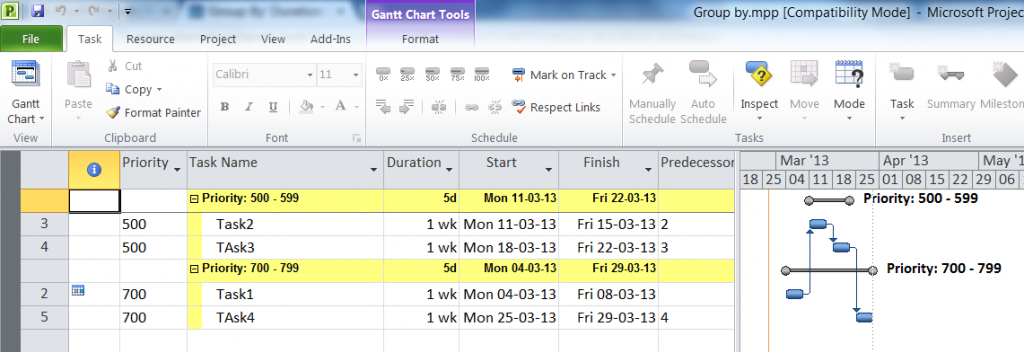
I've got a small programme in MS Project 2010, and am using 'Group By' function to summarise various phases. 

The summary value for 'duration' is not calculating correctly. Is showing the maximum duration within the group, rather than the latest finish minus earliest start. The start and finish dates for the summary bar are showing correctly though. 

I have all my durations entered as weeks, and have tried changing the setting for "duration is entered in..." box in the options menu, with no success. 

Any suggestions?

Thanks, 

Hugh.

7 replies

Oldest first

  1. 0
    Evgeny Z. ·

    I could reproduce this in MSP

    I could reproduce this in MSP 2010, however in MSP 2007 it works how you would expect it to work (see below)

    I suggest post your question on MSP spesific sites:

    http://answers.microsoft.com/en-us

    http://www.msofficeforums.com/

    If you get an answer, please post it here as well.

    Regards.

    Evgeny

     photo 2007_zps4c18dda5.png  photo 2010_zps44f7a5a3.png
  2. 0
    Vladimir Liberzon ·

    Evgeny,usually duration is

    Evgeny,

    usually duration is measured in work days.

    In your example second phase has 10 days duration (another 10 days is idle time).

    So you calculated some special duration that shows the number of work days (if you considered calendars) between phase start and finish.

  3. 0
    Hugh McLeay ·

    Thanks Evgeny Z, Glad to see

    Thanks Evgeny Z, 

    Glad to see you're able to replicate the problem, so I know it's not just me!

    I'll post the same question in those forums you suggested. 

    Cheers, 

    Hugh. 

  4. 0
    Evgeny Z. ·

    Vladimir,I would expect the


    Vladimir,

    I would expect the duration of the group to be equal to be the duration of the virtual summary task, pulled above all tasks, included in the group.

    In this context, I see, that MSP 2007 calculates it more correctly, then MSP 2010.

    The duration of a summary task is calculated by both versions of MSP identically.

     photo MSP2007_zpse8f172b6.png

    By the way, I now noticed, that duration of the phase in Spider is calculated differently, than the duration of the summary task in Microsoft Project, you indeed calculate the time, when there is some work ongoing in this phase . Does it not conflict with the intuitive understanding of the duration of the Phase / summary task? I would personally think that the duration of the phase shall be equivalent to the duration of the hammock, which runs over the same period.

     photo Spider_zps92b0faa3.png

    Regards.

    Evgeny

  5. 0
    Vladimir Liberzon ·

    Evgeny,I think that an

    Evgeny,

    I think that an information on the work duration on each project phase is useful. Besodes, I don't see the reason why an approach to calculating activity duration shall be different with the approach to calculating phase duration. Phase of detailed schedule may be converted to an activity of less detailed schedule (Levels 4-3-2) and its duration shall not change.

    It is easy to apply formula and calculate duration between any dates if necessary but is it real phase duration? The same may be applied to activities that have performance interruptions.


    In MS Project resources may be assigned to summary tasks and have hourly cost. Does it mean that phase cost include resource cost at times when it does not work on this phase? Or resource considered busy and is not used on other activities when summary task is not performed?

  6. 0
    Rafael Davila ·

    Definitively Spider Phases

    Definitively Spider Phases roll up as expected, even when working on different shifts on different activities on the same phase.

    I wonder how the following is rolled up in MSP. I wonder if shift work is performed on a single activity if MSP would get it right for the single activity because of how different shift and resource calendars determine the work hours on the activity.

     photo PhaseDuration_zpsfae1c12a.png

  7. 0
    Hugh McLeay ·

    Ok, I have received a


    Ok, I have received a suitable answer in another forum: 
     
    Use the 'Scheduled Duration' field rather than the 'Duration Field'. 
     
    Still doesn't explain why 'Duration' field won't calculate correctly, but at least it's an easy workaround. 
    It may have something to do with the stupid 'manual scheduling' feature that has been introduced in MSP2010. 
     
    Btw, this is specifically when using the 'Group By' feature to summarise activities, as opposed to 'indenting' to get summary bars (which I absolutely hate!). 
    For the record, the 'indenting' method calculates 'Duration' and 'Scheduled Duration' correctly. 
     
     
    Cheers, 
    Hugh.

Log in or join to reply

ProjectControls.com is free to join. Members can post questions, reply, vote and follow discussions.

Existing members: your original username and password still work. Forgot password?

