
Skip to content

BL Duration % Complete

Gowhar MirMember for 8 years 5 months
Created
3
1
0

Hi there!

I require to show the project progress in terms of duration % complete but the issue is that the assigned baseline duration % complete doesn't auto update. I now am updating actuals on baseline seperately to get the data. Is there a way wherein I can represent both the baseline Duration % complete and current duration % complete together in the same prog?

3 replies

Oldest first
  1. 0
    Rafael Davila ·

    Float, the difference between

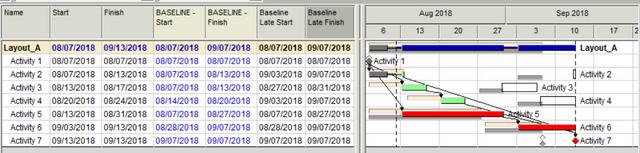
    Float, the difference between Early and Late Dates is at the core of CPM scheduling. Baseline Schedule activities as well as any CPM Schedule activities do have Early Start/Finish Dates as well as Late Start/Finish Dates.  I suggest showing Current Schedule as well Baseline Schedules Early and Late Bars.

    Baseline_Early_and_Late_Bars

    • The green/red bar represents Current Schedule Early Bar.
    • The white box represents Current Schedule Late Bar.
    • The yellow bar represents Baseline Early Bar.
    • The grey bar represents Baseline Late Bar.

    Once you setup your schedule to display Baseline Late and Early bars you will not need to create any progress updates of your baseline, easy and gives you more information.

    Using only Early Dates to compare planned % complete is wrong unless all activities are critical.

  2. 0
    Gowhar Mir ·

    Thanks for the reply. I know

    Thanks for the reply. I know that, normally I use schedule % to represent the progress but this time client is asking for suration %. Any help?

  3. 0
    Zoltan Palffy ·

    all of this is simply a math

    all of this is simply a math function of time

    Scheduled duration % complete 

    start date = 1/1/2017

    contractual time 1025 calendar days

    finish date = start date plus contractual time

    1/1/2017 + 1025 days = 10/23/2019 finish date 

    lets says the data date = 7/1/2018

    days expended todate is data date - start date = 7/1/2018 - 1/1/2017 =  day # 546

    scheduled duration % complete = current data datae (or day number) divided by over all duration which is 546/1025 = 53.27% 


    actual duration % complete 

    from your updated schedule the new forecasted completion date = 11/23/2019 

    new time or new overall extened time is forecasted completion date minus the start date 11/23/2019-1/1/2017 = 1056 days

    Actual duration % complete = current data dtae (or day number) divided by updated forecasted over all duration which is 546/1056 = 51.70%

    this means that you are behind scedule 
    Scheduled duration % complete = 53.27 % minus Actual Duration % complete    = 51.70%
     
    Schedued VS Actual Progress  = 1.56% behind schedule
     
    this can easily be done in a spread sheet 
     
    its a strict math function as you can see

Log in or join to reply

ProjectControls.com is free to join. Members can post questions, reply, vote and follow discussions.

Existing members: your original username and password still work. Forgot password?