
Skip to content

Levelling Resource Hours only on 1 Activity

Christine SchwartzMember for 7 years 3 months
Created
10
4
0

Hi there

I have an Engineering design schedule where one of my resources is 100% allocated to the project. We have loaded his hours on his design activities however when he is not busy on specific design deliverables the remainder of his time is dedicated to supervising others and various other admin tasks. My problem is the flexible nature of these "Admin" hours. In a busy month he is unlikely to do much but yet with the uniform spread of any admin hours I add it can show him as overallocated in some months and underallocated in others.

Is there a way to create a resource assignment where only on the one activity it will allocate hours monthly based on the resources remaining available time after all activity assignments are accounted for and his remaining availability is determined?

This impacts our cost forecasting and I havent managed to find another way to handle this.

Any help would be hugely appreciated.

Kind Regards

Christine

10 replies

Oldest first
  1. 0
    Zoltan Palffy ·

    not really what you can do is

    not really what you can do is create  LOE activity and assign a curve to the resource 

    the LOE will spread the manhours from the start of the 1st activity it is tied to last activity that it is tied to 

    make the predcessor  a SS relationship to the 1st activty of the month and make the successor a FF relationship to the last activity for that month. Activity type LOE 

  2. 0
    Vladimir Liberzon ·

    In Spider Project we call

    In Spider Project we call this variable resource assignment and it is easy to model.

    I don't know similar feature in P6 and suggest to use following workaround.

    Create artificial resource AdminCost that will be assigned at the hammock (LOE) activity that lasts from the project start to the project finish and set its hourly rate as the rate of your Admin.

    Assign Admin to activities that require his personal efforts. Resource Admin hourly rate = 0.

    This way you will get necessary information - right cost of your project, Admin project work hours and Admin "admin" hours as the difference between AdminCost and Admin work hours.

  3. 0
    Rafael Davila ·

    Easy in Spider Project, I

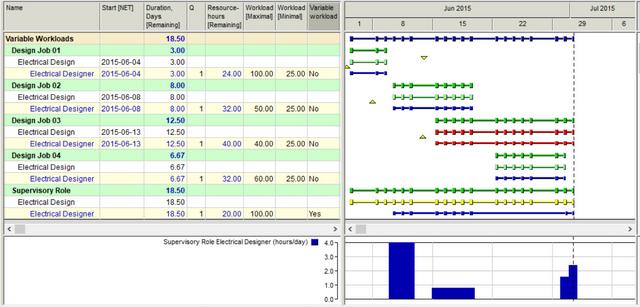
    Easy in Spider Project, I cannot imagine scheduling design jobs without partial workloads and variable quantities and workloads.

    I am curious about how others do it.

    Variable-Workloads-Supervisory-Role-2

  4. 0
    Rafael Davila ·

    I cannot see how a resource

    I cannot see how a resource curve will make it.

    https://www.ronwinterconsulting.com/Reviewing_Resource_Leveled_Schedules.pdf

    • Resource curves to a resource on a LOE activity can constantly change because the duration of a LOE activity can constantly change.
    • Resources on LOE and WBS Summary activities are not taken into account during resource leveling in P6
    • LOE and WBS Summary activities should not have critical resources assigned to them. It is preferable that no resources be assigned to these types of activities.
    • P6 does not consider resource usage curves when resource leveling.
    • The P6 resource leveling process does not consider resources assigned to Level Of Effort (LOE) and WBS Summary type activities.

    As P6 does not levels LOE activities their resource assignments can show overloads.

    Manually leveling resource assignments in constantly changing schedules can be a nightmare.

    P6 resource curves are defined in 1/10th of activity duration.  If LOE duration is longer than 10 days and every day you can get different assignment resource curves will not make it as you will get wrong distribution.

  5. 0
    Zoltan Palffy ·

    a loe wil spread the resouce

    a loe wil spread the resouce from the start of the predcessor to the finish of its successor.

    to get it to spread you have to assign a resource curve or it will stack up on tha data dtae

  6. 0
    Raymund de Laza ·

    In P6 Create a dedicated

    In P6 Create a dedicated Resource Calendar.

    Then Set the Effective Date of the Rates in the Units and Prices Tab.

    You can set different Effective Dates with the same Rates.


    Hoping this will Help.

  7. 0
    Christine Schwartz ·

    Thanks for the suggestion.

    Thanks for the suggestion. Think this might be my best option. Unfortunately guess this confirms my suspicion that Primavera doesnt have the functionality I was looking for.

  8. 0
    Vladimir Liberzon ·

    If you are looking for

    If you are looking for functionality try Spider Project.

    If you need to use P6 look for workarounds like one that I suggested.

  9. 0
    Rafael Davila ·

    You can download demo from

    You can download demo from Spider Project Website and give it a try.  It is a full version download limited to a small number of activities.  It shall take 2 minutes to download, and 2 minutes to install with just one click of the mouse.

    Once you install demo you can download the file shown in the video from the following link and run it.

    http://www.mediafire.com/file/7bdtxf1a061z7p7/Workloads-C.022.sprj/file

    Good luck.

  10. 0
    Andrew Podolny ·

    In order to load the

    In order to load the remaining available units (after all direct assignments for the admin have been completed) - use 1 activity LOE as it was suggested before but load it with the Admin resourse using Future Buckets (i.e. per each month manually entering the Budgeted Hours which is your remaining available hours for Admin res).

    Use https://docs.oracle.com/cd/E90748_01/client_help//en_US/helpmain.htm

    And search for "Entering and editing data in future period buckets - Future period bucket planning FAQ"

Log in or join to reply

ProjectControls.com is free to join. Members can post questions, reply, vote and follow discussions.

Existing members: your original username and password still work. Forgot password?