
Skip to content

Material Resource - Applying an additional fixed cost

J OBrienMember for 8 years 4 months
Created
19
6
0

Hi All,

I'm in the process of building a fully resource loaded schedule and have recently been advised that I need to apply a 6% internal inventory charge to all materials to recoup internal stores costs.

The obvious answer is to adjust the price / unit for each material but that is not possible as these resources are already in use by multiple teams where this 6% rate doesn't apply. Total cost for all resources is calculated costs x units but I'm hoping someone can advise me as to how I could create and apply this 6% charge across the relevant materials.

Cheers


19 replies

Oldest first

  1. 0
    David Kelly ·

    Putting to one side an

    Putting to one side an important argument for using Expenses for materials, rather than Resources, I am not quite clear what you want. Is it: For all materials on activities that have not started, add 6% to the cost?
  2. 0
    Zoltan Palffy ·

    go to tools global changeon

    go to tools global change

    on the right select new

    up top under select subject area choose

    Activity Resource Assignments

    the the specification would be

    where

    resource type equals material

    then

    budgeted costs = budgeted costs  *   .06


    then on the upper right select change

    then on the bottom right select Comitt Changes

    done

  3. 0
    Vladimir Liberzon ·

    Zoltan,I don't understand

    Zoltan,

    I don't understand your advice.

    I understood that Jesse wants to change material unit costs (price / unit).

    Activity cost includes the costs of required materials and depends on activity material consumption.

    You suggest to change the costs of material assignments. But what happens if material consumption will become higher or lower for some reasons. Will material assignment cost be adjusted proportionally?

  4. 0
    Zoltan Palffy ·

    VladHe needs to add 6% to all

    Vlad

    He needs to add 6% to all of his material costs my advice is to run a global chnage to do this for him. 

  5. 0
    J OBrien ·

    Hi Everyone,Thanks for your

    Hi Everyone,

    Thanks for your responses. Zoltan's global change approach seems to have created the required effect. After creating and applying the global change, the budgeted cost of the materials has increased by 6% but the price/unit has remained the same - exactly what I was after. No other projects are affected because the price/unit of the material hasn't changed but i have the material price increase I need specific to my projects.

    Cheers,

  6. 0
    Raymund de Laza ·

    Jesse,There are 5 Rate Type

    Jesse,

    There are 5 Rate Type you can use for Each Resource. One of them can be used as the original rate x 6% then assign to affected Resources.

    Use the Excel SDK to import the new Rate Type.

    Hope this will help.

  7. 0
    Rafael Davila ·

    ...

    ...

  8. 0
    Rafael Davila ·

    There are 5 Rate Type you can

    There are 5 Rate Type you can use for Each Resource.

    NICE

  9. 0
    David Kelly ·

    You are not finished yet,

    You are not finished yet, Jesse! In addition to what you have done, you need to ensure that the "Calculate costs from units" flag is removed from each material resource assignment, and from the resource dictionary, or when you apply progress the change you have made will be undone. To remove the flag at the resource assignment, another global change will do….
  10. 0
    Zoltan Palffy ·

    glad I could help you Jesse

    glad I could help you Jesse

  11. 0
    J OBrien ·

    Hi Raymund,Thanks for the

    Hi Raymund,

    Thanks for the advice. I should have included in my original post that I had considered creating a different rate type and then utilised that for all materials in my projects. I don't have admin rights and wasn't sure how many rate types were available and if I could create a new one in the way you have described. Does anyone know if you can create that without the import? How many rate types are available in the system or can new rate types be created similarly to a UDF?

    Cheers,

    Jesse

  12. 0
    J OBrien ·

    Hi Raymund,Thanks for the

    Hi Raymund,

    Thanks for the advice. I should have included in my original post that I had considered creating a different rate type and then utilised that for all materials in my projects. I don't have admin rights and wasn't sure how many rate types were available and if I could create a new one in the way you have described. Does anyone know if you can create that without the import? How many rate types are available in the system or can new rate types be created similarly to a UDF?

    Cheers,

    Jesse

  13. 0
    Zoltan Palffy ·

    I believe that Raf is correct

    I believe that Raf is correct you can have up to 5 rate types per resource 

  14. 0
    Raymund de Laza ·

    Jesse,I suggests to create

    Jesse,

    I suggests to create UDF under Resource Assignment which contains the 6% x Budgeted units instead of the Price / Unit.

    You can replace the Budgeted units with the UDF using the Global Change.

    Prior to that create another UDF to store the original Budgeted Units so that you can easily revert back if needed.


    Hope this will help.

  15. 0
    Raymund de Laza ·

    Sir Rafael,For Clarity, 5

    Sir Rafael,

    For Clarity, 5 Rate Types are available and any of the Types can be assigned in Each Resources Assigned.

    A Resource can be assigned 5 Times with different assigned Rate Types for each.

    Hope this is clear for you.


  16. 0
    Rafael Davila ·

    Raymund thank you very much.

    Raymund thank you very much.

  17. 0
    David Kelly ·

    Rafael, P6 is below average

    Rafael, P6 is below average at this. Whether a resource’s costs are fixed or per unit time, is a function of the activity NOT the resource assignment. A classic example from my oil and gas world is drilling. The drilling rig is hired by the day, but the drill string is a material whose costs are fixed. I recommend my clients to use the P6 facility “Expenses” to add material costs. Expenses are always fixed, even on activities where all the resource costs are per unit time.
  18. 0
    Rafael Davila ·

    With Spider Project we can

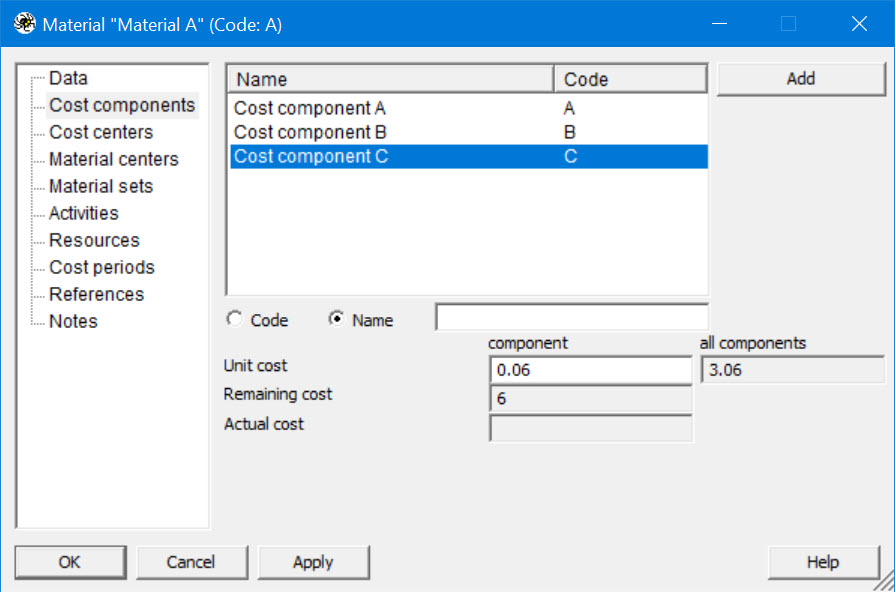
    With Spider Project we can apply as many cost codes we want either at fixed cost or at unit cost.  I expect you should be able to create similar models.  Within P6 having the option to apply different rates to the same cost code helps.

    UP-cost-components

    Materials-cost-components

  19. 0
    Raymund de Laza ·

    You are Welcome Sir Rafael.

    You are Welcome Sir Rafael.

Log in or join to reply

ProjectControls.com is free to join. Members can post questions, reply, vote and follow discussions.

Existing members: your original username and password still work. Forgot password?