Skip to content

Date Range filter - Not showing full 13d

hhadleyMember for 7 years 8 months
Created
9
4
0

Hello Again!


I have another P6 question......We have set up a filter for 2 week look ahead and it works.  However, instead of using the high value of DD+2W, we changed it to DD +13d (due to projects having different data dates).  The problem is, we are not getting all the activities - example, if our filter for 13 days went to Oct 1 from the data date, we are only getting up to Sep 29.  My question is - does P6 calculate differently when using weeks instead of days?


Thanks!

H.

9 replies

Oldest first
  1. 0
    Zoltan Palffy ·

    your filter should look like

    your filter should look like this for DD + 1 week

    any 

    where start is within the range of  DD (low value)   DD+1w (high value)

    or finish is within the range of  DD (low value)   DD+1w (high value)

    or activity status equals in progress

    will be the same as DD+7 days 


    your filter should look like this for DD + 13 days 

    any 

    where start is within the range of  DD (low value)   DD+13d (high value) 

    or finish is within the range of  DD (low value)   DD+13d (high value)

    or activity status equals in progress


    will be the same as DD+ 13 days 


    Also make sure that your data date TIME is correct 

    can you please share the syntax in the filter that you used.

  2. 0
    Rafael Davila ·

    I am no longer a P6 user but

    I am no longer a P6 user but suspect when you open multiple schedules at the same time the portfolio filters only can see a single data date, perhaps the earliest of the jobs opened. No matter what software you use portfolio management is more complicated than dealing with standalone jobs.

    https://docs.oracle.com/cd/E90748_01/client_help/en_US/helpmain.htm?toc.htm?schedule_a_project.htm

    I suggest using DD as your look ahead start date while for the finish date of your look ahead filter use a fixed date.  You can estimate the look ahead finish date as the latest DD + X(days) of the jobs to be opened and pluging it as a fixed date.  Save the filter and any time you have to use it again consider changing the last date of your filter if need be. Maybe you can name it Portfolio Look Ahead + Xdays to distinguish it from your standard filter, mostly used for standalone jobs.  Expect some of the activities/jobs included in your filter to show some progress.  I hope this makes sense as I do not have access to P6.

    Best Regards, Rafael

  3. 0
    hhadley ·

    I used exactly as  you have

    I used exactly as  you have stated here DD(low value) DD+13d as the high value.  The problem is that is counts 13 CALENDAR days rather than the 13 WORKING days that I expected from the calendar in our schedule (as we only work 5 days a week).  I just thought it would automatically use the working days as the count.

  4. 0
    Rafael Davila ·

    Any job can have many

    Any job can have many calendars some global other project specific, so you have to tell the filter which, otherwise it would use consecutive days.

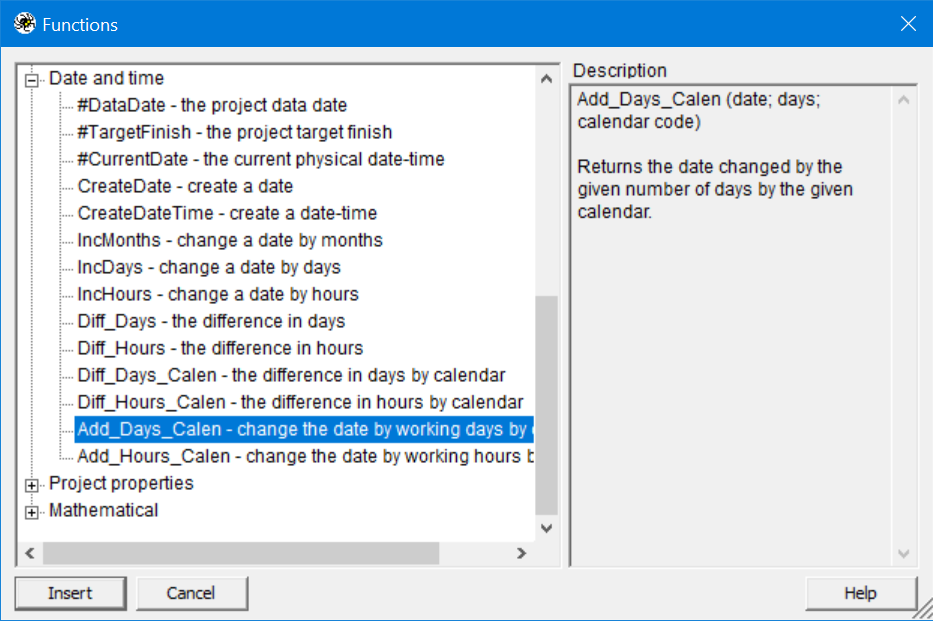
    I do not believe P6 has a function to change the date by working day by calendar as Spider does.

    calendar-functions

  5. 0
    Zoltan Palffy ·

    well thats doing what it

    well thats doing what it should how could it posilbly use working days when you can have muiltiple calendars some 5 days some 6 days some 7 days. If you want working days then change it to DD+9d

  6. 0
    hhadley ·

    There is only one standard

    There is only one standard calendar in all my projects so there should be no confusion on what is considered a working day.  I thought there may be a setting in P6 that I was unaware of that distinguishes between using calendar vs working days when computing things like filters.  All good.  Thanks for all the answers.

  7. 0
    Zoltan Palffy ·

    that does not matter that you

    that does not matter that you only have one calendar what of you had multiple how would YOU program the software to use a specific calendar for a speciifc calculation it cant be done.

  8. 0
    Zoltan Palffy ·

    that does not matter that you

    that does not matter that you only have one calendar what of you had multiple how would YOU program the software to use a specific calendar for a speciifc calculation it cant be done.

  9. 0
    Rafael Davila ·

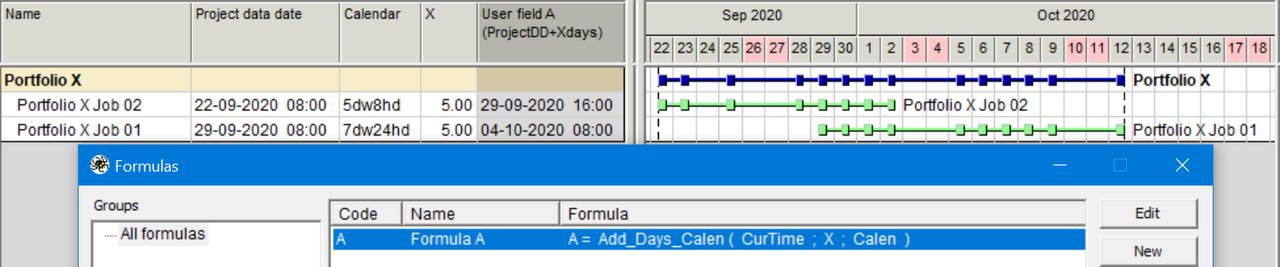
    Can be done in Spider, I was

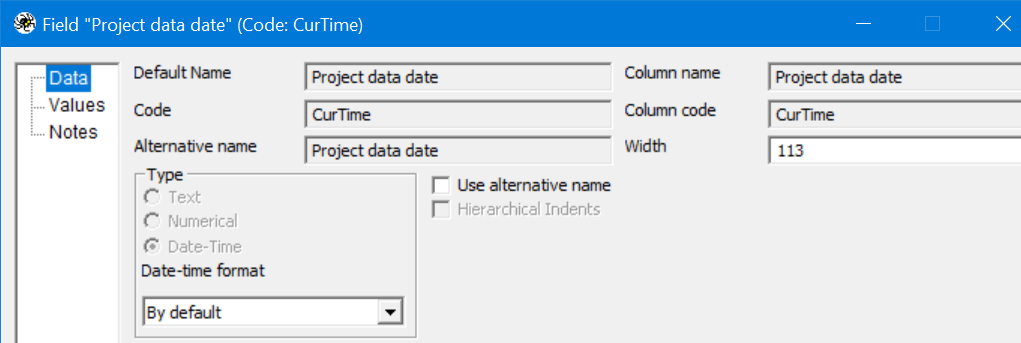
    Can be done in Spider, I was hoping P6 could. In the following portfolio each job have multiple calendars of their own as well as the portfolio. In this way non-work days such as Sept 24 will be considered as such in the calculation. CurTime is the field code for Project Data Date, not necesarily a code of my liking, but field name "Project data date" is.  Creating a filter at the Activities View is a bit cumbersome so I would just sort Project Data Date and use earlier date for my filter start date, then sort field A and use latest date as my lookahead filter end date.

    Image-003

    Image-004

    An option can be to use SA Date Calculator.

    http://scheduleanalyzer.com/sa_date_calculator.htm

    Because calendars include exceptions such as holidays and vacations I do not use Excel for such calculations.

Log in or join to reply

ProjectControls.com is free to join. Members can post questions, reply, vote and follow discussions.

Existing members: your original username and password still work. Forgot password?