
P6 version issue? Edit, User Pref., Application - why do only some versions show "Codes" value vs description choice?
- Created
- 4
- 5
I am using version 18.8 P6 version issue? Edit, User Pref., Application - why do only some versions show "Codes" value vs description choice? I have seen snapshots on Linkedin of the choice "Specify how to display code values" - I do not get the choice and do not see a format column for the Value Description. I can only show the value, which of the two is the less preferred. I tried exclusive mode, no difference. Any ideas why or how to correct. Yes I can make a UDF but I have seen the option - just do not have it. Perhaps they made it a column choice that I just do not see.
4 replies
Oldest first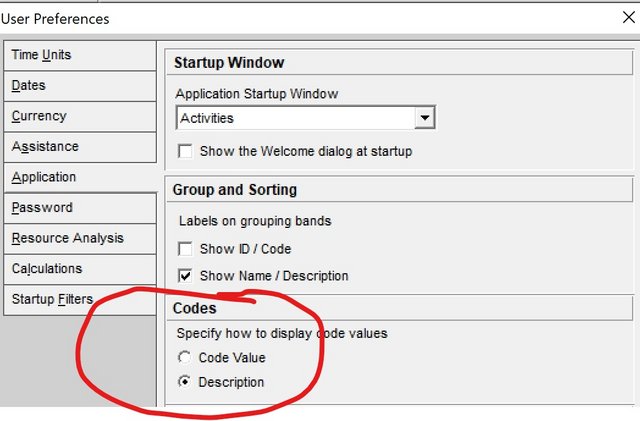
Log in or join to reply
ProjectControls.com is free to join. Members can post questions, reply, vote and follow discussions.
Existing members: your original username and password still work. Forgot password?