
Skip to content

Schedule date calcs in Excel

John ReevesMember for 13 years 5 months
Created
5
3
0

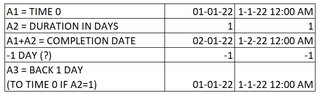
So to calc a completion date in excel that includes the NTP date itself is @sum((A1+A2)-1) because excel does not count the NTP date in that formula.  With a A1 being the NTP date and A2 being that Calendar Days.  Are there any other, or different formulas you use to quickly calc dates in excel. (I see date off by 1 all the time.)

5 replies

Oldest first
  1. 0
    Rodel Marasigan ·

    Not sure how are you

    Not sure how are you interpreting the formula and your understanding of NTP + ?days (completion date). To make it simple lets say NTP + 1 day = completion date. Say NTP = 1 Jan 2022 + 1 day = 2 Jan 2022. If I used your formula, @sum((NTP + 1 day) - 1), the completion date will be still 1st Jan 2022? which make no sense.

  2. 0
    Santosh Bhat ·

    Rodel, It does depend on the

    Rodel, It does depend on the nature of the task being assessed. Generally, a one day task in scheduling will be the same date, consider a task starting 1-Jan at 08:00 and of duration one day. The date will still be 1-Jan, but the time will be 17:00. 

    In Excel, a value of 1 is calculated as a whole 24hr Day. so to check how calcs are being performed in Excel, you will need to display the number format to include hh:mm


    John, a few I use:

    • edate - calculate the same date a number of months plus or minus
    • yearfrac - caluclate the % of a year between two dastes
    • datedif - calculate the difference between two dates in various methods, days, months etc.
    • eomonth - calculate the end of the month (or multiple months) from a certain date
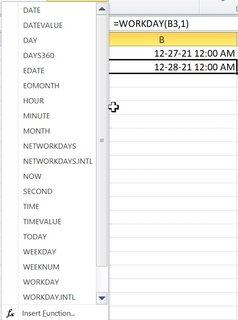
    • Weekday - returns the day of the week from 1-7 of a date (useful if you need to know if its a weekend or not

    Excel is good for dates, just make sure you view the time also as scheduling tools may export the date & time as a fraction of a day, and this can through Excel calcs out.

  3. 0
    Rodel Marasigan ·

    Thanks Santosh, Typical NTP

    Thanks Santosh, Typical NTP contract interpretation is using Finish Milestone and not Start Milestone that is why the Contract defines NTP + ? days = completion date. That's why I am confused on the formula being used. Also if the data is coming from P6 using copy paste or export (it depends on the setting and layout of the user) whether the time is shown or not otherwise the data is always whole number format or 12:00AM therefore in excel it always count as 1 day and not a fraction of a day.

  4. 0
    Rafael Davila ·

    Use date-hour format for

    Use date-hour format for granularity.

    2022-01-07-05-47-46

    Try Date Formulas showing date-hours

    2022-01-07-07-22-15

  5. 0
    Zoltan Palffy ·

    one way in excel is to make

    one way in excel is to make the NTP date 1 days less than what it is in p6 and all dates wil then work out to match p6

    so all you need to do is adjust the starting date which is NTP

Log in or join to reply

ProjectControls.com is free to join. Members can post questions, reply, vote and follow discussions.

Existing members: your original username and password still work. Forgot password?