
Skip to content

Event Code: CNFFZ\-0464-A (Could not find \bin\java.exe)

Jordan Benjamin-SuttonMember for 6 years 7 months
Created
4
2
0

Hi,

I have currently been trying to import Microsoft Project XML Programmes into Primavera P6 Professional R16.2. Every Time i attempt to this, i get a EInOutError with the event code CNFF\-0464-A and the description 'Could not find file\bin\java.exe

Would anyone be able to assist with this and help me be able to import XML files to P6.

Any Help Would Be Much Appreciated,

Thanks,

Jordan 

4 replies

Oldest first
  1. 0
    Rodel Marasigan ·

    Primavera P6 rel 15.xx + up

    Primavera P6 rel 15.xx + up or higher version is using Java 7. If you upgraded your Java to higher version, it may not load third party API such as MSP import/ Export, Schedule Analyser, Visualiser or any P6 third party API using Java environment. To make sure that you have a correct Java (jre), you can checked your machine by:

    • If P6 installation is using 32bit, the java folder (jre7) should be located under C:\Program Files (x86)\Java\jre7
    • If P6 installation is using 64bit, the java folder (jre7) should be located under C:\Program Files\Java\jre7

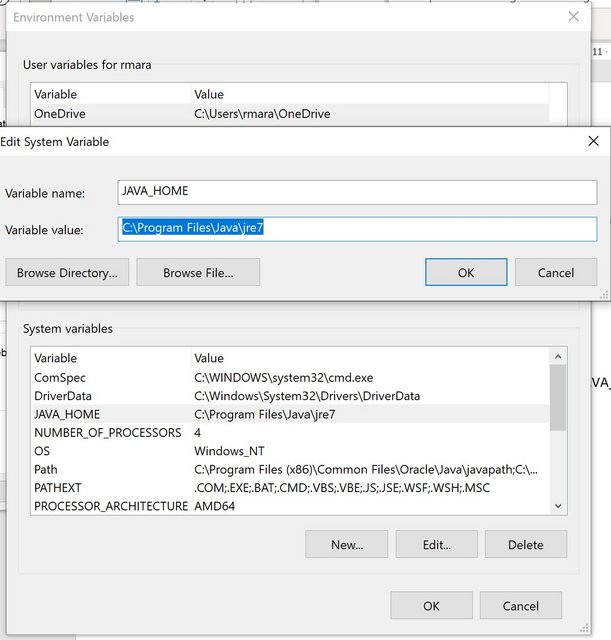
    If you find Java\jre7 folder, make sure that the JAVA_HOME environment is set.

    Setting JAVA_HOME

    The JAVA_HOME environment variable points to the directory where the Java runtime environment (JRE) is installed on your computer.

    The following tasks provide the information you need to set JAVA_HOME on Windows or UNIX systems.

    To set JAVA_HOME on a Windows system:

    Right click My Computer and select Properties.

    On the Advanced tab, select Environment Variables, and then edit JAVA_HOME to point to the location of the of the Java Runtime Environment (JRE).

    Java-home

  2. 0
    Zoltan Palffy ·

    roll back the java version

    roll back the java version and turn off automatic updates for java

    and as Rodel said check the environment path and make sure that it point to the correct location for java home

  3. 0
    Nick Jackson ·

    Thanks Rodel - this is

    Thanks Rodel - this is possibly one of the most useful posts I've seen - this same issue was driving me nuts (I'm on V17 but must get round to updating).

    I needed to uninstall Java (which was V8) go back to Oracle's site and install V7, them point at it as you posted.

  4. 0
    Nick Jackson ·

    Thanks Rodel - this is

    Thanks Rodel - this is possibly one of the most useful posts I've seen - this same issue was driving me nuts (I'm on V17 but must get round to updating).

    I needed to uninstall Java (which was V8) go back to Oracle's site and install V7, them point at it as you posted.

Log in or join to reply

ProjectControls.com is free to join. Members can post questions, reply, vote and follow discussions.

Existing members: your original username and password still work. Forgot password?