Skip to content

Performance % Complete

Emma LangMember for 10 years 2 months
Created
3
2
0

I've created a new project in P6 Version 20, and the performance % complete doesn't match the activity % complete. 

Is there a setting I need to change to make sure these two columns show the same data?


thanks

3 replies

Oldest first
  1. 0
    David Kelly ·

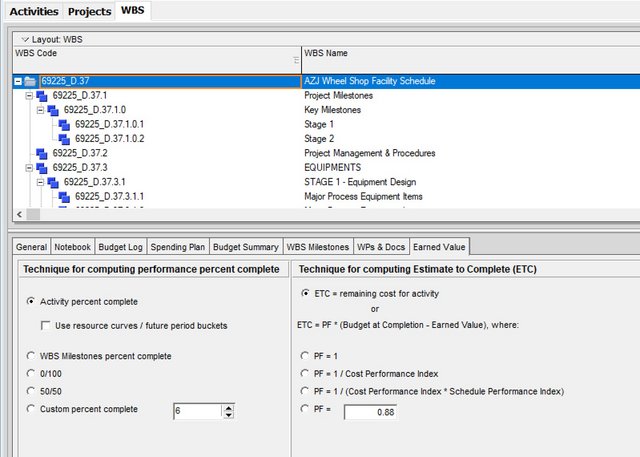
    It is at the WBS level, the

    It is at the WBS level, the Earned Value tab.

  2. 0
    Zoltan Palffy ·

    ToolsAdmin PreferencesEarned

    Tools

    Admin Preferences

    Earned Value Tab

    Make sure that the Technique for computing performance percent complete is set to

    Activity % Complete

    and that Earned value calculation is set to Budgeted Values with current date is at the bottom of this same tab.

    Also at the Project levele under Setings make sure that Baseline for earned value calculatons is  set to Project Baseline

  3. 0
    Rodel Marasigan ·

    The activity performance

    The activity performance percent complete is used to compute earned value and may be based on the Activity % Complete, on the 0/100 rule, on the 50/50 rule, etc., depending on the technique for computing earned-value percent complete for the activity's WBS. The Performance % Complete specifies what percentage of the activity's planned worth has been earned so far.

    You can set the performance percent complete under WBS module. See below:

    Performance-percent-Complete

Log in or join to reply

ProjectControls.com is free to join. Members can post questions, reply, vote and follow discussions.

Existing members: your original username and password still work. Forgot password?