
S-Curve analysis
- Created
- 6
- 4
6 replies
Oldest first- 0ZPZoltan Palffy ·
this is either a manhour or
this is either a manhour or cost based resource driven s curve
the Y axis respresnts the % complete and the X axis respresents a time inter vale (too samll to read) in eather weeks or months
The blue line represents the earliestdates that actviities can be started and completed
The green line represents the latest dates that actviities can be started and completed
The red line represents progress or actuals against the plan
Te red dashed line represents the revised plan
The dashed lines is the forecasted percentages to meet the revised plan
- 0DTDjedilat Toumi ·
thank you a lot Mr. Zoltan
thank you a lot Mr. Zoltan Palffy.
is it normal to find a curve of the revised plan like this ????
- 0RDRafael Davila ·
By looking at the Actual
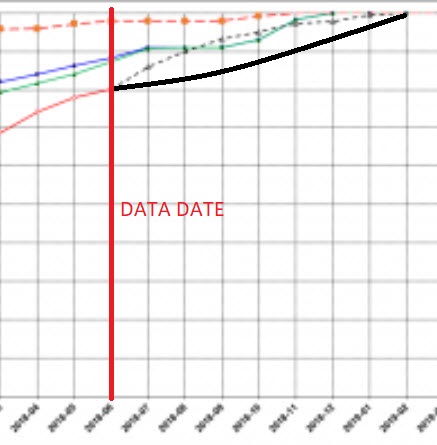
- By looking at the Actual Curve end point we know the Data Date.
- The remaining late curve for current schedule is missing, shall be something like the one I draw in solid black.
- At Data Date the remaining [to complete] early curve and remaining [to complete] late curves must start at same point.
- Any revission to current schedule shall include remaining early and late starting at the same point, the last actual point.
- Usually early curve is above late curve but the use of FNLT constraints can make them intercept at some point and then late curve to be above. It does not always happens but the S-curves even when not obvious can become meaningless when such constraints are used. Not all schedulers are aware of this anomaly.
- There is a reference to interpreting S-curves, the AACE International Recommended Practice No. 55R-09. I do not recommend it as it misses to talk about the anomaly when using FNLT constraints and even misses to talk about early and late S curves. Anyway I feel you should be warned about it.
- 0MCMick C ·
Hey is anybody producing
Hey is anybody producing these S-Curves unsing costs with Asta PP? I am pretty new to this side of things. I am putting together a forecast of a cost loaded and resourced programme to track 2 internal budgets, and then plan to update actuals throughout the project to keep track of any variations which may occur.
Am I right in saying that to include 2 internal budgets, one on BOQ estimates, and another on Tender actuals, Would I be right in saying that to produce both curves I need to baseline the project 2 times in its original "planned schedule position"? and then rejig the amounts for the second baseline?. Essentially what I plan to do is:
- Load in costs which have been broken down to the activity level from a BOQ, then baseline.
- Delete the above costs, and load in Tender/Actuals, then Re-basleine the project in the same position.
- Record Actual cost (Variations) throughout the project in line with Progress.
Does this approach sound like the right way to go about this?
- 0RDRafael Davila ·
1) As per image legend, blue
1) As per image legend, blue and green lines represent planned schedule, perhaps from a baseline schedule with no progress. Actual [red solid line] and to complete early [black slash line] represent current schedule, missing to complete late that should start at same point to complete early starts.
The image shows different versions of the schedule, each with different data date. For those with no progress, no actuals, their data date happens at first point. For those with progress data date happens where actuals finish and remaining [early&late] starts.
2) Any update of progressed schedule shall match actual to the left of data date, to the right it will show updated early and late lines.
- 0DTDjedilat Toumi ·
thank you a lot Mr. Rafael
thank you a lot Mr. Rafael Davila
i didn't get well some points:
1- At Data Date the remaining [to complete] early curve and remaining [to complete] late curves must start at same point.
in my S-curve they didn't start at the same point (see the black circle), is there a problem in my curves??
2- is it normal to find a curve of the revised plan like this ( see the black line)
Log in or join to reply
ProjectControls.com is free to join. Members can post questions, reply, vote and follow discussions.
Existing members: your original username and password still work. Forgot password?