
Skip to content

Progress Measurement - Excel

Jithin KambhikanamMember for 15 years 6 months
Created
6
4
0

Hi All,


Not sure if I can post it here, if not please dont respond.

I need to calculate Overall Planned using if function or any other excel function. As and example I have plotted this below

On 3rd Nov I want to see the Planned % (A) = 15%

Date3-Nov-21 
ActivityDateWeightage
Excavation2-Nov-215%
Blinding3-Nov-2110%
Reinforcement and formwork8-Nov-2130%
Concrete Pouring9-Nov-2125%
Curing16-Nov-2115%
Painting17-Nov-215%
Backfilling18-Nov-2110%
 Total      100%
 Planned %       A


Can it be done in excel, ie one cell (A) will say what was the planned % a range on 3 Nov 21.


Thanks

Jithin

6 replies

Oldest first
  1. 0
    Rodel Marasigan ·

    Yes, you can use sum function

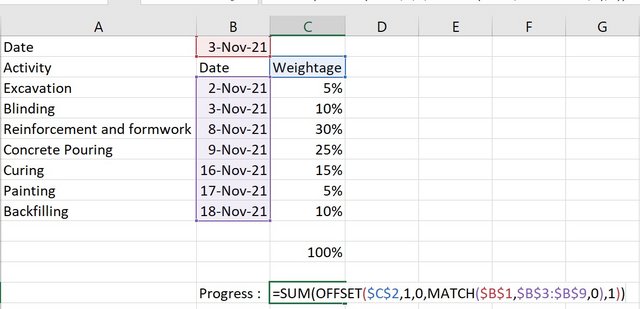
    Yes, you can use sum function with offset and match to get the correct range. I assumed that your lookup is the date.

    Column A = Activity
    Column B = Date
    Column C = Weightage

    Ex: =SUM(OFFSET($C$2,1,0,MATCH($B$1,$B$3:$B$9,0),1))

    Sum-function

  2. 0
    Jithin Kambhikanam ·

    Thanks Rodel,It does work but

    Thanks Rodel,

    It does work but there is a small catch here.

    If the date is not mentioned in Cell B1 doesnt match the dates in Cell B3:B9, then the result is #N/A.

    Say in the above table in B1 if I put 4-Nov-21, Result = #N/A.

    It should rather give 15%.

    Any way to sort this out.


    Thanks

    Jithin

  3. 0
    Rodel Marasigan ·

    Hi Jithin,Yes. Just change

    Hi Jithin,

    Yes. Just change the match type to 1 instead of 0.

    Ex: =SUM(OFFSET($C$2,1,0,MATCH($B$1,$B$3:$B$9,1),1))

  4. 0
    Steven Auld ·

    Jithin,Try using SUMIFUsing

    Jithin,

    Try using SUMIF

    Using Rodel's template, the calculation would be:

    =SUMIF(B3:B9,"<="&B1,C3:C9)

    Dont forget to include the quotation marks around the "<=" part.

    SUMIF(Range,Criteria,SumRange)

    Regards,

    Steven

  5. 0
    Rafael Davila ·

    And what about nonworking

    And what about nonworking days and days with fewer work hours?

    Weird weightage of excavation is less than weightage of curing, well the whole concept of weightages I find it flawed.

  6. 0
    Jithin Kambhikanam ·

    Thanks You, Both the formula

    Thanks You,


    Both the formula Works fine now.


    Rafael,

    Its just for a plotting an example, not in actual and I have considered foundation for a Pump which is small.


    Regards

    Jithin

Log in or join to reply

ProjectControls.com is free to join. Members can post questions, reply, vote and follow discussions.

Existing members: your original username and password still work. Forgot password?