
Activity and phase priority rules
- Created
- 69
- 6
Rafael, Vladimir,
I am still experimenting with priorities and if I don’t take into account the unusual effect of the NLT contains on priorities discussed in a separate thread, I find that when it comes to activity priorities, everything is quite logical (at least with the Standard resource leveling method). I have observed the following behavior and just checking that these are correct observations (Note I was testing only with positive priorities).
But 1st some definitions to make explanation simple
Highest Phase-imposed Priority (HPP) – highest priority of all phases of all levels up for a specific Activity.
Highest Successors Critical Chain Phase-imposed Priority (HSCCPP) – highest of HCPPs of all succeeding activities in the critical chain of a specific activity (if the Activity is not in a critical chain, then is the not used)
Effective Phase-Dependent Priority (EPDP) of an activity - maximum between Activities’ HPP and HSCCPP
Highest Successors Critical Chain Activity Priority (HSCCAP) – highest of Activity Priorities of all succeeding activities in the critical chain of a specific activity (if the Activity is not in a critical chain, then is the not used)
Effective Activity Priority (EAP) – maximum of Activity Priority and it’s HSCCAP
So, the situation, when 2 activities (A1 and A2) conflict over the same constrained resource Spider uses the following rules:
1st Spider looks at of EPDP ignoring activity priority. In another words any task with Effective Phase-Dependent Priority (EPDP) > 0 has always has a higher priority, then a task which EPDP=0, regardless of it’s Effective Activity Priority (EAP). Task with a higher EPDP has a higher priority, than a task with lower EPDP.
If EPDP empty or equal for both Activities, then Spider compares Effective Activity Priority (EAP) of tasks.
Is it how priorities are meant to work for Standard algorithm?
69 replies
Oldest first- 0VLVladimir Liberzon ·
Evgeny,Spider does not apply
Evgeny,
Spider does not apply priorities this way.
Phase priorities are hierarchical and override activity priorities.
Activity priorities matter if phase priorities are the same.
Critical Chain is the result of the calculation, it is not known when scheduling starts.
If an activity has some priority then all its predecessors inherit this priority.
So activity priority is maximal of its own priority and priorities of all succeding activities.
I described the way Spider works with user defined priorities.
Activity priorities may be ignored by optimization algorithms if shorter option is found.
- 0EZEvgeny Z. ·
Vladimir, Thank you for your
Vladimir,
Thank you for your response. I think this is what I have described pretty much, except when it comes to critical chain.
Having played around with different priorities, at the moment I now find that priorities produce often unpredictable effect, even on simple schedules. So far the only predictable solution I found to impose priorities is the “unachievable Finish NLT contain”, set to the Finish milestone (I described it here). However since this is not exactly “certified” method, I fear that it may have some hidden problems, which I have not discovered yet
So, specific things, which I don’t understand:
1) RE “Activity priorities may be ignored by optimization algorithms if shorter option is found.”
Note: I also found, that phase priorities can also be ignored by Optimization Plus.I think I am missing the point here. By definition, when human assigns priorities he does not want the shortest schedule, he wants some parts of it to happen earlier than others, even for expenses of overall duration.
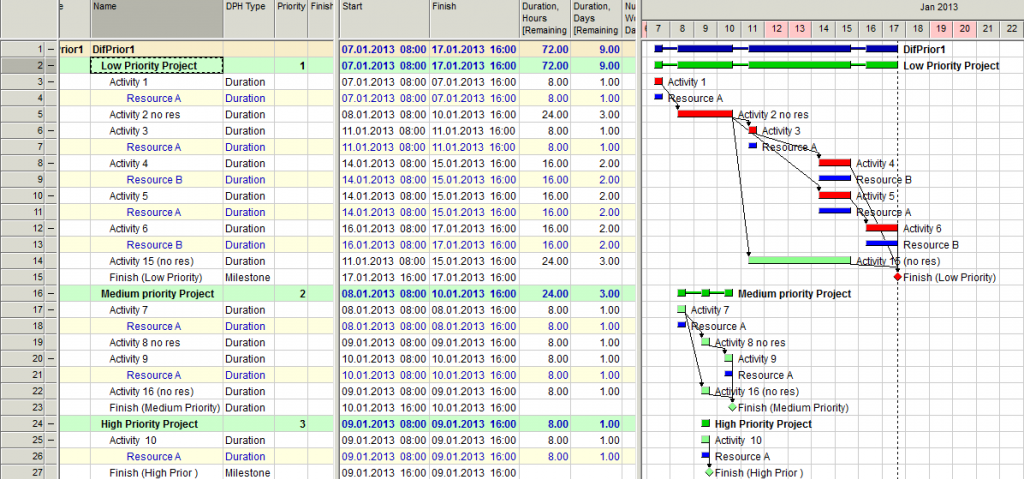
One of the features, which Spider advertizes, is portfolio resource leveling, when different projects are assigned different priorities and resources are leveled based on these priorities. So, if we look at at a simple example below (leveled with Optimization Plus), how could I explain to a higher management, that Resource A is 1st working on Low Priority Project (Activity 1), then on Medium Priority Project (Activity 7) and only then on the High Priority Project (Activity 10)? What is the point of assigning phase priorities in this case if Spider ignores them?
Management will ask: who allowed resource A to work on low and medium priority projects, whilst high priority project is waiting for resource?
https://drive.google.com/file/d/0B1FBt_G3gCVqOWRZLXoxYkJoajg/edit?usp=sharing
2) RE “If an activity has some priority then all its predecessors inherit this priority.”
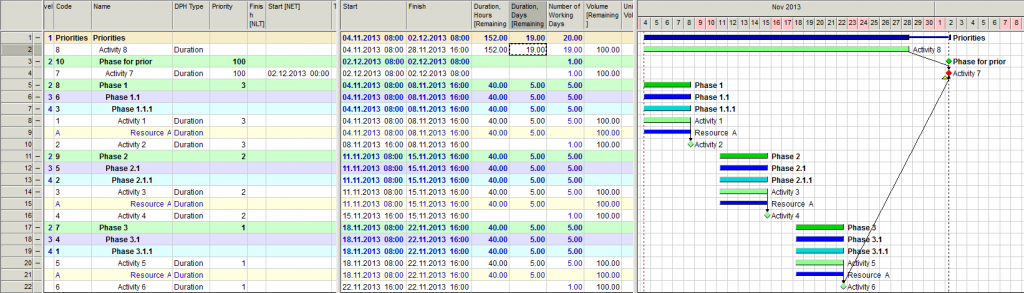
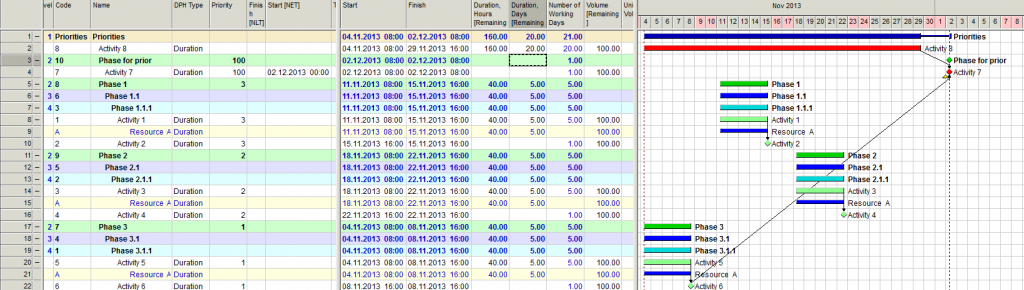
I find that for Optimization Plus it does not happen always and follows some logic, which I don’t understand. In 2 examples below the only difference is duration of Activity 8, which, however, shall not really affect Phase 1 – Phase 3 (due to NET constraint of Activity 7). Yet in one case priority of Activity 7 has been transferred to Phase 3 and in another case it wasn’t.
What is the logic of this? How can this be explained?
https://drive.google.com/file/d/0B1FBt_G3gCVqYmdiLVk2Rk9oM2M/edit?usp=sharing
- 0VLVladimir Liberzon ·
Evgeny,as I wrote in my
Evgeny,
as I wrote in my previous post: if priorities shall be certainly followed use Standard leveling option because optimization may ignore manually entered priorities if the schedule duration may be made shorter. So use Standard option in your portfolio and don't forget to check Use activity priorities box. In your example optimization plus ignores project priorities but creates much shorter schedule than any standard option that set priorities right.
We found logical error with using NLT constraint that will be fixed soon. That explains the behaviour in your second example.
Finish NLT creates stronger priority. If manual priority does not work but required set Finish NLT.
Activity priority is maximum of its own priority and priorities of all succeding activities. This is the explanation of the schedule behaviour in your second example. Activity 7 became critical and NLT constraint is not met. So preceding activities got highest priority including activity 6.
We will make some improvements in dealing with NLT constraints soon.
Best Regards,
Vladimir
- 0EZEvgeny Z. ·
Vladimir,thank you for a
Vladimir,
thank you for a quick reply.
Regarding example 2 (let us finish with example 2 first)
Activity 7 does not have Finish NLT constraint, in which we found a logical problem in previous thread, but it has Start NET constraint. Does your explanation require reconsideration in this case?
Note: I have posted the link to *.sprj file, so you can easily check it.
Regards.
Evgeny
- 0VLVladimir Liberzon ·
Evgeny,in your example
Evgeny,
in your example highest priority 100 is assigned to "Phase to prior". It means that the same priority is inherited by preceding activities/phases. This is why phase 3 has the highest priority and starts first if to apply standard leveling.
Optimization may ignore activity priorities and this is why your first schedule is "right"
- 0EZEvgeny Z. ·
Vladimir,may be I just have a
Vladimir,
may be I just have a different definition of a High Priority Project
RE "Optimization may ignore activity priorities"
One of the advertised features of Spider is portfolio scheduling, where different projects are assigned different priorities.
Question: what is your (or Spider) definition of the fact, that Project A in portfolio has a higher priority, than Project B? In another words if you were to give to somebody a task to do a manual resource leveling of a very simple portfolio schedule, where one project has a higher priority, than other, how would you verify, that this person has done a correct job?
In case of equal priority projects this is simple, you would just say: make sure, that you develop the shortest possible portfolio schedule, whilst taking care of resource (and other) constraints in all projects. But what would you say in case of portfolio of different priorities projects, how would you instruct this prson?
Regards.
Evgeny
- 0VLVladimir Liberzon ·
Evgeny,I already wrote in my
Evgeny,
I already wrote in my previous posts that if priorities are necessary then use standard leveling because optimization finds the shortest schedule and may ignore priorities.
And remember that if some activities of other projects precede activities of high priority project they also get the same priority.
Is it clear?
If resource is available and is required by activities of different projects then activity of the project with highest priority is selected. This is how standard leveling is working. Optimization does not stop at this stage.
Best Regards,
Vladimir
- 0VLVladimir Liberzon ·
Optimization Plus is still
Optimization Plus is still useful - it shows the minimal time for performing the whole portfolio and sometimes it may be useful. But in this case multitasking is not avoided. So, yes use the standard leveling or enter Finish No Later Than for the Finish milestones of projects with high priorities. Optimization algorithms respect NLT constraints.
Did you try to schedule your portfolio example by other tools? It is interesting to delete priorities and compare the results with 72 hours project duration calculated by Spider Project optimization plus method.
- 0EZEvgeny Z. ·
Vladimir,OK understood. But
Vladimir,
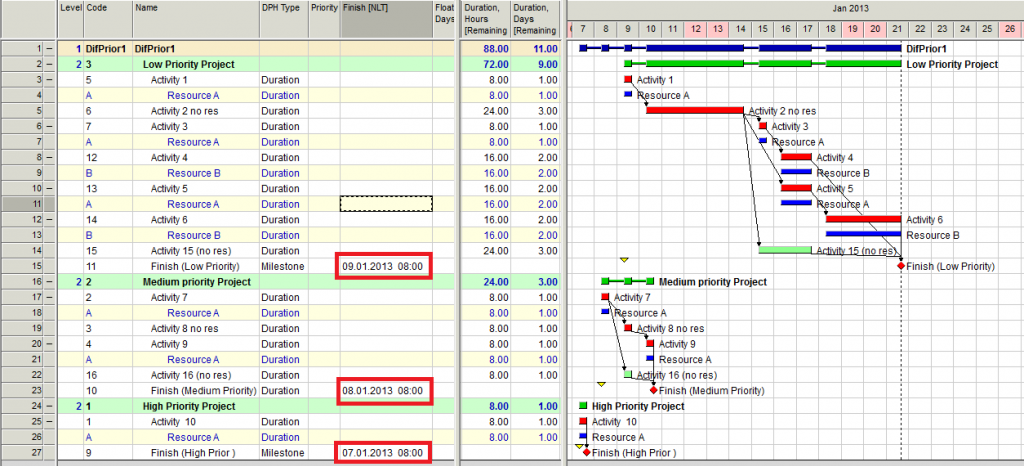
OK understood. But do you actually "bless" prioritizing projects in portfolios by assining "unachievable Finish NLT" constraints to "Project Finish" milestones of different projects ?
So far I found this "trick" very powerfull, flexible and much more intuitime, than assiging priorities to phases and individual activities, but since this is not an "official feature" I fear, that there may be some hidden problem somewhere, which I did not discover or that you will eliminate this feature during one of the scheduling engine updates (there is always this risk, with unofficial features)
I have posted this before, but this is how I mean to use the feature:
https://drive.google.com/file/d/0B1FBt_G3gCVqZnRveUFmMlBoQlE/edit?usp=sharing
- 0RDRafael Davila ·
A portfolio model is
- A portfolio model is similar/equivalent to a single job model where multiple jobs are included under different phases within same model. If optimization is in order at the single job model that includes all sub-projects each with different priorities then optimization is in order at the equivalent portfolio model. As Vladimir said optimization does not stop at the project level but considers whole portfolio. It is just that if priorities are in conflict with optimization then optimization takes precedence.
- Resource leveling shall be done considering all constraints, if other jobs share resources with your job then resource leveling shall be done at the portfolio that includes all connected jobs via hard links as well as via resource sharing. When resource leveling must be done at the portfolio level and when the portfolio is in trouble then optimization can be the the weapon to use.
- Indiscriminate use of optimization algorithms can create chaos, not only in portfolios but at the individual project as well. It is precisely because of this that Spider provides the optional algorithm to keep previous version order of activities when leveling.
- At some point it makes sense to go back and get the job/portfolio within target and and optimization algorithm is used when the other algorithm options where activity priority takes preference fail to meet target schedule.
- 0VLVladimir Liberzon ·
I don't consider this feature
I don't consider this feature as unofficial. It is natural and exists for more than 20 years.
But I have a proposal: now save this portfolio, define it as a previous version, delete these artificial Finish NLT dates and calculate portfolio schedule with Previous Version Support option.
Best Regards,
Vladimir
- 0EZEvgeny Z. ·
Vladimir, I did not mean,
Vladimir,
I did not mean, that NTL constraint is unofficial, but usage of an “unachievable NLT constraint” to set the project priority is not something, which I saw in any of the manuals or help files.
Question: what advantages are delivered by this manipulation with the “Previous Version Support” option, which you described the previous post in compare to constantly keeping “unachievable NLT constraint”?
Regards.
- 0EZEvgeny Z. ·
Vladimir,having looked at the
Vladimir,
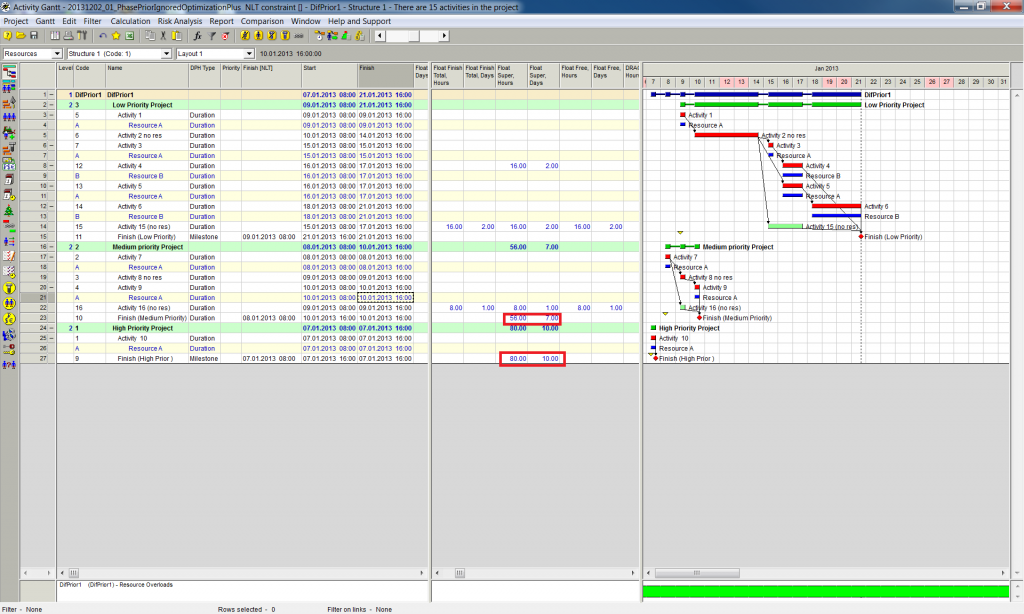
having looked at the floats calculation I can see that with my method floats are also calculated the way I would want them to.
Every sub-project has it's own float calculation, not influenced by the float of another (lower priority) sub-project. The only disputable thing is the float of the NLT-constraint Finish milestone, but even this one is probably exactly the way I would want it to be.
Or am I missing something?
- 0RDRafael Davila ·
Resource leveling algorithms
Resource leveling algorithms shall consider all constraints and this include FNL constraints. Use of constraints for a purpose other than their true intent shall be avoided, this is why in most contracts use of FNL constraints other than contractually required/mandated is prohibited.
At some point use of constraints might have a similar effect as using soft logic instead of true resource leveling.
It seems to me you are looking for making open ends critical a functionality not available in Spider Project.
The problem is that in order for it to work correctly under Spider project [Vladimir correct me if I am wrong, please] you shall first run the resource leveling without any artificial constraint, as good practice dictates, then you can adjust float on open ended paths with a formula that will make open ended activities FNL constraint equal to resource leveled finish of the activity and run again resource leveling. The problem is that before every update you shall clear the artificial constraints you used for purpose of showing open ends as critical. To me it would be better if such functionality for making open ends critical is implemented within the software that will make sure all correct steps are done automatically.
I am trying to create a script for this purposes but it seems like it fixes leveling conditions at time of creation of script, will let you know if this is an issue and if I found the solution.
- 0EZEvgeny Z. ·
Rafael,I don't understand why
Rafael,
I don't understand why you say, that the following is applicable for the method
"you shall first run the resource leveling without any artificial constraint, as good practice dictates, then you can adjust float on open ended paths with a formula that will make open ended activities FNL constraint equal to resource leveled finish of the activity and run again resource leveling. "
I envisage to use it as following (in the example of Portfolio scheduling)
Every project shall have no lose ends. All activities should always have a finish milestone as of its successors. The amount of milestones every project shall terminate to shall depend on the amount of priority levels, which shall be present for this project (minimal 1, but may be more. e.g.):
Project 1
Project 1 time critical Activities Finish
Project 1 none-time critical Activities Finish
Project 2
Project 2 time critical Activities Finish
Project 2 none-time critical Activities Finish
Then portfolio scheduler assigns different priorities to the milestones by assigning them different unachievable NLT constraints. The earlier date of NLT constraint, the higher the priority
Such approach probably does not allow usage of "normal" NLT constraints within the project. But they probably shall not be used in any case, if we are scheduling projects with different priorities (may be only on the highest priority project)
Do you see any flaws in such approach?
- 0RDRafael Davila ·
Evgeny,It seems I overlooked
Evgeny,
It seems I overlooked you was using portfolios instead of a single file with multiple sub-projects and therefore assumed you was looking for a way to make open ends critical through FNL constraints, a functionality available in most other software except Spider, a real issue for some, to the extent the functionality exists in other software. Seems it is not an issue for you nor Vladimir but for me it is when I want the FNL constraint on open ends to adjust dynamically.
http://www.slideshare.net/InSyncConference/p6-version-7-tricks-and-traps

If you do not have Spider Project Professional but a scaled down version that does not support Portfolios then you might need to use a single schedule to manage several independent jobs, jobs that might be internal and do not have a contractual finish date or not even a real FNL constraint, then you might need to display open ends critical.
I am still trying to solve the issues with regard to the script but for my exclusive use as you are not looking for this issue, I am having some issues with todays release that is preventing me to work out the formulas for the script.
Best Regards,
Rafael
- 0EZEvgeny Z. ·
Rafael,RE "...you was looking
Rafael,
RE "...you was looking for a way to make open ends critical through FNL constraints, a functionality available in most other software except Spider..."
I know what you mean. In Ms Project this is an option "Calculate maultiple critical paths", and in Spider it seems not to be available, but you can achieve this by putting "Unachievable NLT constraint" to the end.
In my projects I try not to have much of lose ends. I try to terminate all them to a few milestones. This is also natural. There is always some milestone once everything is done. So for implemantation project I would have "System is implemented", "non-time critical design documentation delivered" "All residual items are solved"
Regards.
- 0RDRafael Davila ·
Evgeny,I know about the
Evgeny,
I know about the unachievable FNL constraint but is confusing if it can alter resource leveling on undesired ways when it is artificial while making it equal to activity finish date would eliminate the issue.
Also now we have the option to expose negative float and using date other than calculated finish date will result on weird negative float values.
I do not find real practical use for negative float as it has no meaning under resource leveling but clients users of other software insist on we disclose such manipulation of float values.
Regards,
Rafael
- 0RDRafael Davila ·
http://www.tensixconsulting.c
- http://www.tensixconsulting.com/2012/01/oracle-primavera-p6-must-finish-by-date-2/
- http://office.microsoft.com/en-001/project-help/find-slack-float-in-your-schedule-HA010211800.aspx
- Spider uses float for many purposes, among them uses float values on the resource leveling process, but resource negative float has no meaning under resource leveling algorithm so if a FNL constraint is unattainable it assigns computed early finish to late finish before backward computation, this makes the activity critical so it is a lie negative lag is necessary to disclose criticality.
- Negative float computations results when late dates are earlier than early dates as adjusted by some software. Spider can mimic it but I doubt it uses the value on any of its algorithms.
- Negative lag confuses forensic annalist so they start their analysis by eliminating the constraint that causes negative float to be displayed.
- Negative lag is a manipulation so perverse that it has created legal issues and therefore it is usually required to specify that negative lag will not be used for delay claims or it might impose additional responsibility on a delaying party.
- I do not like the idea, in any case a different computation that shall be disclosed separate from how normal float shall be calculated, it took me some effort to convince Vladimir to disclose such calculation algorithm under separate functionality in Spider just because this is how some insist float shall be calculated. Now we can disclose both methods.
- I believe Spider will calculate and display negative float if desired but will not disclose resource negative float. I also believe Spider approach to disclose both calculations is an excellent and pragmatic solution to the issue as it would be almost impossible to erase all traces of negative float usage in the US.
- 0BLBogdan Leonte ·
Greetings,Rafael, I agree
Greetings,
Rafael, I agree 100% with Vladimir regarding open ended activities, but for problem/solution I think these formulas might work pretty good:
1. Set FNL: FinDir = if(f_SuccOpers = 0 and Code != 11, Fin, FinDir); where 11 is the code of the final milestone
2. Remove FNL: FinDir = if(FinDir != "" and f_SuccOpers = 0 and Code != 11, "", FinDir); where 11 is the code of the final milestone.
There might be a better solution if you search in the "Links" table for succesor. I haven't managed so far to really get the hang of formulas from different tables, I need more practice.
Regards,
Bogdan
- 0RDRafael Davila ·
Vladimir,Open ends shall be
Vladimir,
Open ends shall be unlawful as a general rule but in occasions it might not be the case as when you are modeling within a schedule multiple independent jobs or networks that share resources but finish of each is independent of the other and you want to disclose float of each network independent of each other while sharing resources.
Maybe this can be done using Portfolios but at times it is easier to use a single file.
By the way the new version issue with my formulas was solved within 24 hours as usual, new full version install took me about 20 seconds, I love my solid state hard disk is faster than the old one, on my typical 600 activities jobs Spider Monte Carlo is fast, very fast.
I do not use script language, too much for my mind, but use editor to modify whatever script I create using record method. From my prior posting you will see I am trying to create a script to automate making open ends critical but wonder about the script recording the calculation settings instead of using last used settings that might be changed after script creation, here maybe a specific script command might be needed unless whatever I am reading on the editor does not means the recorder is fixing the settings.
Latter I will post my file so you can comment on my script if you have the opportunity. The following figure displays the formulas I am using, the idea is for the script to apply formulas 001 to 003, execute schedule run and clear temporary FNL constraints via formula 004. Note I erase FNL cell on open ends by using a formula with FinDir - FinDir, any suggestion or comment will also be welcomed.

Best Regards,
Rafael
- 0RDRafael Davila ·
Bodgan,I got the formulas
Bodgan,
I got the formulas that can get me to where I want, to perform bad, but at times the script is unstable. I am having issues to make some formulas get out of limbo, just look at formula for B, it got to be either Yes or No but not limbo.

The idea is to mimic what other software do automatically following what I suppose is correct algorithm:
- Identify activities with no successors.
- Identify activities with no FNL constraint.
- Mark as open ended activities those with no successor or with no FNL constraint.
I am getting some unstable results and the source might be the fact that some formulas remain in limbo. Maybe you can help me with some ideas as to get formula 002B to get No value when Yes is not applicable.
http://www.mediafire.com/download/u5lgs084db7md7z/RD001.001.sprj
Your help to break the inflexible "good practice" rules will be appreciated as I do not believe on literal interpretation of what shall be a guide but not inflexible rules. Even Microsoft and Primavera P6, P3 and SureTrack among many others, none my favorite, tolerate open ends and provide functionality for it. At times I want to leave open ends and make them critical when modeling multiple separate jobs under a single file whose finish date is not constrained because at the moment there is no such urgency and a FNL constraint does not exists while the jobs share resources and modeling them in a portfolio is an overkill. To follow criticality then an artificial FNL constraint that moves dynamically is needed.
Best Regards,
Rafael
- 0BLBogdan Leonte ·
Rafael, I took a look at your
Rafael,
I took a look at your file and I have a couple of questions:
1. When would you consider that formula 002B is not applicable?
2. I think you created a complicated solution, using 5 formulas. Why not consider that all chains that have a finish date less then that of the project are possible critical paths why not consider the end date of the project as the main criterium for creating FNL constraints. This way you can create and remove FNL for only the last activity of those chains whilst keeping other FNL constraints in the Project/Portfolio unchanged.
If I did not make any mistakes in my judgement I belive these formulas will get you better results.
Set FNL: FinDir = if ( f_SuccOpers = '' and Fin < Fin[BSC,0], Fin, FinDir)
Remove FNL: FinDir = if ( f_SuccOpers = '' and FinDir != '', '', FinDir)
I tried these formulas on your example and did not get FNL for activity 2 which is already critical.
Here are both files, mine and your's with the above mentione formulas.
http://www.speedyshare.com/3GR3u/Desktop.rar
Best Regards,
Bogdan
- 0RDRafael Davila ·
Bodgan,I usually start
Bodgan,
I usually start developing formulas in steps using very simple formulas as to follow whay happens to individual values and then I usually consolidate into fewer formulas, but one of the simple formulas does not work 100% as expected.
Your formulas work perfectly well for what I intend to you got right what I wanted to do.
I am still looking for the answer about why if interested on getting very simple formula 002B rigt, to disclose either a Yes or a No and no empty space I am getting empty space in some cells. I want to know how to get it right and why it is not working as expected. In the future I might need formula 002B to get it 100% right or maybe other simple formula that can have such behavior.
Some of the formula functionality have changed and I will take a look at Spider Help to get updated.
Meanwhile a 1,000 thanks as your formulas shall work perfectly.
Best Regards,
Rafael
- 0BLBogdan Leonte ·
Glad I could help,regarding
Glad I could help,
regarding the formula I think the problem is the way you created the condition for the "if", FNL cannot be negative or zero since it is a date, so FinDir>0 doesn't make sence, the only one that makes sense is the existence or nonexistence of the FNL.
In other words I belive that if you change the FinDir>0 to FinDir != '' the formula will return the right results every time.
- 0BLBogdan Leonte ·
Rafael,I have no ideea why it
Rafael,
I have no ideea why it didn't work, I even tried it in another file than the one you uploaded and I got the same result as you. Perhaps Vladimir could shed some light on this matter.
In my opinion it is a very straight forward "if" statement.
Best Regards,
Bogdan
- 0RDRafael Davila ·
Bodgan,I tried your
Bodgan,
I tried your suggestion but I am still having the same issue, column for B values only displays Yes values.

I do not recall how P6 implements open ends functionality on a Portfolio as there can be additional options as what shall be the FNL constraint. Prehaps in some jobs open ends critical, in others open up to individual project end, in others up to protfolio end. Each opition will affect criticality in different ways and therefore resource leveling.
Best Regards,
Rafael
- 0RDRafael Davila ·
Bodgan,I believe it happened
Bodgan,
I believe it happened as an unexpected result when formula functionality was recently improved, to me a major and welcome improvement.
The following screen shows a workaround I do not like as if you try to consolidate in a single formula will not do it.

Best Regards,
Rafael
- 0RDRafael Davila ·
Thanks, I downloaded new
Thanks, I downloaded new version yesterday and everything works as expected.
As I said before the idea was to eventually simplify/consolidate the formulas and will be able to continue with this approach.
Your formulas work so well I will use them, no need for further refinement and those are the ones I will use. Your formulas are applied directly to regular existing fields, do not depend on user defined fields one of my targets when simplifying formulas, they save a step when transferring formulas to other files. So simple no script is needed another step saved when transferring formulas and scripts.
Eventually I will be looking for portfolios, maybe an additional open ends option in portfolios will be needed, though not sure. I will target for the options to make open ends critical, to make open ends FNL equal to their job finish or to make open ends equal to global portfolio finish. An option you might apply to individual jobs within a portfolio instead of globally, global application would be an additional option.
- 0BLBogdan Leonte ·
I tested my formulas on a
I tested my formulas on a very small portfolio, in which there were no open end activities and it works well.
By appling FNL at the portfolio level I can obtain the criticality index for projects finish dates and for the activities beloging to each project of the portfolio when using MC.
I think it would make more sense to consider the FNL at the end of the project rather than the end of the portfolio. In this case the formula will need considerable adjustments. The easiest way, I think, would be to identify all finish milestones in the portfolio and set the FNL of the activty to the respective finish milestone of the project, a bit more dificult. I will look into it and tell you if I have any good simple solutions for a formula.
Best Regads,
Bogdan
- 0RDRafael Davila ·
Bodgan,You said - I think it
Bodgan,
You said - I think it would make more sense to consider the FNL at the end of the project rather than the end of the portfolio.
I agree and would add - I think it would also make sense to consider SNE at the beginning of the project rather than at the beginning of the portfolio.
It means a few other formulas might be needed to constraint float of project to occur within project range.

By the way thanks for not insisting on the lecture about good practice and providing me such valuable help. Just think about the possibility when managing a portfolio of hundreds of jobs as it happens in the utilities, and a few job supervisors are like me that do not always follow the rules.
Best Regards,
Rafael
- 0BLBogdan Leonte ·
Rafael,You said - I think it
Rafael,
You said - I think it would also make sense to consider SNE at the beginning of the project rather than at the beginning of the portfolio. - I don't know the acronim SNE.
You also said - By the way thanks for not insisting on the lecture about good practice and providing me such valuable help.
I can't really say I have an opinion on the matter since in my country Planning is very little used, only for large/very large projects wich attract International Constractors.
Best Regards,
Bogdan
- 0RDRafael Davila ·
Bodgan,Sorry for the mistake
Bodgan,
Sorry for the mistake it should have been,
 .
. Your help with formulas was excellent, to me your opinion is important, no matter if different to mine or if different to the general consensus in your country. The opinion of all matters, general consensus carry a heavy weight but I do not always agree, guess we can agree to disagree. I am always open to change my opinion if reasoning tells me I should.
My idea on having control of open ends is because they do happen no matter if you like it or not. At times some flexible control is desired, otherwise all software vendors that are calling for strict adherence to their own good practice rules would easily prevent it from happening by stopping schedule calculation whenever there are multiple start/finish open ends on individual schedules or whole portfolios. I challenge these valiant software developers to dare to implement such strict measures if they really meant it.
Thanks once again,
Rafael
- 0EZEvgeny Z. ·
Vladimir,I am still
Vladimir,
I am still experimenting with setting priorities for subprojects in Spider via unachievable NLT constraint, previously discussed in this thread. I am also trying to program vacations and holidays as activities (as discussed here: http://www.planningplanet.com/forums/planning-scheduling-programming-discussion/566439/absence-management-scheduling-software).
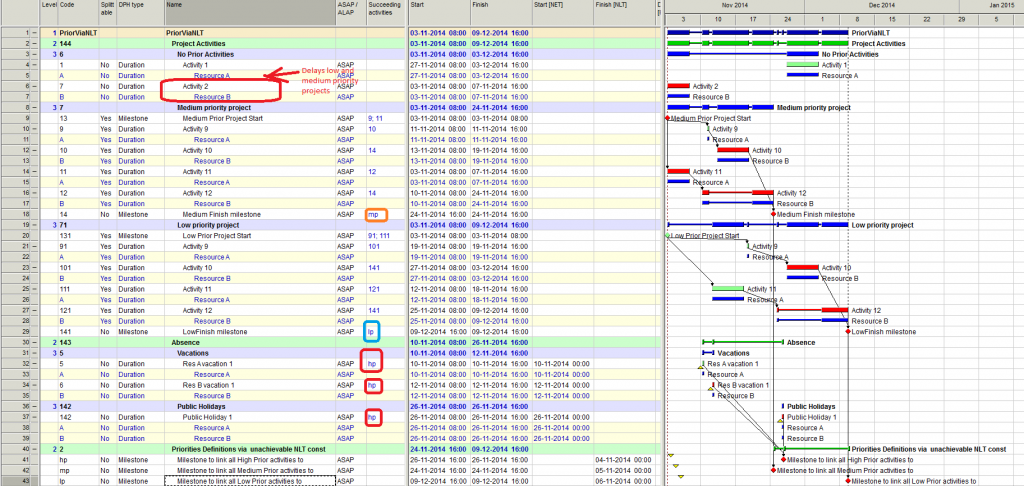
I think I found the way to do it:
- One shall create “unachievable milestones with NTL constraints” (e.g. high, low and medium priority).
- The high priority milestone shall have NLT date earlier, than medium priority, and medium priority earlier that low.
- Then all high priority tasks and /or subprojects shall have High Priority milestone as a succeeding activity, medium priority subproject, shall have a medium priority milestone, low priority subproject shall have a low priority milestone.
So effectively the subproject priority is set by linking subproject or activity to a certain milestone with unachievable NLT constraint.
Please see below example on how I plan to do it. In general it all works fine with the exception of the fact, that in this specific example I see, that unsplitable Activity 2 is placed by resource levelling in such a way, that it delays Medium and Low priority projects, which is not what I want, because activities from this phase shall have priority lower, than low (since they do not have any NLT constraint at all)
Question:
With this Acivity 2, did I just come to the limit of the Optimisation Plus resource levelling algorithm, so that even Spider cannot resolve this task correctly, or is there any other reason?
Link to Spider Project file is below
https://drive.google.com/open?id=0B1FBt_G3gCVqbm5LX1RZWmlkZjQ&authuser=0
- 0VLVladimir Liberzon ·
Evgeny,at the moment of
Evgeny,
at the moment of activity 2 start there are no competitors for resource assignment and this activity is resource critical. Delaying this activity means delay of the project finish.
If to make it splittable everything will be fine.
Regards,
Vladimir
- 0EZEvgeny Z. ·
Vladimir,indeed, if I make
Vladimir,
indeed, if I make Activity 2 splitable, it works as I would expect.
But in this specific scenario (where I have chosen to make it not splitable), if I totally delete Activity 2 and re-run schedule, then both Medium and Low priority projects will finish earlier. This means the presence of Activity 2 delays them. However the idea of projects prioritization (the way I see it at least) is that higher priority project shall not notice lower priority project (provided there is no link dependency between them, only resource dependency). It principle in this example this rule is followed for everything, except Activity 2 (Activity 2 and Activity 1 are meant to have lowest priority). That is why I am wondering why is that.
Regards.
Evgeny
- 0VLVladimir Liberzon ·
Evgeny,Spider algorithms try
Evgeny,
Spider algorithms try to optimize resource usage and minimize overall duration of projects and portfolio execution. Activity 2 requires resources that are not busy at its start time, so Spider assigns available resources to low priority activity that may use them. Delaying activity 2 delays portfolio finish. So Spider decides that this solution is not the best. If this low priority activity is splittable resources are moved to activities with higher priorities but if not it permits to finish the work before starting high priority activities.
Best Regards,
Vladimir
- 0EZEvgeny Z. ·
Vladimir,thanks.Question:
Vladimir,
thanks.
Question: what is your/Spider definition of the fact that one project/phase has a higher priority than the other?
I would define it that a higher priority project should not notice the presence of a low priority project (at least at the time of planning).
Apparently this is not the definition, implemented in Spider (still this seems to be better, than anything else which exists)
So, so what is Spider definition of this? How would you explain it on the way, that high management would understand it, not the schedulers?
Regards.
Evgeny
- 0VLVladimir Liberzon ·
High priority in any case
High priority in any case means that activities of high priority project/phase have an advantage when compete with activities of lower priorities for the same resources. When resource assignment decision is made Spider looks at the set of competing activities and selects those that have highest priorities.
In your case there were none activities that competed for resources at the moment of activity 2 start. More than that, if to delay activity 2 then overall duration will increase. So this delay was considered as poor decision.
Optimization considers many options and may find the solution that minimizes project duration if to ignore some priorities. This solution is proposed.
- 0EZEvgeny Z. ·
Vladimir,thanks.So if I just
Vladimir,
thanks.
So if I just describe this in general words, would this be a correct practical interperetation of your statement:
<<
In case of prioritisation by using method of Unachievable NLT Constraint priority in general is given to the projects/path with earlier NLT constraint in case of the resource conflicts. Due to the features of the resource levelling algorithm it is however possible, that the schedule of the high priority project would be longer in the presence of the low priority project, than the schedule of the high priority project alone.
To assess the impact of the low priority project on the high priority project planner should perform the schedule run with and without low priority project and compare the results.
>>
- 0EZEvgeny Z. ·
Vladimir,I am still thinking
Vladimir,
I am still thinking about my example, posted 2014-11-03 21:00 and I sort of still believe, that in this particular example Spider does not come up with 100% correct answer in relation to prioritization. Meaning that it still allows low priority activities to delay higher priority activities.
I still would want spider to delay Activity 2 until it stops interfering with Medium and Low priority activities.
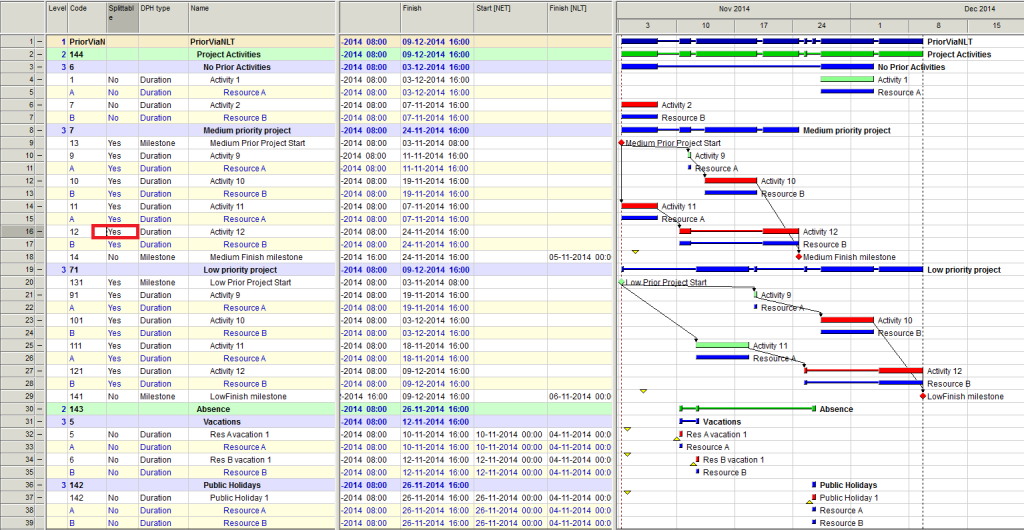
I did notice however, that if I set the flag on Activity 12 to be not splitable, then spider prioritizes everything as I would expect.
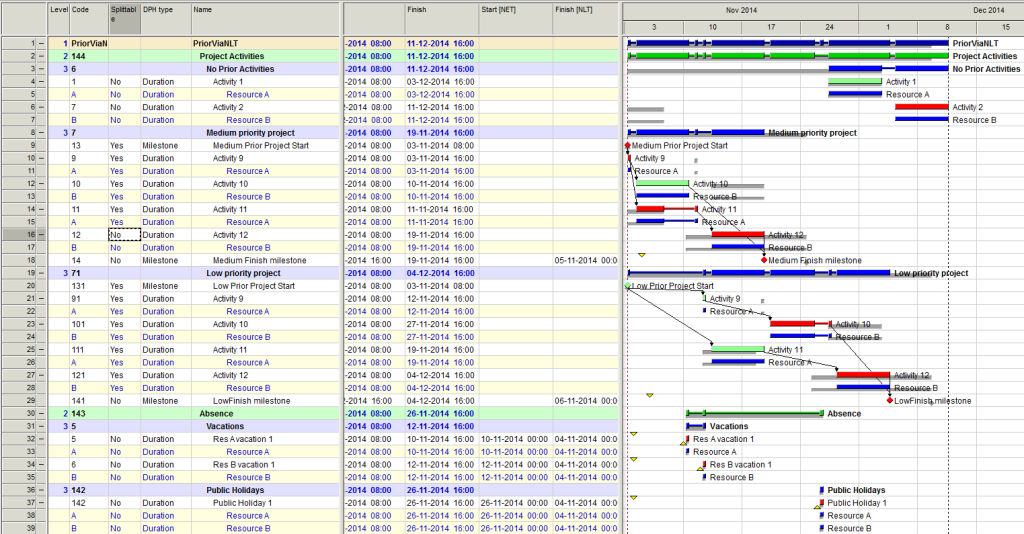
https://drive.google.com/file/d/0B1FBt_G3gCVqSTlhMnRPeWVPRlU/view?usp=sharing
I do realize, that resource constrained scheduling, when taking into account different priorities is more complex task, then in the situation, when there is only one project. So, may be this is something to look at going forward, so that Spider will be able to resolve even such tasks.
Regards.
Evgeny
- 0RDRafael Davila ·
Evgeny,I do not have the file
Evgeny,
I do not have the file of your schedule and this is needed to understand the schedule, forget the talking after a few activities things complicate.
I can see Spider working as I would expect, scenario one is less restrictive as it allows splitting to make it more efficient, it finishes two days earlier.
Depending upon your resource leveling settings algorithm it will have different outcomes but if selecting optimization you have the higher priority on the "mother of all activities", the project itself, so project duration will be priority number one and everyone else priority 100, or whatever.
Spider allows you to make management decisions by giving you options. Unless in much hurry in this particular case I would select the second option, without activity splitting, the two days saving might be lost by the inefficiencies the split might cause. In case of splitting I would expect duration of some activities will increase and would need to be adjusted requiring another resource leveling run. Spider make it easier to find alternate solutions but management decisions on which is best still rest on you.
Best regards,
Rafael
- 0EZEvgeny Z. ·
Rafael,I actually posted the
Rafael,
I actually posted the shedule, here it is once again:
https://drive.google.com/file/d/0B1FBt_G3gCVqSTlhMnRPeWVPRlU/view?usp=sharing
What I want to achieve is to find a reliable and effective prioritisation mechanism in Spider. My definition of a higher priority is that a lower priority sub-schedule shall have no influence on the higher priority one. In another words Higher priority schedule shall not notice the low priority one, the low priority shall run on the “remaining resource availability”
The straightforward way in Spider to achieve this goal would be to use task and/or phase priorities. But this is not good for me, as Spider only respects these priorities in a standard Method, which turns it into MS Project in terms of resource levelling in this case.
So, I did find how to achieve my goal – by using an unachievable NLT constraints (which I mentioned many times here). In this case I have ability to use optimisation Plus and to have a proper prioritisation.
Still in this case you can see, that in the top example, if I simply delete Activity 2, the medium and Low priority schedules will finish earlier, which means it had an impact there, which is not what I wanted.
In the bottom example (when activity 12 is not splitable), this is not the case. In the bottom example if you delete “No Prior Activities”, the “Medium Finish milestone” as well as “LowFinish milestone” will not change their dates. Equally if you delete “Low priority project”, the “Medium Finish milestone” will not change. Which is what I wanted. So here it works excellent!
But the top and bottom examples are just different schedules, they only differ in relation to whether activity 12 is splitable, but they are still different. And in one of them Spider works as I would expect and in another one – not quite. Which is still not so bad, as it is better than any other software out there (to the best of my knowledge). Nevertheless may be Vladimir may consider and tune the algorithm, so that it would work as expected even in this case as well.
- 0RDRafael Davila ·
In your sample job I did not
In your sample job I did not find any defined phase or activity priority! The priority comumn is empty, if you are not expicit the software will not know.
The discussion is old and long, can you give me the priority you want for your phases and within each phase the activity priorities. Maybe you just want activity priorities, in such case keep the option to Apply Phase Priority unchecked or even priority values for phases empty.
It is possible Advanced algorithm will keep activity priorities but with a sorter schedule than Standard. Resource leveling is known as an NP problem, at times what you consider a lower level algorithm can get better result for some schedules, therefore I am not sure it is a good idea to force algorithms to fit a specific schedule.
I never liked the idea on using constraints as a way to tweak resource leveling, I keep constraints at a bare minimum. Spider can calculate a negative float value but do not use it for optimal resource leveling, it would be nuts, still you can try using it as a priority.
Log in or join to reply
ProjectControls.com is free to join. Members can post questions, reply, vote and follow discussions.
Existing members: your original username and password still work. Forgot password?