
The way Spider calculates phase duration
- Created
- 12
- 5
Dear all,
I just noticd, that the way Spider calculates the duration of a phase is a bit strange for me, or at least this is not what I am used at MSP.
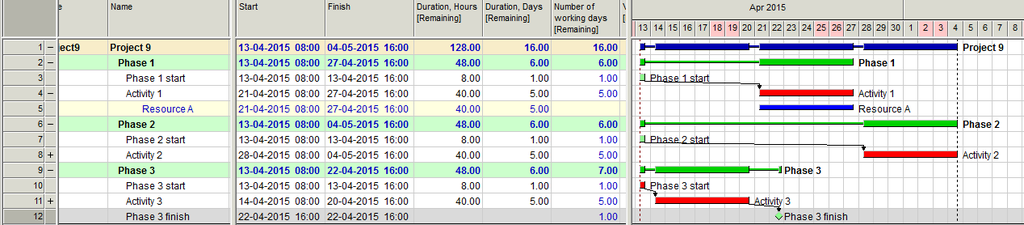
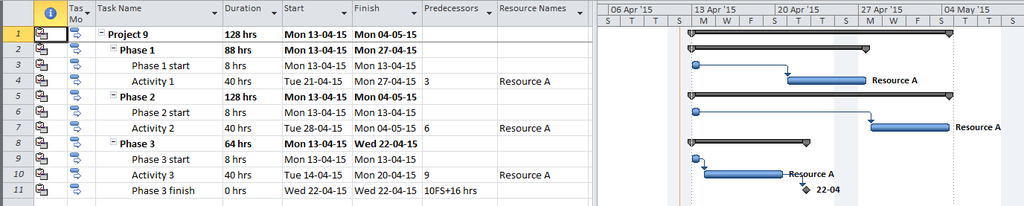
1) Is there a way to show phase duration as the [date of latest activity] - [date of earliest activity]?
2) What is the definition of "Number of working days remaining?"
12 replies
Oldest first- 0VLVladimir Liberzon ·
By default phase duration is
By default phase duration is calculated basing on phase calendars and may differ from actual phase duration based on calendars of all activities and resources that belong to this phase. In any case hours and days when no activity of this phase is executed are not counted.
Spider also calculates total number of work days when the phase activities are excuted. This number is reflected in the field Number of working days. If an activity worked one hour in one day and another hour in the different day then the number of working days will be two. And again periods when no phase activity is executed are not counted.
Elapsed duration may be easily calculated using formula (manually or automatically), so it does not make sense to create separate field for this data.
I see that MSP shows elapsed duration and I don't see much sense in phase duration equal to 128 when total duration of all phase activities is 48. We try to apply the same approach to calculating both activity and phase duration counting work time only.
- 0RDRafael Davila ·
1) Is there a way to show
- 1) Is there a way to show phase duration as the [date of latest activity] - [date of earliest activity]?
Just add a Hammoack and you will get the following figure, it should not be difficult to figure it out Phase Duration represents the count of hours [not sum] during which any activity was performed during the phase.
If you look at Activity 1 Phase after adding the hammock additional hour count happened yielding 88 hours.
If you have a particular need for phase duration calculation add a user defined field and a formula, easier than creating hammocks, in this case it was just for illustration purposes.

- 0RDRafael Davila ·
Because Phase Calendar is the
Because Phase Calendar is the union set of all work hours it will be special and can be different to any child activity calendar, so it won't matte what it reads or to what you change it. Take some time to create a 24-7 calendar assign it to the hammock ans see what happens to the phase duration, then change phase calendars and see what does not happens.
It works as intended but because of this maybe at phase level no calendar name shall be available.

- 0EZEvgeny Z. ·
Vladimir, Rafael,thank you
Vladimir, Rafael,
thank you for your responses.
RE "Elapsed duration may be easily calculated using formula (manually or automatically), so it does not make sense to create separate field for this data."
I must be doing something wrong, because I have created a user-defined field (myDuration) to automatically calculate such elapsed duration, but I can't make it work.
I use formula:
Diff_Days_Calen ( Fin ; Start ;A )
Would anybody be able to have a look at it?
https://drive.google.com/file/d/0B1FBt_G3gCVqZV9TM0ktWGp1QVU/view?usp=sharingRegards.
Regards.
Evgeny
- 0EZEvgeny Z. ·
Vladimir,Ok, thanks. It works
Vladimir,
Ok, thanks. It works now.
I also set the flag for "Execute automatically => In activity Gantt after scheduling". But the strange thing, is that it shows the result of a previous calculation (of a calculation one step behind).
what I mean:
step 1; do scheduling 2 times
step 2: do resource constrained scheduling. Result: the user filed still shows previous value
step 3: do normal scheduling again. Result: user field now shows the value, which should have been shown in step 2
step 4: do normal scheduling again. Result: now it shows correct value
Does it work the way it is supposed t?
- 0EZEvgeny Z. ·
Vladimir,thare was a typo in
Vladimir,
thare was a typo in my original post. It is " In activity Gantt after scheduling". But the problem, that user filed displays results of the previous step calculation is still there
https://drive.google.com/file/d/0B1FBt_G3gCVqTUxVd2NlYjNmLWs/view?usp=sharing
Log in or join to reply
ProjectControls.com is free to join. Members can post questions, reply, vote and follow discussions.
Existing members: your original username and password still work. Forgot password?