
Managing resources (people) absence in Spider
- Created
- 67
- 10
Dear all,
I am looking at resources in Spider and have a question how to simulate resources absence.
As I can see, every resource needs to have a calendar, which, in turn, depends on a Week object and exceptions.
I am now considering the situation of named resources.
Question 1
As in practice each resource has his own absence schedule (due to individually booked vacations ), does it mean, that I will have to create:
- separate exception for every vacation of every resource?
- Separate calendar of every resource?
So, in case I have 10 resources, each of them will have approx 5 vacations spread over the year (in addition to public holidays), that means, that for the project of 1 year I will have to create 50 exceptions and 10 calendars just to cover resources vacations.
Is it correct?
Question 2
How to handle situation, when resource is only made available for a some time (shorter, then expected duration of a project)
In MS Project one can set resource availability periods, (which is by default set to From N/A To N/A), but in Spider I found only how to set exceptions, not availability.
Regards.
Evgeny
67 replies
Oldest first- 0RDRafael Davila ·
I am now considering the
I am now considering the situation of named resources.
Question 1
As in practice each resource has his own absence schedule (due to individually booked vacations ), does it mean, that I will have to create:
- separate exception for every vacation of every resource?
- Separate calendar of every resource?
So, in case I have 10 resources, each of them will have approx 5 vacations spread over the year (in addition to public holidays), that means, that for the project of 1 year I will have to create 50 exceptions and 10 calendars just to cover resources vacations.
Is it correct?
Yes, this is correct with any software, you have to tell the software, no software will be able to figure it out by itself. In my case it would be a single vacation exception from X-mas to 3-kings day for all employees. Can you imagine 2 climbing crane operators on vacations twice a year on the same job, a single tower?
If you got to get into this granularity tell the software, it will do the hard part for you, it will let you know what about the impact.
Question 2
How to handle situation, when resource is only made available for a some time (shorter, then expected duration of a project)
In MS Project one can set resource availability periods, (which is by default set to From N/A To N/A), but in Spider I found only how to set exceptions, not availability.
Availability is the time where exceptions do not apply. If you want to limit the range just establish an exception from any time before the project start to the start of the availability and another from the end of availability to a distant time after project finish. This I rarely use because we usually let the software unrestricted to tell us when the resources will be needed. At times it is a genuine scheduling need and the software must provide for it, it just do it on its own way.
Use of exceptions is very efficient and allows Spider to report on non available time without having to print calendars that include every day of the year.
Eventually you will learn to use resource production triggered by activities, another unique functionality available within Spider another way to handle availability of resources. This I find it more useful when some resources become available at certain phases that will occur not per fixed calendar dates but for a phase dates range that might change as the job progress. Remember that in the construction industry it is common to hire local labor as the work develops, your modeling needs might be different, and is valid.
Resource Production
Spider Project enables resource production (or consumption) on activities. The user can either set a list of resources produced/spent on activity (at page Resource Production in activity properties dialog box) or set for individual resource (at page Resource Production in resource properties dialog box) a list of activities, that produce/spend current resource.
The user can specify whether resource is produced (consumed) at the beginning or at the end of activity by checking corresponding boxes At Start or At Finish.
Amount of resource units produced (i.e. positive value) or consumed (i.e. negative value) is set in the field Quantity for selected resource (at page Resource Production in activity properties dialog box) or for selected activity (at page Resource Production in resource properties dialog box).
It is recommended to use resource production option to model quantity of resources available in the project life cycle. To change resource quantity the user can also include dummy activities (producing or consuming resources) to project work breakdown structure.
Displaying idle time on Histograms most probably will interest you, but this is a separate issue by itself we shall deal when you start creating table reports and diagrams.
- 0EZEvgeny Z. ·
Rafael, understood.My only
Rafael, understood.
My only concern is that that must be quite a challenge to manage all these tons of exceptions and calendars.
I have another question in this respect. I understand how to manage named resources, but in case of un-named resources (e.g. 50 brick layers) how do you manage the fact some of them take vacations at certain dates, thus the total availability of resources goes down. So at certain week you can have 40 of them, other week 45.
Is this possible to model?
Resource production is an interesting concept. Just wondering how it works together with resource leveling?
Regards.
Evgeny
- 0RDRafael Davila ·
I understand how to manage
I understand how to manage named resources, but in case of un-named resources (e.g. 50 brick layers) how do you manage the fact some of them take vacations at certain dates, thus the total availability of resources goes down. So at certain week you can have 40 of them, other week 45.
Is this possible to model?
Sure, if change in availability is date dependent use fixed date milestones to model resource production to increase/decrease availability. If dependent on activities that move as the project moves use similar approach but instead of fixed milestones use milestones that move with the activities. Once you start exploring this functionality you will see how easy it is to model. Remember that all these field values are displayed on tables you can always display when needed, it is transparent and never hidden.
Of course you do not necessarily have to use milestones it can be the activities themselves. The use of milestones might help as a reminder on the Gantt, it is a matter of personal preferences.
Be aware that the use of partial assignments is not the same as reduced quantity availability even when both might yield same amount of work-hours. One activity might require 8 work-hours by two resources working at the same time on a part time basis [4 hours each], a single resource working full time [8 hours] will not meet the requirement for two activities.
Real life resource assigments can be complicated, but transparent functionality that do not require work arounds that might be erroneous makes it less dificult.
- 0EZEvgeny Z. ·
May be this is not a
May be this is not a question, specific to Spider, but sometimes I see that to manage absence in MS Project people create just a high priority task for vacation (e.g. Peter vacation – 2 weeks ), for public holiday, training etc. and then assign correspondent resources to these tasks.
The advantage of such approach is that you can create resource usage report (who is doing what report) and one can clearly see, what resource is doing, or why it is not available, as vacation or training gets shown there as an activity for this resource.
If you simply use exception, then it is not immediately obvious from the report why resource is not available for specific period.
Does such approach make sense?
Regards.
Evgeny
- 0RDRafael Davila ·
Just switch from Gantt view
Just switch from Gantt view to Resource Gantt, here you will be able to see all assignments grouped by resource, you can apply filters as well and create diagrams and table reports as well.

But the approach of using an activity to model vacations is still poor as resource leveling might move the activity.
Optimization will disregard priorities in favor of duration and other algorithms might still delay the activity if a prior activity using the resource is scheduled to finish after the vacation start. Say you have an activity that uses resource A, start today and last 20 days but the resource will be on vacation during X-maqs, the vacation activity approach will delay the activities.
Prior to resource leveling.

After resource leveling with all priorities equal.

After resouce leveling with priorities assigned.

Note that even with no resource leveling the effect of vacation was correct, the activity was discontinued during the resource non-work period, same as if a long week-end.
Go with the direct and reliable methods to avoid any possible trap, if a resource will not be available model availability the correct way, through resource calendar exceptions. With few resources you might notice but with hundreds of activities you might miss a few. With few resources if you notice you might solve the problem by brute force, by somehow forcing the software to do what it should do easily. Enter the data in a transparent and consistent way and let the software do the dirty job for you.
Let me know if I understood you well, at times I have problems understanding the ways of MSP users, especially with regard to productivity and volume of work. Work different to effort as you might work 8 hours but other working the same 8 hours might produce half the volume of work. MSP lacks direct functionality to model volume of work and productivity as related volume of work, when in need to model this I cannot follow the faulty logic used by MSP users.
- 0EZEvgeny Z. ·
Rafael,If I follow the
Rafael,
If I follow the “exceptions” approach for absence management, will I be able to do the following:
- Create a report for all vacations, reserved for a specific person.
- Create a report for all public holidays applicable for a specific person (in case of multinational distributed team)
Regarding the subject of a “volume”
You see, not every activity can be measured in a volume in my view.
If you lay bricks – then yes. However what if you write a book or a document? In this case, one can spend 20% of a time to type in 80% of characters, and then will spend remaining 80% to polish off the document. How do you measure the volume in this case? How do you measure the % of readiness?
Therefore the only thing which matters in this case for a scheduler / project manager is estimated time to complete the task. Things are much less linear, when it comes to software development, documentation creation etc.
Regards.
Evgeny
- 0RDRafael Davila ·
If I follow the “exceptions”
If I follow the “exceptions” approach for absence management, will I be able to do the following:
Create a report for all vacations, reserved for a specific person.For each Named Resource define Named Exceptions and Named Calendars then with the use of user defined fields you can filter the calendar exceptions table. By clicking on the exception lines you can easily check on assignments.

Create a report for all public holidays applicable for a specific person (in case of multinational distributed team)
It is easier to create a report directly from the calendars table filtering for the resource. Keep it simple, the following provide both. At a single click you can transfer the filtered data to Excel and edit your report.

Regarding the subject of a “volume”
You see, not every activity can be measured in a volume in my view.
Of course, not all activities are necessarily production type, can be Duration Type, but even Duration Type can have volume of work.
If you lay bricks – then yes. However what if you write a book or a document?
In this case, one can spend 20% of a time to type in 80% of characters, and then will spend remaining 80% to polish off the document. How do you measure the volume in this case? How do you measure the % of readiness?This is a duration type Activity with a volume of work equivalent to 100% of the work.
Just use volume of work as percentage, by assigning 100 to volume and % to unit. - 0EZEvgeny Z. ·
Rafael,understood. It is
Rafael,
understood. It is possible to extract the information about all exceptions and their dates, available for a specific resource, but this is not a simple report. One would have to link Resource table, Calendar table and Exceptions table with each other. Exception table would contain information about the start and finish date of every exception. Potentially, in case every report’s calendar has the same name as the resource itself, one can skip linking the resource table.
The easiest way to achieve this would be probably to export project to Ms Access (as I understand this feature is available is full version) and then build a simple query to pull this information out of there.
By the way, so far I did not find a way how to achieve this in MS Project at all. That is why for my project I prefer just to have exceptions as a task, with resources assigned to it. It is easier to manage and to show. Even though I agree, it may not be the way it was meant to work.
Regards.
- 0VLVladimir Liberzon ·
By the way you can also show
By the way you can also show vacations as tasks.
In this case your resource asignments shall be variable and vacations tasks shall have high priority.
With variable assignments resources will move to higher priority task and return to work when vacation activity will be finished.
I still think that it is more complicated than just assign calendar exceptions.
When you wrote that in MS Project you create vacation activities and link them with other activities I wonder what you will do when some activities will be delayed. It always happens. Does it mean that you reconsider vacation activity links after each project rescheduling? Or you just keep frozen schedue where data date is different everywhere? In any case it is hard to predict project status at the moment of each vacation.
Our customers use external databases only for the integration with other softwares. Any report is easier to create in Spider and don't forget about report templates and scripts. If a report is complicated create a script that will produce this report by one mouse click.
- 0RDRafael Davila ·
Evgeny,I thought about Access
Evgeny,
I thought about Access but the fact that on the calendar table the exceptions field is a multi-valued field makes such query a bit complicated for someone like me who for years have not used database software.
Even handling of multi-valued fields is relatively new to Access.
Best regards,
Rafael
- 0EZEvgeny Z. ·
Vladimir,RE “..you wrote that
Vladimir,
RE “..you wrote that in MS Project you create vacation activities and link them with other activities..”.
I don’t think I wrote, that I had any links to or from vacation activities. I use them exactly, how you suggested in your previous topic.
RE: “ Any report is easier to create in Spider”.
This is probably me, but I did not find a way to create a report in Spider, which would show all exceptions, applicable to a specific resource with exception dates. To do this one would have to link Resource table , Calendar table and Exception table in one query to have the following result.
Resource Name Exception Name Exception Start Date Exception Finish Date Resource A Chrismas 25.12.2012 26.12.2012 Resource A New Year 31.12.2012 02.01.2013 Resource A Vacation 1 01.04.2013 10.04.2013 Is it possible to do it in Spider with or withour scripts?
Regards.
Evgeny
- 0RDRafael Davila ·
Evgeny,Contrary to my
Evgeny,
Contrary to my industry [Construction] for yours [IT] and others like design firms the call of the day is the use of named resources, it is real, it is a big issue. I suspect this need is what is making users of MSP to use it in the way you are, in an error prone manner, at the expense of much trouble. It comes out of a real need, not out of lack of knowledge, IT people are among the most capable persons.
Perhaps it would be better if such table for "Exception Assignments" is generated from within Spider so mere mortals like me can pull down the data at a single click of the mouse. This table shall display for every resource all assigned exceptions on a separate line that will include all exception data in addition to start and finish date. Maybe resource production shall also be included on a separate line, the software will also have to look at the Resource Production Table. Fields for standard resource assignments might require to be under different columns than those for resource production. Also can be considered to include projected start and finish dates of resource production, to be pulled down from activity table.
Who said named resource management is easy using CPM software at current state? It will never be easy but some extra functionality will help.
Best Regards,
Rafael
- 0EZEvgeny Z. ·
Rafael,RE " I suspect this
Rafael,
RE " I suspect this need is what is making users of MSP to use it". I actually mentioned, that in MSP I could not find this possibility either so far, using neither complex nor simple way.
So, I actually think that Spider produces more information in this case. It is just that Vladimir said that there is no need to export Spider to database to pull it together, but so far I could not find how.
Regards.
- 0RDRafael Davila ·
If Assigned Calendar Codes [&
If Assigned Calendar Codes [& Name] are made available as a multi-valued fields there would be no need for a UDF to be manually populated [or by formula if it can be done], then with the use of filters [applied on single or multiple columns] you can get the reports.

You can download the file from the following link.
http://www.mediafire.com/?pr975s1hp6ia50s
This can do the trick but the Exceptions Assignments Table would be better as there would be no need to use calendar codes to relate resources to exception assignments.
Maybe on the background the Assigned Calendar Codes are not a multi-value field, just that they look like it, to me it would not matter how the table is built.
http://www.theregister.co.uk/2006/07/18/multivalued_datatypes_access/print.html
Leave the details to the experts, give me the tables.
- 0EZEvgeny Z. ·
Rafael, If doesn’t cost too
Rafael,
If doesn’t cost too much time, would you be able to export for me some project to MS Access file (*.mdb) and make it available together with the original *.sprj file itself?
I just want to see in which form Spider exports projects.
Regards.
Evgeny
- 0RDRafael Davila ·
As a first try I suggests
As a first try I suggests using CSV-file Export function, a file format most database software can handle. You can download the project file from the link provided on my previous posting.
Export Project Table To File
Separate project tables, as well as the whole project, can be exported to text files (CSV format).
Exporting Project tables or Documents
To export tables (documents) into text files, select Export Table to file from Table menu in any project table. After selecting table export options in Table Export dialog box, Export into Files dialog box will be invoked, to set up export settings.
CSV (Comma Separated Value) format saves table in a format, where its columns will be separated by TABS or any other symbols (delimiters). This format allows the user to export any table documents to other programs (such as Word, Excel, and Databases). File extension of the files is .txt.
Delimiter can be changed in the Spider project options dialog box.
Documents saved in HTML format can be opened with internet browsers. Therefore, the user will be able to access these documents without using Spider Project software.
The following figures illustrates how.
- Create a folder on which to export the tables.
- Select Project/Export/To CSV-files.

- Select folder for export.

- Specify Comma delimiter.

- You will get all tables exported as follows.

You can record a Script to automate the procedure to a single click.
Now it is up to you and your knowledge of your database software to import CSV tables and create a template for your reports. Maybe the newly created Access Database can be connected to Spider.
For your requirement that I consider not unusual I still would prefer a direct table within Spider, a table that anyone can use without the need to ask IT and get a response for "next week".
I rarely use CSV, not even Excel to transfer data among Spider files, I use Excel for very simple tasks. I prefer to use what they call "Reference Books", a piece of cake compared to the method used by competing CPM software to transfer data with Excel using their special templates.
Good luck.
- 0VLVladimir Liberzon ·
Evgeny,all Spider Fields
Evgeny,
all Spider Fields created in any CSV table and database are described in the CSV and DB import/export section of Help menu.
Reports that you want nobody required and I agree that it is hard to get them.
But resource availability reports for any period is easy to get in a table form or as a diagram

In this example resources have planned two weeks vacations at different times.
Upper diagram shows overall availability of some resource skill (resource center).
- 0VLVladimir Liberzon ·
Evgeny,our users limked
Evgeny,
our users limked Spider with other programs (1C, Navision, etc.) using CSV export/import.
Yes, Spider exports everything and if some values in CSV files will be changed Spider will open project with new values. Export to databases does not add much to this functionality.
For us it is easy to create standard report that you requested but usually people are interested in resource availability like in my example. I am not sure that your report adds value to availability report. Please try to convince me.
Best Regards,
Vladimir
- 0EZEvgeny Z. ·
Vladimir,as exceptions are
Vladimir,
as exceptions are the reverse of availability, there is not much difference.
It is just that practically it is easier to print to somebody his 5 lines vacation report to check it, rather than to ask him to check his 365 days availability report.
In a matrix organization people often book vacations without following all the necessarily procedures or there are no proper procedures to make sure, that vacation information ends up with the scheduler. That is why it requires periodic verification. And if you constantly will give people to check 365 days report, they will simply get fed up very quickly.
So, nothing more than that.
Regards.
- 0EZEvgeny Z. ·
Rafael,I have MS Access, but
Rafael,
I have MS Access, but Spider demo does not have feature to export to Access. However having looked at how it exports to text files, I tend to agree with you, that on a calendar table the exceptions field most probably will be a multi-valued field. I am also not sure, that it will be a multi-valued field in MS Access 2007 terms, or it will be just a text field, separated by a “|” symbol. In the latter case, this will not make it that straight forward to build a query in this case. Having said this, I am sure there is some way to achieve it, may be using some MS Access VBA code.
The important, and quite impressive I must say, is the fact that Spider can export ENTIRE schedule to text or database. So, it is important that information is made available. So if somebody needs something special, they can always extract it.
By the way, MS Project has discontinued starting from version 2007 feature to export project to MS Access.
Regards.
Evgeny
- 0RDRafael Davila ·
Evjeny,You said "If doesn’t
Evjeny,
You said "If doesn’t cost too much time...". So I would like to see how it comes out in Access. Not the file as I do not have Access, and my alternative would be to buy and learn a Database software.
I am very interested in your request as in order to see a resource calendar my actual options require to print separate tables in order to see all details.
I would like the report to display for every resource the Resource Calendar, Calendar Week and Calendar Exceptions combined on a single Report as follows.
Resource Name
Resource Calendar
Calendar Data Titles
Calendar Record
Calendar Week
Calendar Week Data Titles
Week Record
Calendar Exceptions
Exception Data Titles
Exception Records
Best Regards,
Rafael
- 0RDRafael Davila ·
http://office.microsoft.com/e
http://office.microsoft.com/en-001/access-help/guide-to-multivalued-fields-HA001233722.aspx
In certain industries it is not only about the day but also about the shift as sometimes some companies rotate shifts. Spider has unique capabilities for easy modeling of shifts on a single activity.
I wonder how best to model rotating shift in Spider. Perhaps by assigning a 24/7 calendar and then with the use of exceptions you can rotate the available hours in addition to vacations and holidays.
Shift can also model longer work-hours during the Summer and shorter during the Winter plus other availability scenarios, your activity might be delayed from Summer to Winter time and if production + duration is affected it should be in the model.
This would make your request still more useful to check on availability if you need to see the details on the available hours.
- 0EZEvgeny Z. ·
Vladimir,Coming back to this
Vladimir,
Coming back to this subject.
In one of the topics you have written, that
“By the way you can also show vacations as tasks. In this case your resource assignments shall be variable and vacations tasks shall have high priority”.
Just for your information, I found out, that in my view it is better to use not priorities, but to set 2 constraints on every vacation task (Start [NET] and Finish [NLT]). In this case this vacation is then really not movable even if one uses Optimization Plus resource leveling.
Regards.
- 0RDRafael Davila ·
Not movable indeed, if you
Not movable indeed, if you change the exception they will not move and will show wrong bar if you miss re-drawing your bar manually to fit the changes. A MSP user common solution, to draw instead to use CPM functionality.
A virus that has mutated into what others call Bucket Planning.
To draw vacations bars that do not move with the changes on the exceptions better use separate software, either Excel or a Paint software, they are going to be completely independent anyway.
-"So, in case I have 10 resources, each of them will have approx 5 vacations spread over the year (in addition to public holidays), that means, that for the project of 1 year I will have to create 50 exceptions and 10 calendars just to cover resources vacations."
This means drawing 50 activities just to cover vacations of 10 resources.
It is not uncommon for our construction jobs to have over 100 employees at any given time, this would mean 500 vacation exceptions if each of them will have approx 5 vacations spread over the year, 500 dumb activities that will not move.
I believe your original idea on using tabular reposts is the way to go. I do not know of any serious scheduling software that only produce Gantt reports. Tables and reports are a much needed, so do bars, but none is a full substitute of the other.
- 0VLVladimir Liberzon ·
Evgeny,applying FNL
Evgeny,
applying FNL constraint is the same as applying higher priority.
I agree with Rafael: creating 50 dummy activities is not easier than creating 50 calendar exceptions. But you will not need to use advanced functionality like variable resource assignments and hide vacation ativities creating reports. I do not see why creating vacation activities may be preferable to creating calendar xceptions.
Best Regards,
Vladimir
- 0EZEvgeny Z. ·
Rafael, Vladimir,I think
Rafael, Vladimir,
I think whilst for named resources the usage of vacation tasks is questionable, for none-named resources this seems to be the only way to do it in Spider (this is not a criticism as in MSP it is not possible at all)
This is how I understand it:
For named resources:
one either has to create exception for every vacation or to create a “vacation task” with fixed dates. As I understand, “vacation task” is not the way it was meant to be done, but it also has several advantages in my view:
- It will appear in all the reports (e.g. who is doing what report). I think it is important to show vacations on “who is doing what” report. Also there may be some other activities, which are just like “vacation like” (unmovable). One can think of trainings, other important and unmovable appointments etc.
- It will be possible to use schedule also to collect statistics on person’s vacations over the year (how many days etc)
For non-named resources:
For these resources the quantity by definition is above 1 (e.g. 10 brick layers), but these resource may also go on vacations. I thought it was Rafael’s suggestion to use resource production feature to simulate people’s vacation in this situation. And since in Spider it seems not to be possible to have resource production of the same resource both at the beginning and at the end of the same task, I think the solution is to use not one, but even 2 tasks to simulate one vacation of one person. In the start of vacation the resource is removed and at the end added (via resource production).
Or, am I missing something?
Regards.
Evgeny
- 0RDRafael Davila ·
Evgeny,I suggested resource
Evgeny,
I suggested resource production for how to handle the situation when resource is only made available for a some time (shorter, then expected duration of a project), for any resource type, named or non-named.
I suggest exceptions to model vacations, for any resource type, named or non-named. At home in my industry, Construction Industry, we schedule vacations for x-mass recess so we apply the exception across the board for most resources, for any resource type, named or non-named.
Most available CPM software remember and takes into account when resources are on vacation, they differ on their approach to store the exceptions. I believe with Spider it can be less difficult (yes still difficult, impossible for me) to generate a report for vacation periods because in Spider exceptions are stored as a range while in other software you mark individual hours for non-work time and do not let you see for what reason each non-working time little segment was assigned as non-working. For the moment you can do it very easily using separate reports, one for your resources where you show their calendar ID, one for your calendars where you show the calendar exception IDs and one for your exceptions where you display the specific date ranges. You cannot combine the 3 reports into one with ease [if can be done within Spider] and under your needs I see a lot of value for such report as you clearly defined it. For the moment the option would be to export the reports to a Database and generate the report, but still some fields are multi-valued fields and this complicates it further.
Resource Gantt Diagram tells you in a graphical and tabular way who is doing what to the activity level. It does not display unavailable time as an activity. I do not like the idea of using activities for displaying non-available time or available time for all resources, but it does not means it cannot be displayed as a bar. I would prefer to have functionality to display on Resource Gantt, in addition to activity distribution each resource global availability on a separate row and each exception at another individual rows. Row elements at the same outline level than activities, convenient for filtering purposes.
But my list is endless, I would also like a Cost Gantt similar to Resource Gantt. From these diagram views it would be easier to generate the reports and edit/enter data as well. In this case I prefer challenging Vladimir and his team for more powerful functionality than reports, for me Spider reports works perfectly, Diagrams are more powerful, adding diagrams will add report options.

To me finding the logic to resource allocation is the most difficult task, anything that adds understanding to it is of much value. I find your request of much value. Then why not asking for the table as well as for the bar display for exceptions that do not require additional activities. The Cost Gantt I can live without, is more a matter of convenience.
Best Regards,
Rafael
- 0EZEvgeny Z. ·
Rafael,May be I missed
Rafael,
May be I missed something regarding resource production. But how would you simulate the following:
You have a resource “brick layers” with quantity 10. Since brick layers are all the same pretty much, they are not named in your schedule (there is only one resource with quantity 10 to cover all of them).
But on week of 28 January one of them goes for 1 week vacation and on the week of 11 February another one goes on 2 weeks vacation.
How do you simulate reduced resource availability of these resources for the weeks, when some of them are on vacation?
Regards.
- 0VLVladimir Liberzon ·
Evgeny,on January 28 one
Evgeny,
on January 28 one resource unit will be "spent" and produced again in a week, on February 11 one resource unit will be spent and produced again when will return from the vacation.
Modeling is easy - create two zero duration activities linked FS with vacation duration lag. Apply SNET constraint on vacation start.
On first activity -1 unit is produced, on the second +1 unit is produced.
Creating named resources with individual vacations is more complicated though it is also possible.
It is easy or I missed something in your question.
Best Regards,
Vladimir
- 0RDRafael Davila ·
Vladimir,But it will delay
Vladimir,
But it will delay activities as all resources will share a single calendar. Maybe I am missing something but I modeled the schedule using resource production using time instead of activity resource production, shall be similar to your proposal, I guess. But the project was delayed as illustrated on the figure.

It looks like they are not the same model, it depends on your needs.
Best Regards,
Rafael
- 0RDRafael Davila ·
Vladimir,If you compare the
Vladimir,
If you compare the models it looks to me like it is not the same modeling available resources via resource quantity than via calendar exception. In one model I assigned different calendar and exceptions to all resources while in the second I assigned the same calendar and exceptions to all resources.
I believe what you are saying is related to a model I have not performed in my comparison, a model using activities resource production instead of the fixed time resource production I am modeling.
I use activity resource production as well as time resource production but my comparison is between resource production using a time fixed single resource production [single calendar, single set of exceptions = none] versus using skills [different resources, different calendars, different set of exceptions].
Resource production might be easier but does not equals skills under the sample jobs I am using. Skills give me a shorter schedule duration even at the expense of increasing some activities time span. In the first model activities time span is increased, in the second model activities time span was not increased but delayed enough to delay overall project duration.
Team calendar is calculated as an overlap of activity calendar and team resources calendars while a single resource team will have a calendar equal to the single resource calendar. In my first model there are several resources with different calendars due to exceptions while in the second model there is a single calendar and this makes the difference.
Please feel free to take a look and if you find an error let me know.
http://www.mediafire.com/?1o08ns4nnx2kvzz,azw6chr6f085kaj
Best regards,
Rafael
- 0VLVladimir Liberzon ·
Rafael,you are right that in
Rafael,
you are right that in this case time production shall be used instead of activity production. But Evgeny wanted to see vacations in the diagram. Defining vacations as time production is similar to setting calendar exceptions.
Using skills is fine but it requires creating named resources and if the number of workers is large it may become complicated. I think that modelling vacations as resource production is preferable in this case.
For bricklayers I would use variable resource assignments. When the number of workers become lower or increases the work is done but with different speed.
It looks like in your example activity interruptions do not work as expected.
Best Regards,
Vladimir
- 0EZEvgeny Z. ·
Vladimir,I did what you
Vladimir,
I did what you suggested and it works fine, except now I found one problem:
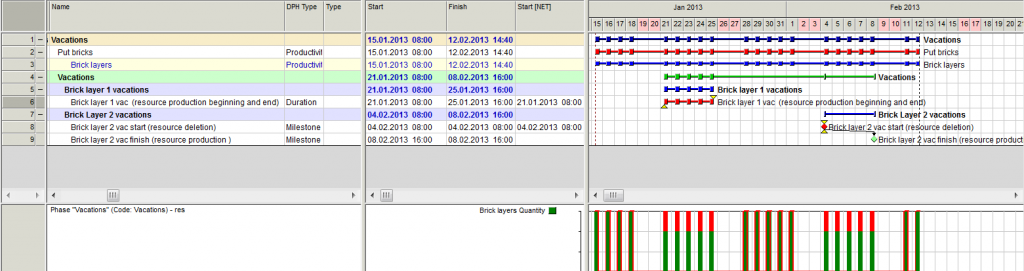
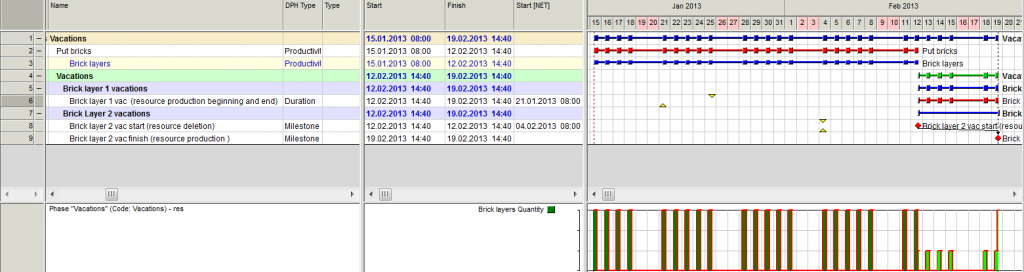
When task has resource production, associated with it, Spider resource leveling delays this task. Even setting Finish NLT constraint does not help (up until now, if was a remedy, which always worked).
So, effectively I now have 2 problems:
- Why task with resource production gets delayed by resource leveling to start with (it does not have any resources itself). What is the logic here?
- Why setting Finish NLT constraint does not help.
Note: I tried it both with single task as well as will 2 milestones, separated by a link with lag.
See below screenshots:
The sample schedule one can download here (Vacations.001.sprj )
https://docs.google.com/folder/d/0B1FBt_G3gCVqS1pmZTJqcWI0Qjg/editWithout leveling
Without leveling:
With leveling:
Regards.
Evgeny
P.S.
Contrarily to what I have written previously, that “in Spider it seems not to be possible to have resource production of the same resource both at the beginning and at the end of the same task” I found out, that it is possible. It is also used in this schedule
- 0VLVladimir Liberzon ·
Evgeny,use time production
Evgeny,
use time production instead of activity production.
I discovered this problem and wrote about this earlier in this discussion. Production activities may be delayed if resources are busy but time production will not.
But I still consider this as a problem and we will work with this.
Regards,
Vladimir
- 0RDRafael Davila ·
To me delay of activity 3 in
To me delay of activity 3 in my sample schedule using resource production works as expected, activity 3 was delayed until resources are available for the whole activity duration.
Cannot start on Jan 22/23/24/25 because it must start when ressources are available within the duration of the activity as we are using continuous PDM model.
I got to be missing something.
I was expecting for the Skills model to produce an earlier finish time in accordance to the software rules, and it did even when activities 3 and 4 were finish delayed by reason of calendar exceptions that are active at the time of activity as scheduled. A very slippery finish delay reason.

- 0BLBogdan Leonte ·
Greetings,I was reading the
Greetings,
I was reading the conversation since I've been meaning to see how resource production works. I noticed in a couple of posts the terms "time production" and I was wondering what do they mean, in relation to resource production and activity resource production, is is a functionality of spider that I don't know of, or you were refering to something else.
Regards,
Bogdan
- 0RDRafael Davila ·
When you double click a
When you double click a resource line on the resource table you will get displayed a resource properties window, there you have a tab for Resource Production.
Among the options are to issue a resource production fixed with time or a resource production that is generated with the activity.
You deduct resources via a negative value.
It is common for contractors to increase resource availability based on how the job activities progress and not on fixed dates therefore there is a need to model resource production that moves with activities as they move.
At times the contractor increase or decrease resource availability based on time such as when seasons have an impact, say on Winter you reduce resource availability while making others available.
In this way you will see correct resource availability as planned by PMs at the jobsite.
- 0BLBogdan Leonte ·
Ok, now I think I undestand
Ok, now I think I undestand what you meant. Let me see if I got it right, you were talking about increasing the number of resources available for a specific period of time, rather than for a single activity, les't say summer, so you would produce resources at the beggining of summer (for exeample) and have negative resource production in winter. Hope this is what you meant.
After reading the posts it has occured to me that resource production can be very helpful in portfolio management, when you move resources from one site to another in oder to finish some jobs more quickly. Please correct me if I'm wrong.
Best Regards,
Bogdan
- 0RDRafael Davila ·
RE: - you were talking about increasing the number of resources available for a specific period of time, rather than for a single activity
This is correct it is about timing, not about a specific activity. Resource production available for all activities can be controlled fixed with time, or can be triggered by an activity. When triggered by an activity it will be available for all activities, it is the timing of a movable activity that determines when it resource production will happen.
Say you are scheduling the construction of a school like ours, all reinforced concrete. During the Concrete Phase you will hire more concrete work labor and will keep a minimum such force for miscellaneous concrete to be executed latter on. A contractor plan his manpower, it is not merely assigning the maximum across the board for all job duration. This plan will have an effect on your schedule. The combination of resource production fixed with time and resource production triggered by activities [ I usually use milestones] will help you create better plans.
- 0VLVladimir Liberzon ·
Time production is usual when
Time production is usual when you hire or remove project resources at certain time.
Activity production is used when you plan mobilization as subproject (a ship shall be moved from the port to construction site, heavy machines moved from one site to another, some equipment shall be assembled before use, etc.).
When produced resources may be used at any activity where they are are required.
- 0RDRafael Davila ·
Very frequently you have more
Very frequently you have more resources available than needed, this makes some resources to be idle. This comes at a cost you want to track and keep under control, especially when in your budget such idle time was not considered.
Modeling resource availability fixed with time when in reality is to be driven in a dynamic way by the schedule is wrong, although might be handy on a Delay claim. There is some logic into the planning for resource availability, it is good practice to make your model to follow true logic. Don't just draw your availability as if fixed bars.
At home we have no seasons, we are on the Caribbean, it is always Summer and rainy, therefore we do not plan resource availability based in fixed time, we plan our resource availability based on stages that move as the project moves. Those using software that cannot follow true resource planning and constraining that moves with the phases are forced to use fixed time resource availability. They must manually adjust the availability as the schedule plan moves.
If using Monte Carlo this plan will not change and will generate many unrealistic plans. I do not trust Monte Carlo simulation under software that cannot automatically model ever changing resource availability as it happens at home. In such case the software will model hundreds or thousands of schedule runs with a resource alignment that is not real, hundreds or thousands of wrong schedules, a big mess.
At least with some trouble they can fix their deterministic plans.
- 0RDRafael Davila ·
I would use Skills for
I would use Skills for resource loading when resources have different calendars, for vacations I would use resource calendars and exceptions.
If the crews can work with less than 10 bricklayers then I would assign the skills to different teams, but this is another topic.
Also can use production type activity if duration depend on resource productivity, another topic as this is implemented through volume of work, a functionality not available in MSP and perhaps not available in any other package.
The beauty of all is how it works with resource leveling.
I suggest displaying a column for calendars to make sure calendar assignments are correct, also double check on assignment of calendar exceptions. Definitively your request for a view on calendar exceptions applied for every resource could help a lot.

- 0EZEvgeny Z. ·
Vladimir,I was playing around
Vladimir,
I was playing around the latest Spider version (11.01.37) and found out, that the problem, identifyed by you in your post from Mon, 2013-01-14 21:28 is still present.
Just wondering, is there spesific reason not to fix it, you simply there were other priorities?
Re:
<<
Rafael,
an activiy will be delayed if requires exactly 10 bricklayers and there are only 9.
But I found that vacation start may be delayed if resources are not available at their start date.
It shall be corrected.
Regards,
Vladimir
>>
Regards.
- 0VLVladimir Liberzon ·
Evgeny,I delayed this
Evgeny,
I delayed this decision because if you need an exact dates time production works properly, but additional option - to change resource quantity after they will finish jobs where they were assigned may be useful too.
And indeed there were other priorities. Since January many new functions appeared in Spider Project.
Regards,
Vladimir
- 0RDRafael Davila ·
Evgeny, I downloaded your
Evgeny,
I downloaded your file Vacations.001 and could not find any unexpected result.- To me it makes sense resource leveling delaying activities not only because of resource usage but also because of resource production even if the activity uses no resources. Even if the activity uses no resources if resources are not available for deletion it makes sense for the activity to be delayed until the deletion can be executed.
- In your sample file Activity 1 is set to be the first activity to start after resource leveling based on the actual settings. Because initially there are 3 resources available it consumes all available therefore availability equals zero. I suggest changing resource leveling settings to see how it changes, for a start try with Activity Priority option.
- Because during Activity 1 execution there are no available resources to be deleted then it makes sense for the resource leveling to delay Activity 2 until there are resources to delete. Still I would say that resource reduction at the start of activity execution is unusual.
- Same goes with Activity 21.
- Activity 22 is delayed because of a logic link with lag, not because of resource availability.
- I added Activity 23 just to have a longer projection of resource availability visible.
I suspect Vladimir is referring to other issue that might still be or might not be pending. For this issue another sample might be needed. If you have such file please make it available if different to Vacations.001
Please verify on my statements about Vacations.001 and let me know if you are in disagreement.
Best Regards,
Rafael - 0RDRafael Davila ·
Vladimir,What a surprise,
Vladimir,
What a surprise, Resource Production can delay activity execution even when not resource loaded, and it makes sense just that it is not so obvious.
There is a reason why every activity is not scheduled to start at the beginning of times, million years before 10,000 BC. Perhaps if the Scope of Delay Reason is modified then it would be able to display a delay reason for every activity such as:- Project Start
- SNET Date Constraint
- Predecessors Logic
- Resource Availability
- Materials
- Financial
- Resource Production
- Out of Sequence
- Actual Dates (in the case of a finished activity)
- Other
By reducing the detail level for all or some reasons it might be easier to program, it might be of faster execution. It will give enough clue as for the user to find out the details, especially those hidden delay reasons for which now the functionality gives no clue.
It might be that at the beginning some delay reasons might be overlooked and labeled as "Other" but very soon it would be all inclusive.
Guess that if you schedule all my requests as separate activities maybe we can find a limit to Spider

Best Regards,
Rafael - 0EZEvgeny Z. ·
Rafael,Re “I downloaded your
Rafael,
Re “I downloaded your file Vacations.001 and could not find any unexpected result.”
May be the result is not unexpected, but it is not what I was looking for. As the idea is that vacation has fixed dates and shall not be delayed, it shall only be taken into account.
So, the way out is to use time resource production, however I find, that it is not so easy to track.
If you have 100 brick layers and each of them is going on vacation 5 times a year, you would have to have 1000 entries is the time resource production to show this. This will probably difficult to manage, especially as you can’t assign some sensible name to time resource production entries
So I am just wondering, how in reality the absence (vacation) of unnamed resources is managed? (for named resources this can be done via calendar exceptions)
Regards.

Log in or join to reply
ProjectControls.com is free to join. Members can post questions, reply, vote and follow discussions.
Existing members: your original username and password still work. Forgot password?