
Filter activities by resources
- Created
- 38
- 6
38 replies
Oldest first- 0BLBogdan Leonte ·
Hello,here is the full
Hello,
here is the full answer.
Also you can select any column and filter any resources that meets certain criteria.
- 0EZEvgeny Z. ·
Vladimir, Bogdan, thanks! It
Vladimir, Bogdan,
thanks! It works!
Just to check my understanding
1) There are built in filters, which one can access through Filter menu (e.g. activities without preicessors only etc)
2) it is also possible to build own filters by clicking filter icon
Questions:
Q1) Can I build manually filter with equivalent functionality to the one of built in filter (e.g. activities without preicessors only)?
Q2) When I build a new filter manually, can I re-use (refer to) built in filter? E.g.: activities without preicessors only AND something else
Q3) When filter is applyed, can I see exactly which filter is applyed and which logic?
- 0BLBogdan Leonte ·
Evgeny,Q1) Can I build
Evgeny,
Q1) Can I build manually filter with equivalent functionality to the one of built in filter (e.g. activities without preicessors only)?
Yes.
Q2) When I build a new filter manually, can I re-use (refer to) built in filter? E.g.: activities without preicessors only AND something else
No you cannot refer tu built in filter, but you can build any number of simple filters and then combine them into one complex filter. This complex filter can contain simple filters and formulas also.
Q3) When filter is applyed, can I see exactly which filter is applyed and which logic?
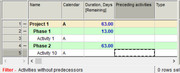
In the lower part of the window you may see which filter is applied, number of rows selected, filter on links.
If you see which filters are applyed then you know the logic.
Also you can undo filters from the Action->Undo table and you can undo them in random order. (An action once undone, it cannot be redone)
Hope this aswers your questions.
Best regards,
Bogdan - 0BLBogdan Leonte ·
This is not a filter, it is
This is not a filter, it is more of a report, but it has some advantages in the sense that it also displays amount of resource hours, volumes of work, costs and so on and so forth.
What I am talking about is Project Truncation, you can find it the Reports and Diagrams->Project truncation.
It creates a truncation of the project between 2 dates or from data date +/- number of days.
- 0RDRafael Davila ·
Evgeny,For how to use this
Evgeny,
For how to use this magic please follow the steps.
After creating a few simple filters try something more complex and come back with your questions. Perhaps lookahead filters.
You can download the following file to explore a few look-ahead and look-back filters.
http://www.mediafire.com/file/sidwwv9lorbs0cc/Filters-A.002.sprj/file
As they do not depend on UDF you can copy and paste them into other files without any UDF code conflicts. Or you can transfer the following Reference Book.
http://www.mediafire.com/file/zqpb4vqwbjm2464/Filters_Lookahead.001.sdoc/file
- 0BLBogdan Leonte ·
Evgeny,you may also want to
Evgeny,
you may also want to look into layouts because if you apply filters and then save the layout into the project then it will remember the filters.
For example you may want to create a 2 weeks lookahead + filter all activities that use resource B. You can either create a simple filter for these 2 conditions or 2 filters and 1 complex filter with the 2 conditions.
After this you can save the layout as 2 weeks lookahead and when you call it it will automatically apply the filters. Layouts can also store columns (order, size), level of detail of the WBS, report diagrams, scale of the gantt chart, pretty much anything.
- 0RDRafael Davila ·
Bodgan,What is the difference
Bodgan,
What is the difference between what you call simple and complex filters?
- Perhaps you mean when using AND/OR/NOT conditions?
- Perhaps when inserting other filters?
- If not enough inserting functions, field[modifier] or formulas can also complicate the filter.
Best Regards,
Rafael
- 0RDRafael Davila ·
Bodgan,I wonder if there
Bodgan,
I wonder if there might be more complexity, maybe they are relational if written in this way instead of copy-paste the isntructions as text.
If a change is made on referenced filter it will notice?
What if circular references among filters are created?
It looks like they are relational.
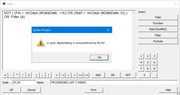
I did not know, thank you once again.
Now I know I have the option to copy-paste instructions to keep them separate or use insert filter to keep them related. A drawback is that you unknowingly can delete a related filter. Always keep a reference book in case you need to restore some deleted filters.
Best Regards,
Rafael
- 0BLBogdan Leonte ·
Rafael,I don't think the name
Rafael,
I don't think the name matters, the ideea is that you can created create filters by referencing other filters.
What I haven't been able to figure out so far is how to use formulas inside filters; I don't even know how it would be useful, but I suppose Vladimir will be able to give us a comperhensive answer.
Best Regards,
Bogdan - 0RDRafael Davila ·
I have no Spider
I have no Spider Documentation other than Spider Help, I learned it by experimenting with sample files as well as through Planning Planet where Vladimir is always available in short time. Once you learn the basics you will see there is no need to memorize the field names, no need to memorize formulas. While spider has a script language I know no single command, I just record the script by typing as if recording an Excel Macro.
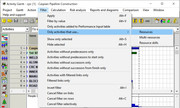
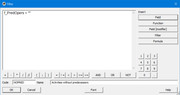
To get the fields while creating a filter:
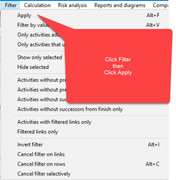
Click Filter from Menu
Click Apply
Click New
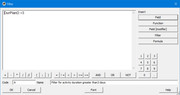
Click Field
Select field – there you will see the field names and codes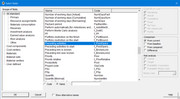
I use Planning Planet to learn, at times by asking questions, at times by answering questions. Today was good day, I learned a few things about Spider Filters I did not know.
- 0EZEvgeny Z. ·
RE<<you may also want to
RE
<<you may also want to look into layouts because if you apply filters and then save the layout into the project then it will remember the filters>>
Ok, at looked at layouts. But I think I am missing feature Layout => Load from project (activate saved layout)
I have:
Layout => Load from file
Layout => Save to file
Layout => Save in project
But not Layout => load from project ??
- 0RDRafael Davila ·
Be reminded that it is
Be reminded that it is possible for activities to have both predecessors and successors yet still suffer from dangling – hence inadequate – schedule logic. These cases – generally categorized as dangling finish and dangling start – are also known as “orphan relationships.”
In Spider Project:- Filter for Activities without Successor from Finish only will filter out dangling finish activities.
- Filter for Activities witout Predecessor to Start only will filter out dangling start activities.
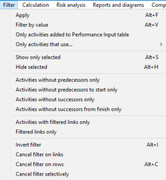
You can make use of "Preceding activities to start" and "Succeeding activities from finish" fields to create the filters by your own. Spider Project is very powerful software; it might have many fields you do not even imagine.
- 0BLBogdan Leonte ·
You cannot load from
You cannot load from project.
Spider uses reference-books in order to transfer data from one project to another.
Here is are 2 sample movies:
1. How saved layouts work:
2. How to create and transfere layouts reference-books:
In conclusion, you have to create the layout which contans filters, WBS structure, WBS Level, Diagrams, columns, Gantt scale, etc.; save it in the project or in a file.
If you save it in a project you have to create a reference-book of the Layouts table in order to transfer it into another project.
If you save it into a file then you can loaded into any project without reference books.
Also form the main Spider windows you can set in the Options of new projects and documents a default Layout file which will be applied to any new project created.
Hope this clarifies some things.
Best regards,
Bogdan - 0BLBogdan Leonte ·
Vladimir,in your example the
Vladimir,
in your example the filter would be s_pln_ContractPrice < s_pln_ContractCost
However you have a button in the filter creation window you can enter in the filter Fomulas that were previously created; how do you use them?
- 0RDRafael Davila ·
First project instructions is
First project instructions is a good way to start learning Spider.
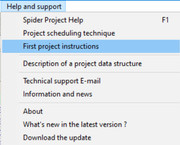
Reference Books are introduced under First project instructions.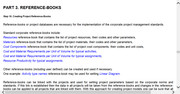
You transfer the Reference Books by opening the desired target schedule(s) as well as the Reference Book where you click menu Document then Data Transfer and make your choices.
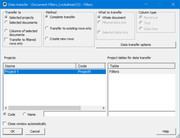
You can try with the following Reference Book.
http://www.mediafire.com/file/zqpb4vqwbjm2464/Filters_Lookahead.001.sdoc/file
Unfortunately Filters and Formulas are not introduced here.
- 0RDRafael Davila ·
You can also try Spider
You can also try Spider Project Help for information on Reference Books.
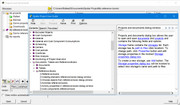
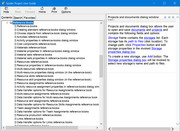
Reference Books are one type of document used by Spider Project stored as separate files, search on Spider Help for “Documents”.
Think of a Reference Book as a table you can transfer to a project file that contains many tables.
If one Reference Book, say a Filters/Formula Reference Book, contains user fields you must also transfer the corresponding user fields via another Reference Book for it to work as expected. Before transferring the UDFs, make sure there are no duplicated UDF codes if you need them to be different. You might edit the UDF codes within the Reference Book to avoid conflict, when transferring non existing codes will be created.
Any correction and clarification by Vladimir will be welcomed. - 0RDRafael Davila ·
It might be that Planning
It might be that Planning Planet be a good place to provide additional guidance in the form of links to white papers and videos. Could be a win-win for Planning Planet, Spider Development Team as well for Spider Users.
http://www.planningplanet.com/advertisers/spider-project-team
- 0BLBogdan Leonte ·
In Spider there is an option
In Spider there is an option Activities with filtered links only - after filtering links when you apply this filter spider will show only activities which have visible links in the links table
Maybe Vladimir would consider creating a built-in filter similar to the one above but for resource assignments - you will filter resource assignments and then apply the filter Activities with filtered assignments only
And maybe another one named Filtered assignments only - which will show activities and assignments, but only the visible assignments.
What do you think?
- 0BLBogdan Leonte ·
Rafael,In Spider it is
Rafael,
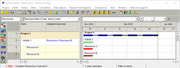
In Spider it is possible. There is a Column (in the Other) group called Assigned Resources. This columns shows assigned resources similar to MS Project, see picture:
Then you can create filters to show activities containing only desired resources (no matter how many); however when expanding to assignments, all asignments will be visible since the filter is applied to the activities.
Here are some sample filters using this column:
- Contains ( f_Resources ; 'A' ) and Contains ( f_Resources ; 'B' )
- Contains ( f_Resources ; 'A' )
- Contains ( f_Resources ; 'B' )
- NOT Contains ( f_Resources ; 'A' )
PS I used A, B, C from Resource A, Resource B, Resource C. Using the Contains ( ; ) function you will have to specify the name of the resource as it appers in the resource table.
I think this is a reasonable solution.
Best regards,
Bogdan - 0RDRafael Davila ·
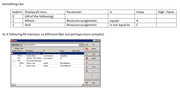
RESOURCE FILTERS ARE EXECUTED
RESOURCE FILTERS ARE EXECUTED ON RESOURCE ASSIGNMENTS VIEW
We might want to filter for:
1) Activities with certain resource: Say activities with Resource A
2) Activities with either one resource: Say activities with either Resource A or Resource B
3) Activities with all selected resources: Say activities that include Resource A and Resource B; I do not know hot to create such filter within Spider Project but can be done outside of Spider Project if using Excel.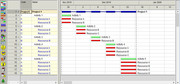
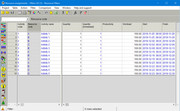
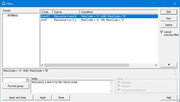
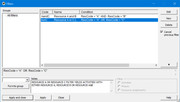
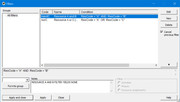 RESOURCE A&B FILTER YIELDS NONE
Click this line to download the Excel worksheet
Frequently I am interested in looking for activities that have certain resource but is missing another. If missing the companion resource then it shall be fixed.
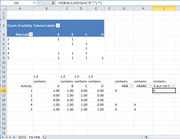
Do you know a better way to filter for Activities that include Resource A and Resource B? and what about Activities that include Resource A but not Resource C?
- 0RDRafael Davila ·
Bogdan YOU MADE MY DAY, the
Bogdan YOU MADE MY DAY, the filters work directly from Gantt.
Thank you.

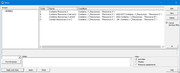
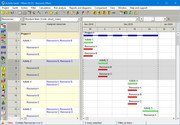
 Frequently I am interested in looking for activities that have certain resource but is missing a required companion resource. If missing the companion resource then it shall be fixed.
- 0
Marcus Possi ·
Hi. I do think that you may
Hi. I do think that you may find something helpfull in http://www.spiderproject.com/index.php/books in English. The majority of our work is written in Portuguese, but there is something about in our fourth edition. there is another one in English, about Spider Project WEB, but it is not the focus here. BR, - 0RDRafael Davila ·
Vladimir,Thanks, I copied
Vladimir,
Thanks, I copied your note into my reference file under specific filter notes box for future reference.
Bogdan,
Thanks, once again. I copied your note regarding the field for Assigned Resources into my reference file under project properties notes box for future reference.
Marcus,
Thanks for the reference.
Best Regards,
Rafael
- 0RDRafael Davila ·
Agree, better use
Agree, better use multi-resources whenever possible.
The advantage of multi-resources is that by modifying them you can apply the modification to all or specific multi-resource assignments. Companion resources can be as many as needed which can complicate verification.
Multi-resources are great, but not always you use them (for whatever reason) so filters are still handy.
 2
2 
 4
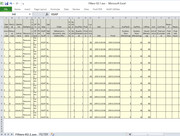
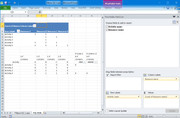
4 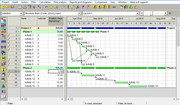 Before Filter
 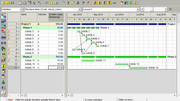 After Filter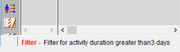
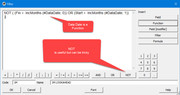 7
7 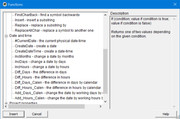

Log in or join to reply
ProjectControls.com is free to join. Members can post questions, reply, vote and follow discussions.
Existing members: your original username and password still work. Forgot password?