
SDK Query
- Created
- 33
- 4
Thanks and more power to planningplanet!
33 replies
Oldest first- 0JRJose Ramirez ·Okay, look at the ones i have done in the past...yeah, i can help you but if you are working with SDK (it’s easier if you just link to MSSQL if you are using it: oracle is even easier, because primavera has samples reports)
I had some issues with the SDK, so i just gave up and work only with SQL.
here is the link to the one i have created:
http://www.planningplanet.com/forum/forum_post.asp?fid=1&Cat=8&Top=64950
let me know....if you me to help you....
better yet i have some time to kill before my next project 10 days from now. so, if you want just tell me what you need and i will try to make it for you....
i am using crystal report XI release 2
cool - 0DAD Artagnan ·Thanks mate. I have been trying for the past week to see how i can pull the data that i need from the database so I can customize reports in crystal reports or excel or access maybe but I am still in vain . I think this will help. Let me read the link that you gave me.
Thanks again. Cheers. - 0JRJose Ramirez ·The SQL Query (this Query was written for a cost analysis and forecast Report (the Report i provided you earlier with the link on my first reply to your Q):
SELECT "PROJECT_1"."proj_id", "PROJECT_1"."proj_short_name", "TASK_1"."task_name", "TASK_1"."task_code", "PROJECT_1"."last_recalc_date", "TASKFIN"."bcwp", "TASKFIN"."bcws", "TASKFIN"."act_work_cost", "TASKFIN"."act_expense_cost", "TASK_1"."target_work_qty", "TASK_1"."act_work_qty"
FROM ("pmdb$primavera"."dbo"."PROJECT" "PROJECT_1" INNER JOIN "pmdb$primavera"."dbo"."TASK" "TASK_1" ON "PROJECT_1"."proj_id"="TASK_1"."proj_id") INNER JOIN "pmdb$primavera"."dbo"."TASKFIN" "TASKFIN" ON ("PROJECT_1"."proj_id"="TASKFIN"."proj_id") AND ("TASK_1"."task_id"="TASKFIN"."task_id")
WHERE "PROJECT_1"."proj_id"=435
1. First Go To SQL and Look at the Table (find the Tables You Need for example the Report Below you will Need One Of The Following "DBO.PROJECT" tables (p.s. the pix below is for the "DBO.TASK" Table):
**You need to get Familiar with the Primavera MSSQL DB STRUCTURE (tables, Columns)
To see what each table contains please (Left CLICK Once On The Table >>> Next Right Click >>> Then Select Open Table)

2. You Need to "Create A New Connections" In Crystal Report:
Go To Crystal Report:
Go To "DataBase"
Select "Database Expert"
Click On "Create A New Connection"
Server Name: is the ComputerName\PRIMAVERA
USER ID: sa
Password: Prima123Vera
DataBase: The alias of the DataBase You are working with


Server Name: is the ComputerName\PRIMAVERA
USER ID: sa
Password: Prima123Vera
DataBase: The alias of the DataBase You are working with
3. Select Next Or Finish Either One Works (Now That You Have Stablish The Crystal Report And MSSQL Connection: Now You should select the Tables you will be using to create the report)
4. On Crystal Report:
Go To File
Select Options
Uncheck if Checked (AUTOMATIC SMART LINKING) (this will cause you lots of problems if it’s check since it will not work very well)
When You link the DBO.TABLES For example: DBO.PROJECT.proj_id with DBO.TASK.proj_id (or see the pix below for more examples)

P>S> I would start with a BLANK REPORT it works better...Well, I hope this helps
- 0DAD Artagnan ·I got to the point where I was able to connect to primavera SDK. In MS Access, i can make a query to update the scope_level set to "7" so i will be able to see the tasks data however in crystal reports i couldn’t do that...
is there a way to do this as well in crystal reports?
Thanks in advance. - 0JRJose Ramirez ·Hey D, Sorry for the long delay:
The Reason I don’t try to connect to the PMSDK was because i could not get all the info. from the db but once i worked directly with MSSQL I didn’t have a problem as long as you link the tables as i said below and start to know the structure of the DB:
Okay to chk if you dbo.tables are link correctly and you are able to view data please do the following:
Go To: Field Explorer
Select a Table: DBO.TASKFIN (Click on the + to expand)
Select a Column: DBO.TASKFIN.bcws
Right Click on the: DBO.TASKFIN.bcws: Select BROWSE DATA (This will probably bring up the server log on info. You will just need to type in the password for your server.
You Should be able to see the similar information as the pix below:

- 0JRJose Ramirez ·The Table TASKFIN is on a MSSQL connection only: contains all the information you need to finish what you had asked me last night: (the only other table you will need is the PROJECT Table to get the proj. id and proj_short_name)
ACTUAL COST = TASKFIN.act_work_cost
Cumm Current ACT COST for the project = FORMULA below (this formula returns % so if you don’t want % just delete * 100 at the end of the formula)(BTW these two formula i have provided only work with the PMSDK connection since the Table names are different then the MSSQL. So, if you try to use this formula on MSSQL connection you will get table not found error). All u have to do is to change the table names.
****
Global NumberVar RemRT;
Global NumberVar SchRT;
RemRT := RemRT + {PROJWBS_SPREADS.remain_work_qty};
SchRT := SchRT + {PROJWBS_SPREADS.sched_work_qty};
if (SchRT <> 0) then
(RemRT / SchRT) * 100
else
0
****
BUDG COST = TASKFIN.bcws
****FORMULA for CUMM BUDGE COST>>>>Global NumberVar BCWS_RT;
BCWS_RT := BCWS_RT + {PROJWBS_SPREADS.bcws};<<<<<
Actual Expense Cost = TASKFIN.act_expense_cost
Your Q to ME:
i got it now...
my problem now is to have a crosstab report, if that’s how it’s called.
(this is how i want it to look like.
-------------------- (dates) ------ 2/12 ------ 2/19 ------- 2/26 -------- 3/5
ACTUAL COST
CUMM ACT COST
BUDG COST
CUMM BUDGE COST
and make a graph out of this..
thanks again in advance... )

- 0JRJose Ramirez ·Hey D, Thank you for that info. I was going with financial Periods but setting the spread_interval to Weeks (is something i didnt’ think about before).
For Making Graphs: I have always used both excel and crystal report (with access, pertmaster, primavera 3 or 6).
Excel is the easiest for me:
see the S-Curve graphs below is a Regular Plan Vs Act Vs Rem and The % used of it: if you want i can email you this template or one from crystal report too:


The S-Curve Below Is For Forecasting:
S-Curve Forecasting Instructions
Column F9 = (8)
L- must be found by trial and error. to do this, try different values of L in a sytematic fashion until the value for L is found which minimizes the standard deviation of Error (SDE)
Or
You need to use Solver (Excel add-in) to automatically find the value for L which minimizes SDE.

- 0JRJose Ramirez ·here is how if you wanna make a Forecast Report
Remember to set up your P6 layout to mirror your excel report layout:
Forecast Report for Activities that the Expected Finish Date is less than the Data Date (yout will need to enter you data date here A2 n B2 (1/26/09 or Cell A2 & B2) Or =IF(AND(OR(K3=$C$2,K3=$B$2),O3<>$C$2),"DD",IF(AND(ISBLANK(M3)=FALSE,M3<$C$2),"EF",""))
Plus: Conditional Formatting Column M (Expected Finish) [formula Is =AND(M1<>0,M1<$C$1)], Color (RED) Plus: Conditional Formatting Column P (Total Float) [Cell Value Is Less Than 0], Color (RED)
Here is the Data or Excel Report:

Here is the Graph that counts the number of activities:

p.s. regarding: http://leeds-faculty.colorado.edu/Lawrence/Tools/SCurve/scurve.htm ( i try this for a few weeks out but it was a pain to get the data to report something close to reality, i think it only works for his example the rate of Tech. Adoption. So, i gave up on it. I guess i need to work on it more and try to applied it to a project budget. But if you use permaster i can get better and realistic results. So, no point wasting your time with that excel spreadsheet and you can also get pretty little graphs from pertmaster better than p6. See Below:
with Primavera Pertmaster 8.6 (you can make the best graphs ever lol)
Pertmaster Cost Analysis:

Pertmaster Finish Date Analysis:

Schedule Sensitivity Index:

Duration Cruciality:

Critically Index:

Duration Sensitivity:

- 0DAD Artagnan ·Thanks. Your reports are truly helpful but from excel to access to crystal reports, i am going back to excel because my colleagues are used to it. I tried to extract the SDK to excel using ms query. I only know how to use spread data in sdk and nowhere else. I can query the task_spread for instance but nothing comes out because i need to set scope_level to 7 first.
this what i do
UPDATE PROJECT SET PROJECT.scope_level=7
SELECT act_cost FROM task_spread.....
but update and select don’t seem to get along...
How can i get SPREAD data from MS SQL? - 0JRJose Ramirez ·Okay, i hope you received the files i sent. I sent them like five times. I haven’t got the email not delivered message again. so i am thinking is all good now. I think the problem was that i was sending you VBA codes as txt file and i think your firewall was liking it so it was kicking it back thinking it was a virus code....so i did n’t included the vba codes when i resent the stuff again...well, have a good day and i am going to bed it’s 2 am here...let me know if you have any issues with what i sent you...
- 0JRJose Ramirez ·Okay D, hope you get this: for excel
Right Click Anywhere on Black Part of the Graph
(see Pix Below)
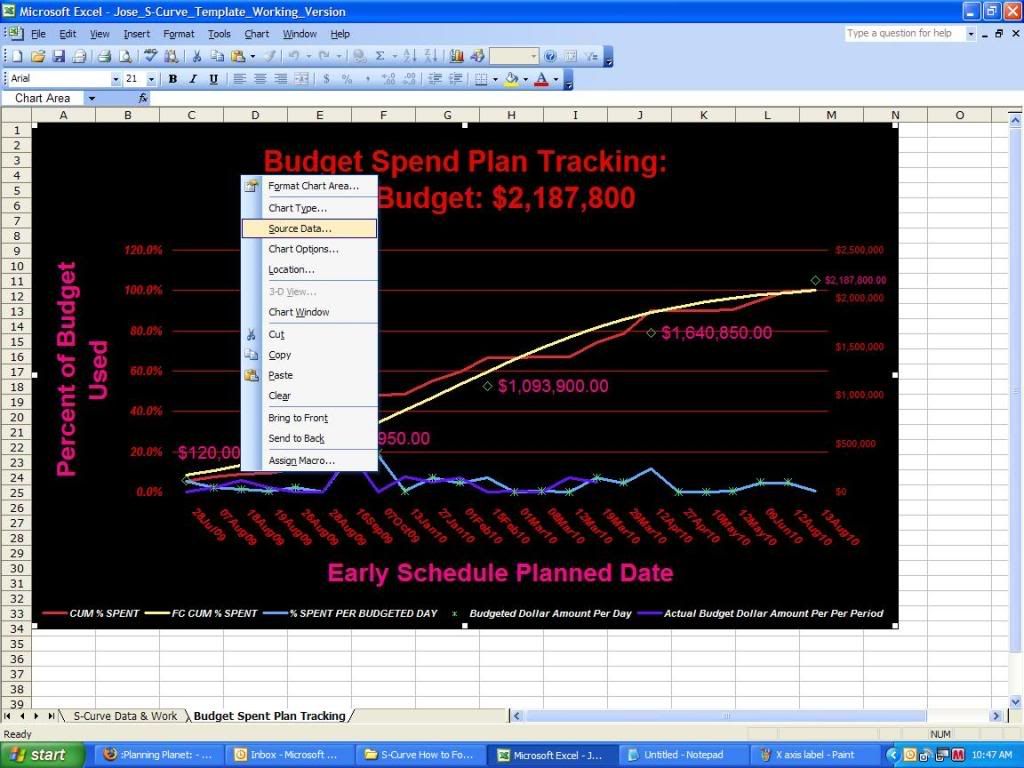
Go To Source Data: Series (Second Category (X) Axis Label) Enter this (=’S-Curve Data & Work’!$A$2:$A$25)
See pix below:

Regarding the Spread:
My Spread Are based on Financial Periods:
A. Create batches of financial periods In the Project Management
module choose Admin, Financial Periods.
1. Go To: ADMIN
Select: Financial Periods
2. Enter the batch start
and end dates
3. Choose the
timescale for each
financial period in
the batch, along
with the day of the
week you want the
periods to end on.
4. Click to generate the batch of
financial periods.
5. If you want to: After the batch is created, click in the Period Name
column to edit the name. Names must be unique.
Or
B. Create a single financial period In the Project Management module
choose Admin, Financial Periods. Click Add.
To View This Info. Via PMSDK:
GO TO TABLE: TASK_SPREADS SELECT COLUMN: fin_period_bcwp
OR
GO TO TABLE: PROJWBS_SPREADS SELECT COLUMN: fin_period_bcwp
Here is what it looks like in primavera as a layout that contains the fin_period for May-11-2009

In MSSQL GO TO DBO.PROJECT COLUMN LAST_FIN_DATE_ID (this is the id # for each financial Period Your project ha reported)
- 0DAD Artagnan ·thanks mate. i thought the data in the excel were on the fly. .The task_spread table in the SDK is basically what I want to pull out which I was able to do in ms access by just running macros by updating scope_level and sysoption then querying the task_spread however making graphs in ms access is a pain in the a** and nothing much can be done about it that’s why I resorted to excel again. In Crystal Report, I was able to run the update query but I get the "memory full" error. Now am back to access and I got stucked with running sum (dsum) query because it is ridiculously slow. If interested, I will send you the access file which pulls the data based on spread criteria. If i could fine an alternative to dsum function then i will use ms access and then transfer the query table to excel.
Anyway, the thing about MS QUERY is that once you refresh it, it gets the linked data automatically which will be helpful and easy for my team that’s why i am burning myself up to get it done on the fly in excel. Otherwise, i have to study vba and sql more...
thanks again.
- 0JRJose Ramirez ·You know that in crystal report the info. is on the "Fly as well" as long as you change the Data Date on Primavera and refresh (F5) Crystal Report you will have the latest information. Also all you have to do on excel is fresh the data (Data >> Refresh Data!) and you will get the new information if your spreadsheet is link to a data base.
Well good luck finding your solution.
The excel spreadsheets I sent you contained all the macros (VBA) codes. So, all you have to do is read the steps on the email I sent and you will know at least how to access the DB with excel and the codes you will need to extract or write the data.
The PMSDK Doc folder contains lots of info. on what kind of data each table contains because they are a lot of columns/tables the end with _spread. So, you need to know which table has the info you want. I would suggest spend some time with this and learn the DB structure otherwise you will be as lost a ghost (lol).
I don’t understand why you don’t just extract the data from Primavera by creating a layout that contains all the data you need and copy n paste it to an excel spreadsheet or exporting it as an excel file and create the graphs from there. Since what your trying to do is a very simple report. I have sent you a template of the S-Curve Graphs. That’s the simplest way, if you are not familiar with VBA or SQL OR PMSDK. You will have to do this once a week or month depending on your needs for reporting information.
- 0DAD Artagnan ·Jose, can you please help me with this coz I tried to use this query in vba but I am getting an error. This query seems to work in access but in vba it won’t.
sSQL = " SELECT a.spread_type, a.normal_format, a.act_cost, a.target_cost," _
& "FROM TASK_SPREADS a INNER JOIN (PROJECT b INNER JOIN TASKRSRC c ON b.proj_id = c.proj_id)" _
& "ON a.task_id = c.task_id"
Thanks mate. - 0JRJose Ramirez ·Hey D, you are welcome. I hope i was able to help just a little, lol.
Yeah, it takes a while to get the PMSDK to work well with crystal ... the thing that i hate is that the tables and columns are all named dif. on PMSDK n oracle n MSSQL...I am still learning but since i only use Crystal for the reports, i don’t need to link or go through the PMSDK to get to the primavera Database, instead i just link directly to MSSQL. If I am actualy extracting data or writing data to db i use all the PMSDK excel work sheet i send to you.
What the Primavera Software Development Kit Programmer’s Guide on the PMSDK Folder is teaching you, is already made (rather well) in those WBS.xls, Project.xls, Activities.xls or Directory6x.xls files provided by Primavera which are the one i sent to you. So, you don’t need to be writing any queries to set access levels on the database since this is already done with the .xls files for you. See example below:
’Call cn.Open(sDSN, sName, sPass)
SDK_login
Call cn.Execute("Update PROJECT set scope_level = 7 where proj_short_name = ’" + vProjName + "’")
Call cn.Execute("Update PROJECT set access_level = 1 where proj_short_name = ’" + vProjName + "’")
What you can do is modified a copy of those files to better fit your needs. That’s if you are master VBA programmer and could do it better then the Primavera Programmer’s.
JoseR
- 0MDMimoune Djouallah ·
hi please can you share those
hi
please can you share those files, actually i installed the sdk, done my queries in ms access but i am lost in all those tables, i just want to download the spread data by my financial period
my email is mimoune.djouallah@gmail.com
regards
- 0KVKelli Vosler ·
Hi, I am trying to run a
Hi, I am trying to run a report on primavera data using Crystal Reports. I can run an update statement on the projects table using an sql command to get information from the task table, but after the update statement runs, I get the following error message:
database connector error: 'IM001:MicrosoftODBC Driver Manager Driver does not support this function' .
If I click cancel, the data from the task table shows up in the report. How can I get rid of this error message so the sql command will run without the error message?I am using Crystal Reports 2008 version 12.1.0.892 with sp3.
- 0AAAlhasan Abdalla ·
download the latest sdk from
download the latest sdk from here
- 0JSJun Sarvida ·
Hi to all, Im new in this
Hi to all,
Im new in this site and Im very enterstied in linking primavera to excel and other format presentation, can any one help me to have a primavera dictionary.xls and wbs.xls pls? Kindly pls email me at junsarvida@yahoo.com...Thank you so much.
JUn


Log in or join to reply
ProjectControls.com is free to join. Members can post questions, reply, vote and follow discussions.
Existing members: your original username and password still work. Forgot password?