
Timescale - month/week timescale
In the Open Standard
Andrew HamiltonMember for 12 years 11 months
- Created
- 2
- 1
0
We usually refer to our weeks as "week ending" however the timescale shows the week beginning date.
ie. Last week was "week ending october 26". When I chose month/week as my interval it shows "Oct 20" as you can see in the picture below:
Our weeks end on saturdays (thus start on sundays) and so that's how I have the admin preference set. Does anyone know of a way to change it so it shows the date as the last day of the week instead of the first?
2 replies
Oldest first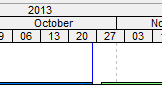
Log in or join to reply
ProjectControls.com is free to join. Members can post questions, reply, vote and follow discussions.
Existing members: your original username and password still work. Forgot password?