Skip to content

Cumulative S-curves:

David MasonMember for 8 years 3 months
Created
12
5
0

Seemingly (without defaulting to Excel) we STILL can't generate in P6 Early and Late cumulative progress curves which form a natural continuum (at the data date) from the cumulate Actual progress curve !

Or am I missing something ??

12 replies

Oldest first
  1. 0
    Zoltan Palffy ·

    progress based on what

    progress based on what dollars, manhours or units ? What is your measuing stick ?

  2. 0
    Raymund de Laza ·

    Early Remaining or Late

    Early Remaining or Late Remaining Curves shall originate from the End of the Actual Values at Data Date. The Curve shall be Continues until At Completion Values.

  3. 0
    David Mason ·

    Yes - that's what I want them

    Yes - that's what I want them it to do (but the remaining curves start from zero again at the data date).

    If P6 could hold the Early & Late cumulative curves at the baseline - this would give an envelope between the early and late curves which the actual progress curve could be measured against. But P6 doesn't offer this yet and defaulting to Excel as usual :( 

  4. 0
    David Mason ·

    Schedule is resourced with

    Schedule is resourced with labour units and their costs.

  5. 0
    Raymund de Laza ·

    To obtain the required curve,

    To obtain the required curve, Actual Values shall equate with Earned Values and the Remaining Values shall be the difference between At Completion and Actual Values.

  6. 0
    Rafael Davila ·

    As soon as there is progress

    As soon as there is progress and the DD is moved then for current updated schedule actual Early and actual Late S Curves will overlap to the left of DD giving you the impression it is a single line. Then after the current DD they will separate showing current plan early and late cumulative S Curves.  Try setting your diagram to show both Early and Late cumulative S Curves and nothing else.  

    If you select to display remaining S Curves, only remaining values at DD will be considered and it will be 0 at DD.  It will not accumulate whatever is at the left of the DD.  Try setting your diagram to show both Early Remaining and Late Remaining cumulative S Curves and nothing else.

    You can add to the diagram the original plan Early and Late S curves.

    Now try showing all at the same time.

    Good Luck

  7. 0
    Zoltan Palffy ·

    do you use store period

    do you use store period performance ? if not you should 

  8. 0
    David Mason ·

    These are the only curves P6

    These are the only curves P6 offers.....

    Baseline

    Budgeted

    Actual

    Remaining Early

    Remaining late

    Planned Earned Value

    Earned Value

    Estiamte at Completion.


    Where do you source the Baseline Early and Late from please ??

  9. 0
    Rafael Davila ·

    This is how ancient P3 would

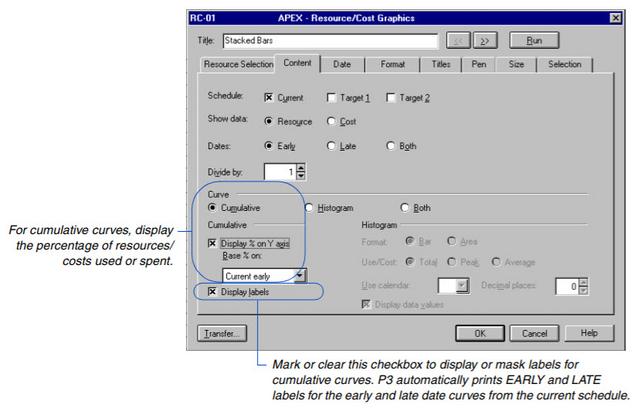
    This is how ancient P3 would give you the Early and Late Cumulative "S" Curves for current plus two target/baselines.


    SCurve01

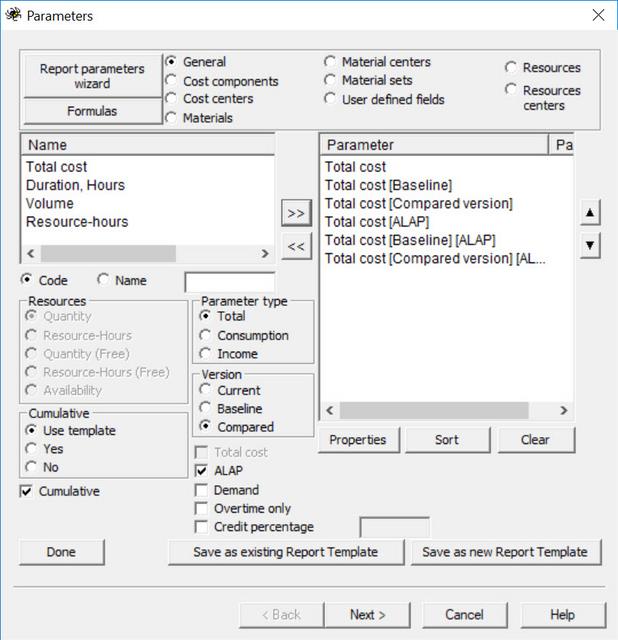
    This is how Spider Project would give you the S Early and Late Curves for current plus two baselines named baseline and compared schedules.

    SCurve02

    I do not use P6 but it shall be as easy as 1,2,3, so easy, no big deal.

  10. 0
    David Mason ·

    Thanks Rafael - we don't have

    Thanks Rafael - we don't have these report generators..... are they options in P6 or an external package ?

    The only one i can dig up is teh "Resource Usage Profile Options" which allows the stacked histogram and a default overall planned curve :(


  11. 0
    Zoltan Palffy ·

    filter for what you want then

    filter for what you want then selecy select view show on bottom then select activity usage profile

    then right click on the lower right graph area and select activity usage profile options

    from here you can select either costs or units to be diaplayed as well as the baseline and or the current schedule


  12. 0
    Rafael Davila ·

    You replied - Thanks Rafael -

    You replied - Thanks Rafael - we don't have these report generators..... are they options in P6 or an external package ?

    • These are options on other software, among them old P3 software, I expect similar options to be available in P6 as these reports have been required for decades.

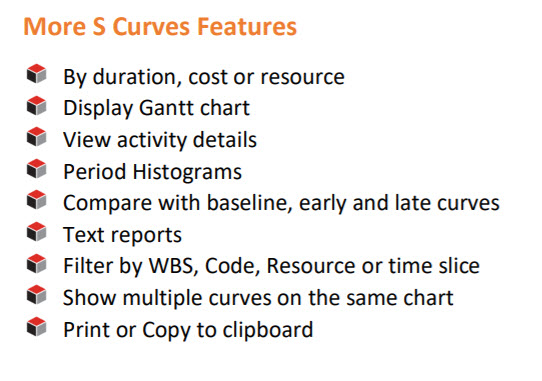
    If your software cannot generate with ease such S-Curves as it should you might try external packages sych as Project Tracker.  Based on what their brochure says I would expect Current and Baseline Early and Late S curves be available.

    Project_Tracker_More_S_Curves

Log in or join to reply

ProjectControls.com is free to join. Members can post questions, reply, vote and follow discussions.

Existing members: your original username and password still work. Forgot password?