
Any better logic report reports other than what is in P6?
- Created
- 12
- 8
Any better logic report reports other than what is in P6? I have used this software for a long time, it seems odd the report writer is so antiquated and that there is not a default report that can be filtered on a code that simply lists the pred and succ activity name etc. Yes, it can be made - but how is there not a default one for 11 x 17 paper which is about the best way to keep it readable. Are there any 3rd party tools for this?
12 replies
Oldest first- 0JRJohn Reeves ·
Yes, I simply want the
Yes, I simply want the acivity information, then a list of the predecessors and then a list of the successors in a professional readable manner. Sometimes the activity is between those two variables also, whatever looks good. Something that you can print filter per engineer or break per and code to give different lists to different people. I have spend time in the past creating them. I end up on so many systems and didn't take that report. I can make it, but that report writer is a real hassle. If I fix it up I will send it back also, I need to give some engineers some logic for a schedule I am making. P6 has never had a good report writer, back in the 80's I used R&R report writer - it was so easy. I am sure if I modified every day it would be easier. I can read any lousy report, but this is for other people. .erp file donations welcome. johnreev44@comcast.net
- 0JRJohn Reeves ·
Yes, I simply want the
Yes, I simply want the acivity information, then a list of the predecessors and then a list of the successors in a professional readable manner. Sometimes the activity is between those two variables also, whatever looks good. Something that you can print filter per engineer or break per and code to give different lists to different people. I have spend time in the past creating them. I end up on so many systems and didn't take that report. I can make it, but that report writer is a real hassle. If I fix it up I will send it back also, I need to give some engineers some logic for a schedule I am making. P6 has never had a good report writer, back in the 80's I used R&R report writer - it was so easy. I am sure if I modified every day it would be easier. I can read any lousy report, but this is for other people. .erp file donations welcome. johnreev44@comcast.net
- 0RDRafael Davila ·
To my understanding most
To my understanding most scheduling software display predecessors and successors, all allow you to save the activity table layout with the fields you want to include, all allow you to export the tables into Excel. Have you tried this approach? Instead of a static report the user can filter the table without the need of the scheduling software.
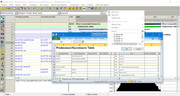
Except for simple logic the activity table is not enough to provide all logic parameters that are particular to links. Among the missing parameters are the link calendars that can be different to predecessor and successor calendars, the Monte Carlo parameters, the unit of lag (day/hour/volume), remaining relationship lag etc. The Links table can supply the missing parameters.
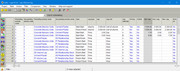
Logic League can be of help with P6 links table.
Logic League by Ron Winter Consulting LLC.
Best Regards, Rafael
- 0SBSantosh Bhat ·
John,Please visit this page
John,
Please visit this page on my website http://www.austprojplan.com.au/p6-inter-project-relationships/
There is a zip file that can be downloaded that includes an ERP file that produces such a report
It was intended as a report to link inter project relationships, but the report titled "Activity Relationships - Flat Listing" should achieve what you want, and it can be exported to a CSV file to be opened as a spreadsheet if required.
- 0JRJoel Roberts ·
Hi John,Check out the
Hi John,
Check out the reporting features of the ScheduleReader Pro software.
- 0RDRafael Davila ·
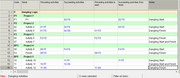
I was hoping for something
I was hoping for something better.
- The report does not even identifies lag calendar, please show in your report lag calendar.
.
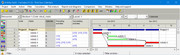
- Misses to identify predecessor and successor calendars essential logic parameter that should also be included in this report, please show in your report predecessor and successor calendars.
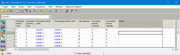
- Does not helps to identify dangling logic, a separate report is required, please show in a report predecessor activities to start node and successor activities to finish node.
Best Regards, Rafael
- 0RDRafael Davila ·
You can add a colum for
You can add a colum for Preceeding Activities to Start and another column for Succeeding Activities from Finish as to make sure there are no unintended open ends, or dangling logic.

- Take a look at Activity 11, it has a predecessor and a successor but is open ended at start as well as at finish nodes.
- This kind of report makes it easy to pinpoint open ends.
- Dangling Logic - TomsBlog
You can set up a filter for this purpose, just remember that the existence of predecessors and successor does not mean there are no open ends. I suggest you can use this sample schedule, make it activity of 5 days duration and use the logic as shown. In my case it proved to be easy. Filter condition; f_PredOpersBeg = '' OR f_SuccOpersEnd ='', cannot be any easier.
Best Regards, Rafael
- 0RDRafael Davila ·
Santosh:Thank you for the
Santosh:
Thank you for the challenge, there is always room for improvement, the previous reports were very basic.
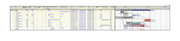
While there are not many logic/relationship parameters, in addition to the missing parameters that I mentioned, the following can also be included.
- Resource dependency, even if you do not use software resource leveling these are temporary relationships that must be flagged in some way as the first step in manual resource leveling calls for the deletion of these.
- Reson for delay, usefull for materials leveling as resource dependency does not shows for materials resources.
- If Broken due to out of sequence progress.
- Lag unit if hours or days.
- Baseline values for all/some relationship parameters.
- Prior update values for all/some relationship parameters.
The following reports show some alternative out of many, there is no single best report but there are fields that we should never miss. Depending on a single report is myopic.

Best Regards, Rafael
Log in or join to reply
ProjectControls.com is free to join. Members can post questions, reply, vote and follow discussions.
Existing members: your original username and password still work. Forgot password?