
Skip to content

S curve Formula

Bryc AliMember for 16 years 11 months
Created
14
6
0

During my experience in few company, I found a kind of table to draw our s-curve, you can choose a number of period and you have the forcast corresponding of this period, the periode can be (hour, day, week or month), for exemple :

Number of period 4 / period( 1) 13.20% / period( 2) 27.50% / period(3) 36.40% / period(4)  22.90%

With this value you can draw your s-curve, DO you have any information about it ? or the function that you can insert only the number of period and you have the percent that you mus achieve in each period ?

14 replies

Oldest first
  1. 0
    Zoltan Palffy ·

    you have not mentioned what

    you have not mentioned what the curved is measuing what is the measuing stick ?

    why do that  ? why not cost load or manhour load each actvity and let the program draw the curve for you  ?

  2. 0
    Bryc Ali ·

    It's mesured forcast percent

    It's mesured forcast percent of progress

  3. 0
    Raymund de Laza ·

    As Zoltan says, Cost loaded

    As Zoltan says, Cost loaded Schedule will generate the near realistic Forecast and S-Curve.

    Otherwise, your Target is Nowhere.

  4. 0
    Zoltan Palffy ·

    percent progress of what ?

    percent progress of what ? what is your measuing stick ?

    so are you saying for example that you have 100 activities and 50 of them are done then you are 50% complete ?

    each activity does not have athe same weighted value in terms of dollars, manhours, commodity units or even duration so you can use that.

  5. 0
    Anoon Iimos ·

    It is just linear. For

    It is just linear. For example: X and Y axis or Columns and Rows. Where Columns represent Time or Period (Constants) and Rows represent Scope (or Variables) with corresponding Units, Quantities and Costs (as perhaps you have seen in your BOQ). You simply equate Scope with Time and that's all (period).
  6. 0
    Venkatesan Kumar ·

    Hiyour calculation period

    Hi
    your calculation period looks like a fiscal year Method, it contains 4 No. Of Quarters in the fiscal year. According to Fiscal year forecast, the assigned period calculation is the achievement of each quarter of the fiscal year. master schedule holds the complete plan of the fiscal year achievement.
  7. 0
    Bryc Ali ·

    Sorry for the confusion, I

    Sorry for the confusion, I will try to explain, for exemple I have to achive a Task in 4 month with a Manhours of 10000 hours, 

    Number of period 4 / period( 1) 13.20% / period( 2) 27.50% / period(3) 36.40% / period(4)  22.90% it means:

    The first month my progress need to be 13.20% or 1320 hours and the second month 27.50% it means 2750 hours in period and 4070 hours cumulative .... you see ?

  8. 0
    Zoltan Palffy ·

    activity #1 month #1 = 1320

    activity #1 month #1 = 1320 hours

    activity #2 month #2 = 2750 hours

    activity #3 month #3 = 3640 hours

    actviity #4 month #4 = 2290 hours

  9. 0
    Bryc Ali ·

    I know that but i want to

    I know that but i want to determinate de fonction that gives me the percent function of the number of period ? to draw the s-curve you see ?

  10. 0
    Nelson A. Rodriguez ·

    You can use a theoretical S

    You can use a theoretical S curve equation like: Y = X / ( X + Exp(C1-C2*X) ) Where C1 and C2 are the parameters to control both: whether the curve is front or back loaded, and the level of knowledge the executor has about the project's subject.
  11. 0
    Bryc Ali ·

    What about C1 and C2 ?

    What about C1 and C2 ?

  12. 0
    Rafael Davila ·

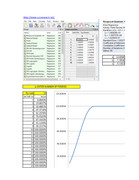
    You can use Curve Fitting

    You can use Curve Fitting Software to get a formula that fits your scurve shape.

    Scurve-Fittingjpg-Page1

    Then using Excel you can make use of the formula to get the numbers.

    http://www.mediafire.com/file/vd0at7qvc10cp9z/Scurve_Fitting.xlsx/file

    Good Luck

  13. 0
    Anoon Iimos ·

    You have to consider that

    You have to consider that there are several types of curves in a certain schedule. At least: Early Curve; Late Curve (based on planned data) and Actual Curve. The Data Date determines where you are at a certain time. And ideally, all data at the left of the data date should be actuals, and everything on the right shall be planned. Of course your calculations shall be based on cumulative weighted percentage that boils down to 100% whether based or using Quantities or Currencies. Each WBS level should have corresponding weight percent as well, which shall come down to 100% with the sum product of activities under it. And the total of all WBS should also come down to 100% which shall represent the whole project. I hope this clears the confusion.
  14. 0
    Angelito Estrella ·

    excell

    excell functions

    norm.dist

    stdev.s


    gives bell shape curve

Log in or join to reply

ProjectControls.com is free to join. Members can post questions, reply, vote and follow discussions.

Existing members: your original username and password still work. Forgot password?