Skip to content

Tracking progress in Spider

Evgeny Z.Member for 18 years 9 months
Created
56
8
0


I have the following question regarding tracking of progress in Spider:

I observe the following behavior:

Once I have updated progress on some of the activities (once I have entered an actual data for some of the activities), after that I will get an advice to reschedule project (which is logical).

However when rescheduling, Spider just looks at progress of all activities, finds the latest date among all activities for which the actual data is available (let us call it  Date X), assumes, that if any other activity was not updated, that means it was not done, and them just reschedules all of the activities, which Spider considers as not being done to start after Date X.

Example:

Activity 1 and Activity 2 were scheduled to start on the same date,
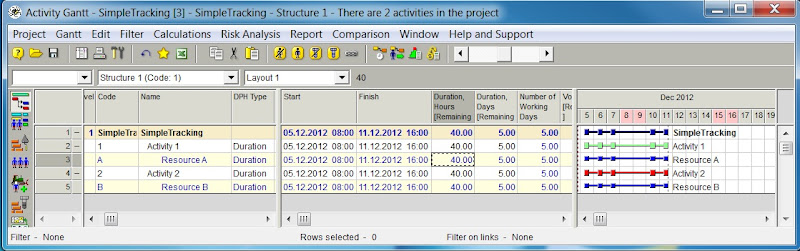
Activity 1 only progress has been updated.
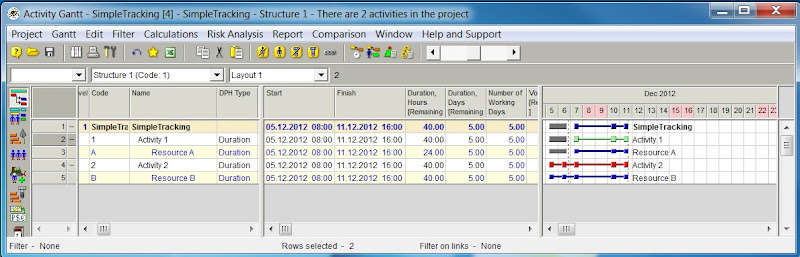
Reschedule. Result: Activity 2has been delayed
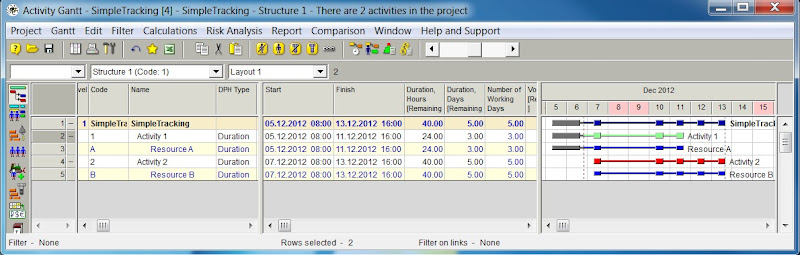
I understand the logic, but the difficulty I have with it (and may be because I am coming from MS Project) is that it requires, that at certain moment I would update ALL of the activities of my project until the same date. I am not sure it is practically possible. Sometime you just can’t contact people to get progress from them.

I my practice I go to activities for which I know the progress, I update these activities, and for the rest of the activities, for which progress information is just not jet available I ASSUME, that they are on progress and later, when actual progress is available  will update those.  MS Project does not have any problems with this:
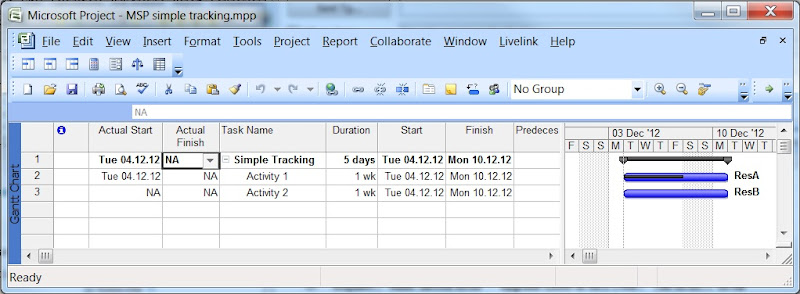
However MSP allows me to reschedule uncompleted work to start after certain date. And this date can be any date. This date can be even earlier, then the last actual date (see example below). This I found is also not possible in Spider. In addition to this I have a flexibility of doing it for entire project or just for selected tasks.
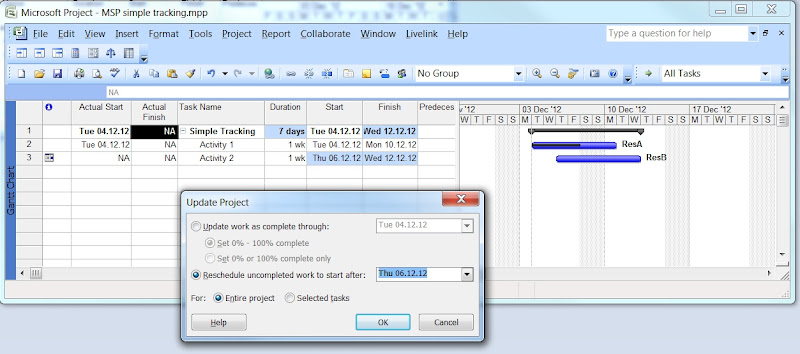
I feel like spider imposes quite a strict rules on me, which I am not sure are always practically to achieve. Or am I missing something?

56 replies

Oldest first


  1. 0
    Vladimir Liberzon ·

    In Spider you can use

    In Spider you can use multiple WBS.

    Phases of one WBS do not exist in the another. What shall happen with the phase links in different WBS where it does not exist? Removing WBS the software shall remove all WBS elements links?

  2. 0
    Evgeny Z. ·

    Vladimir,I raised the same

    Vladimir,

    I raised the same question to Rafael and he provided an answer in the another thread:

    Regards.

    Evgeny

  3. 0
    Evgeny Z. ·

    Meanwhile coming back to

    Meanwhile coming back to tracking in this thread….

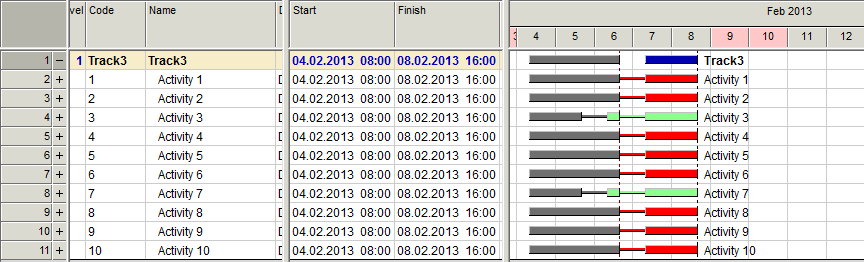
    I have tested the functionality with v 11.01.05 and it works now exactly as I thought it should be!!

    I am now  able to create schedule with different data date for different tasks and to reschedule it, starting from certain date.

     photo 1_diffdatadate_zps1795e987.png

    I am also able now to align to the same date progress information of all tasks, by  clicking Add to Actual Input Table on the phase level (this was not possible in the past). In this case Spider comes up with default values in the input table, which, when transferred to the Performance Archive, would align the progress data on all Activities to the same end date.  

     photo 2_aligned_zpsb10aed11.png

    So, it all works as expected.


    I only found one little thing, which requires clarification:

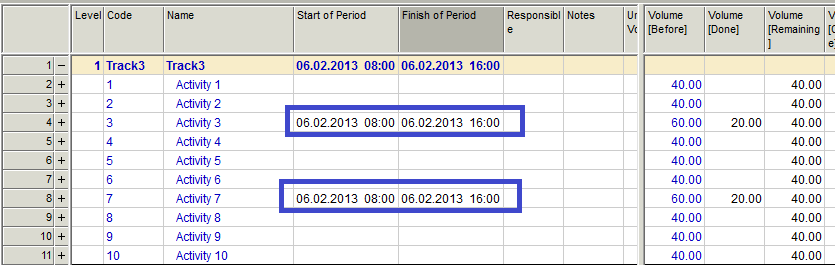
    When aligning activities, the activities which already have actual data in entire range being entered, when pulled into the Actual Data Input Table, would not have any performed volume as well as start and finish date would be empty.

     photo 3_datainputtable_zps9c0d126c.png

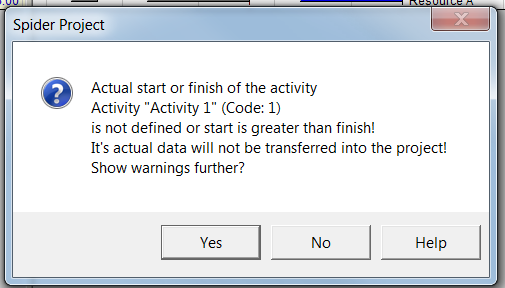
    Later on they would not be transferred to the performance archive and the following warning would come up:

     photo 4_warning_zps25ca0e5d.png

    Such entries would get stuck in the Actual Data Input Table and would have to be manually cleaned from it.

    Question: it a deliberately made functionality?

    Alternative solution would be not to pull these activities in the actual data input table at all or to give possibility to filter and delete them out of Actual Data Input Table.

    Regards

    Evgeny 

  4. 0
    Vladimir Liberzon ·

    Evgeny,any activity can be

    Evgeny,

    any activity can be removed from the Actual Input table if to select this action in the pop-up menu that appears after right mouse click.

    Entering data twice for the same period means adding new actual information or make changes to already entered information. It is useful to know about activities whose actual data was already collected.

  5. 0
    Evgeny Z. ·

    Vladimir,I know, that any

    Vladimir,

    I know, that any activity can be removed from the Actual Input table. But it just that for some of the schedules one will have to remove a lot of activities, and since there is no filter in Actual Data Input Table, one may have to remove a lot of lines manually. For small schedules, like I mostly have, this would not be a problem.  However for big schedules one can think of some filter or possibly not to import “empty” activities into the Actual Data Input Table.

    Just for illustration. If one would want to align the progress of all activities to common data date, he would get Actual Data Input Table, where a lot of lines will have to be manually deleted.

    Initial schedule:

     photo 1_schedule_zpsaeb650ee.png

    Actual Data Input Table to align schedule to common Data Date

     photo 2_actual_data_input_table_zpsf16773f7.png


    In this example, for instance, one would have to delete all activities, except 4 and 8.

    But, as I mentioned, this is not a big thing.

    Regards.

    Evgeny. 

  6. 0
    Vladimir Liberzon ·

    Evgeny,it is possible to add

    Evgeny,

    it is possible to add only selected activities to the Input table if to choose this item in the activity pop-up menu. Then you will not need to delete other activities, they will not appear there at all.

    But I do not object to adding Filters in the Input table.

    Regards,

    Vladimir

Log in or join to reply

ProjectControls.com is free to join. Members can post questions, reply, vote and follow discussions.

Existing members: your original username and password still work. Forgot password?