
Double Links
- Created
- 30
- 4
Vladimir.
While investigating some formulas to get Relationship Float [SLACK], Double Link Remaining and Elapsed Lag1 and Lag 2 values and other relationship values I found it might be convenient to show both lags as well as their calendars in the Succeeding Activities column.
http://www.austprojplan.com.au/relationship-float-and-viewing-in-primavera-p6/
Needless to say I am starting with time lags only, volume lag will follow and then some Double Link parameters.
Best Regards
Rafael
30 replies
Oldest first- 0RDRafael Davila ·
Very frequently I am having
Very frequently I am having to open other windows available under Main Window and believe a pull down menu item for this purpose will be better than moving to the Main Window as the vertical icons bar is only good for a few icons.

Or under Window as new menu item Main window documents next to current Main Window menu item.

- 0RDRafael Davila ·
As per PMI:
As per PMI: https://www.pmi.org/learning/library/basics-cpm-scheduling-software-axon-8170
- Early Start (ES): Earliest date the activity can start
- Late Start (LS): Latest date that the activity can start without causing a delay to the project completion date.
- Early Finish (EF): Earliest date that the activity can finish
- Late Finish (LF): Latest date that the activity can finish without causing a delay to the project completion date.
In Spider we have:

- What is the difference between Start [ASAP] and Start [Early]?
- What is the difference between Finish [ASAP] and Finish [Early]?
- What is the difference between Finish [ALAP] and Finish [Latest]?
- What are Spider equivalents to PMI Early Start (ES), Early Finish (EF), Late Start (LS) and Late Finish (LF)?
I believe clarification can be included as part of the Default name to include PMI equivalent name; see next figure, no need to mess with field codes and always visible.

Best Regards,
Rafael

- 0RDRafael Davila ·
Double lags are visible in
Double lags are visible in the Predecessors/Successors column I wonder if double lags were visible long ago because otherwise it would be too soon! Sorry for any inconvenience.
This is what I was looking for, I can look for lag calendars and any other link parameter at the links table.

Thanks.
- 0RDRafael Davila ·
I have Date1, Diff_Days_Calen
- I have Date1, Diff_Days_Calen and Calendar Code. I am looking for a formula that will yield Date2 given the other values I know. I am looking for a formula that will change a date by the difference in days/hours by calendar.
- BTW I am figuring out some tricks on the use of formulas and script editing that are making it easier to handle multiple If statements by calculating several formulas in sequential order. Formulas in combination to scripts are very powerful; some calculations are impractical to do without the script.
Best Regards,
Rafael
- 0VLVladimir Liberzon ·
Spider Start, Finish and
Spider Start, Finish and Float Fields
Early Start and Early Finish show the dates calculated using CPM ignoring resource constraints.
Start ASAP and Finish ASAP show early dates in the current schedule calculated considering all project constraints (resources, supplies, financing).
Start ALAP and Finish ALAP show late dates in the current schedule calculated considering all project constraints.
Finish Latest shows the latest date of activity finish that does not delay project completion (with activity start not moving).
DRAG shows activity contribution to project duration. In particular it shows project duration change if activity duration will become zero.
Free Float shows activity delay that does not delay any other activity in the current resource constrained schedule.
Total Float shows activity delay that does not delay project completion in the current resource constrained schedule.
Start Flex shows activity start lead that does not affect scheduled dates of other activities.
Finish Flex shows activity finish delay that does not delay any other activity in the current resource constrained schedule.
Super Float shows activity finish delay that does not delay project completion in the current resource constrained schedule. We are thinking of renaming Super Float to Total Flex, and Flex to Free Flex (for Start and Finish).
Please look at the sample project that shows these fields values.
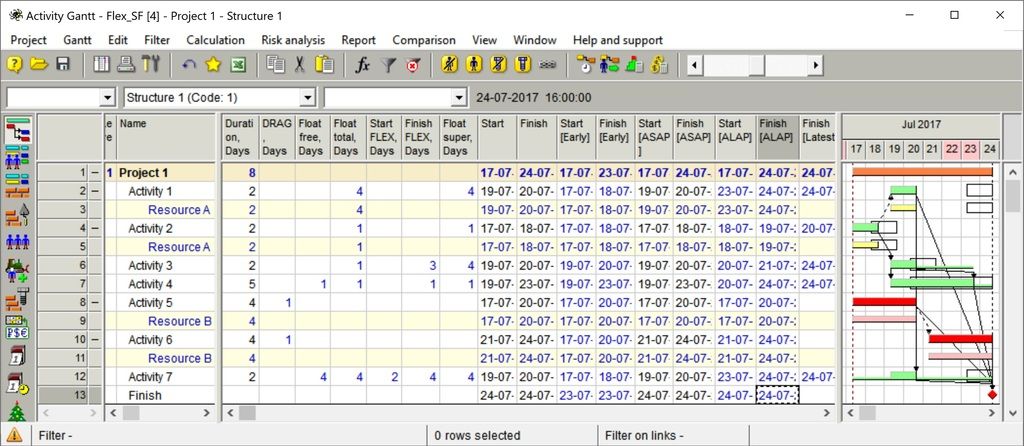 Late dates in this schedule are calculated taking into account resource constraints and are shown as hollow bars.
In this project activities 1 and 2 uses the same resource A. Activity 1 was delayed due to resource constraint and resource link is shown as dotted arrow.
Activities 5 and 6 use the same resource B and again activity 6 was delayed (shown by dotted arrow).
Activities 5 and 6 are critical and have one day DRAGs. Other activities have positive total floats.
Activity 7 has both Start and Finish Flexes, activities 3 and 4 have only Finish Flexes.
Activity 3 has different Total Float, Finish Flex and Super Float. Its Finish may be delayed for three days without delaying any other activity and for four days without delaying project completion.
Project has 7days/week calendar.
- 0RDRafael Davila ·
Vladimir,As always thanks a
Vladimir,
As always thanks a lot.
With the new menu option "View" it is easier to navigate to views like WBS Chart, Time Location Chart, Cost Components and many others, even when we already had access from the Tool Bar and Main Window. I will mostly use new menu option but at times will continue using the other options. Depending on what I am doing I will customize the Tool Bar for easier access to some views but will be able to access directly other windows from the new View menu without having to go to Main Window. Needless to say Main Window is still invaluable to navigate among opened projects as well as opened documents, impossible to stop using it for some navigation needs.
About the view of basic double lag information on the Predecessors/Successors column at Gantt it is as expected but not sure if it is new or if it was already available. Impossible to see all link parameters within these columns but it do help. I just added 28 link user defined field easily visible at the links table, impossible to show them all at a single column. There is no substitute to the links table view.
I cannot live without the Standard Reference Books functionality that makes easy the transfering of the UDFs, Formulas and Scripts to any other project. I use codes with an added prefix for the items I will transfer among several jobs to make sure there will be no duplicate or conflict. This coding add some clues about what the field means when you look at the formulas.
The new formula will be of much help to get the values at a single click rather than manually calculating the values for every line on the links table. I suspect a few Spider Project users must be already doing some calculations impossible or impractical without these formulas and scripts and hope this new formula will be of help. It looks like users will be able to explore exotic float and link calculations.
- Do not forget I am looking for start of Start FLEX as an available field, while shown in Gantt image as a narrow bar the date is not visible to the user.

- As well as Finish of Finish FLEX it might be calculated by formula but I believe both shall be available fields.
Best Regards,
Rafael - 0RDRafael Davila ·
Excellent!I already copied
Excellent!
I already copied your last posting into a PDF for future reference, so good I suggest publishing it at Spider website and keeping it updated as need be.
Spider - Start, Finish and Float Fields
Best Regards,
Rafael
- 0RDRafael Davila ·
Vladimir,Basic Scripts to
Vladimir,
Basic Scripts to increase D1 by work hours done: 1st version missing ability for unit in days. I used an iteration method as considering calendar week and exceptions by other means can be difficult.

N can be negative.

- A huge limitation of this approach is that the script can only be applied to a single date field.
- Another limitation is that N shall be an integer. Maybe some sort of data validation for numeric fields could be implementd to limit values to be fractional/integer and to be within certain values range.
- A Spider Function is better for this purpose.
Best Regards,
Rafael - 0RDRafael Davila ·
I am trying to figure out how
I am trying to figure out how to calculate finish dates for volume lag without having to mimic volume lag as an activity of production type.
- It looks like not all lag can be modeled as an activity, in particular volume lag.
In the following scenario I opened some SS and FF slack by delaying Cement Plaster using a date constraint.

Multiple resources working on different shifts, variable quantity and partial workloads can complicate the calculations that anyway were done during the schedule run. In order to better understand current status and the schedule behavior these values are needed.
Double lags I rarely use but volume lag I use more frequently.
Once I get those missing/discarded dates relevant to float such as start/finish Flex and lag finish dates everything will become clear. I recall Ron Winter asking for those dates including the ability to indicate actual remaining lag.
- Making CPM More Transparent
- In-Progress Lag Report and Value - Remaining Lag should be displayed just as remaining duration is shown and editable. The CPM feature of Remaining Duration was added so that Schedulers could monitor and change this calculated duration result. Lags are to relationships what durations are to activities. Why should Remaining Lag calculations be discarded by the software instead of saved and displayed? Why should we be unable to indicate that actual remaining lag is only 2 days instead of the calculated 4 days? Part of the reason CPM Schedules are so hard to understand is that fact that not all of the data used is displayed.
Any help will be welcomed.
Best Regards,
Rafael
- 0VLVladimir Liberzon ·
Yes, creating new fields for
Yes, creating new fields for remaining lags looks reasonable.
But I don't see much value in calculating lag dates.
Lags are relationship properties, dates are activity properties.
If an activity has many dependencies the number of these dates may be large and uncertain. Most of these dates shall be calculated, stored, displayed and never used.
- 0RDRafael Davila ·
Remaining Lag = Lag - Elapsed
- Remaining Lag = Lag - Elapsed Lag.
- Lag is an input value.
- Elapsed Time Lag is a function of dates. With the dates I can figure out Remaining Time Lag. This is available data.
- Elapsed Volume Lag is an update value. This is available data.
- The calculations can be tricky, better if done by the software. Definitively it will be a welcomed value.
- To edit Remaining Lag by editing Lag can be tricky, better if done by direct user input.
- I still wonder how you would deal with remaining lag2 on double links as lag2 can be tricky even if lag1 and lag2 are time lags.
- Same as activities Lags have associated dates for a lapse of time.
- Given the value for Remaining Volume Lag I am still concerned of current calculated end date for it to elapse.
- With the dates I can figure out Relationship Slack, the available reserve before it becomes driving.
- The calculations can be tricky as we will have to deal with dates for successor node, better if done by the software.
- I still wonder how you would deal with Relationship Slack when the relationship is a double link or when lag is a Volume Lag.
- To communicate with the field, dates can be easier to understand. For them looking at early vs late bars/dates is easier to understand than just giving early dates and float values, easier than just looking at activity start as a start milestone + remaining duration.
- The same goes with remaining lag, we know remaining lag starts at DD (unless there is out-of-sequence progress) but end date is of concern. If you only give me remaining lag I still must figure it out to know when it is scheduled to end. If you only give me relationship slack I still must figure out to know how late it can be delayed. To communicate remaining waiting time rather than saying 5 days under calendar C is easier if you spell the date.
- What Ron Winter is asking might be easy for time lags but not for volume and double lags.
- The more functionality, the harder it can get, it still helps if the software gives you the discarded dates.
- Remaining Lag = Lag - Elapsed Lag.
- 0VLVladimir Liberzon ·
Activity early and late dates
Activity early and late dates are calculated during project scheduling.
Dates belong to activities, not dependencies.
As I wrote earlier if an activity has many dependencies and dates are calculated for all of them we will need a lot of new fields (Date 1, Date 2, etc) in Activity properties and Activity Gantt Chart. Required number of these fields is unknown. I don't think that this is practical.
Remaining lags belong to dependency properties and can be added.
- 0RDRafael Davila ·
Keeping link dates can be set
Keeping link dates can be set as an option, you do not always want to look at them, for Monte Carlo you do not want this overhead to slow it down.
Maybe by keeping links dates they can be displayed on the Gantt as activities, a zero lag relationship as a milestone, non-zero time/volume lag as a duration activity, double links as a pair of activities, slack as a different bar (a Free Float Bar), same for late bar and resource dependencies.
Because it will greatly increase the number of lines the use of links filter would be necessary in most cases. Default option when displaying links as activities might be to display only non-zero lags. These in addition to the other link filters we already have.
Sounds radical ?
- Activities and their relationships can occur within the values of Total Float (Drift + Float) available.
- Intuitive visual representation of activities and relationships on a single canvas is possible.
I do not believe that single canvas shall be a Pert Chart, impossible to follow when you have many/hundreds/thousands of activities and many more links. The Activity Gantt is a better choice that will give you a table and a graph. I rarely display link arrows; I use the predecessor/successor columns. In case of links successors/predecessor would be activity start/finish node.
- 0RDRafael Davila ·
Not an expert in relational
Not an expert in relational database tables but I wonder if.
- Links Dates could belong to Links Table once calculated. In such case a few fields x a lot of existing record lines shall do it.
- Maybe after schedule run Dates from Links Table could be transferred to Activity Table using a few fields. A new record line will be created for every link with few fields populated. A table in which activity records and link records will be merged. In this way activity and link bars could be displayed.
- 0VLVladimir Liberzon ·
Rafael, dates are not links
Rafael, dates are not links properties. But let's suppose that we added dates to links - what dates? Dates of link start and link finish? Link start may be calculated basing on preceeding activity dates, finish may be calculated basing on dependency lag. Succeeding activity may have many incoming dependencies and besides may be delayed by many other reasons (limited resources, due dates, supply and space constraints, limited financing). Activity properties will have unknown number of dates defined by incoming links and most of them will not be interesting to anybody.
I am sure that remaining lags, earliest, early and late dates are sufficient for informed decision making.
- 0VLVladimir Liberzon ·
Rafael, Lag finish time can
Rafael,
Lag finish time can be calculated but how do you plan to use it? Many lag finishes for the same activity, some to start and some to finish, some to 30%, 50%, 70% of its volume? In any case they do not replace the scheduling and are hard to use.
- 0RDRafael Davila ·
Definitively remaining lag
Definitively remaining lag will help. It is when they are active/elapsing at DD that the information is of much value. Maybe a flag to identify it is in-progress will provide some additional help.
I could figure myself some Relationship Dates (shaded in grey) but got stuck with Volume Lags. All lags are time lags and durations in days.


As you can see I am already using new function Add_Days_Calen.
Am I doing something wrong?
Best Regards,
Rafael
- 0RDRafael Davila ·
In addition to RFF and RTF I

In addition to RFF and RTF I am also looking for Active Elapsed and Active Remaining Lag. So far for simple time and volume lag looks good, next will be for double lags [time/volume/both].

As usual with a script and a single click of the mouse everything is calculated in the right sequence.
Best Regards,
Rafael
- 0RDRafael Davila ·
Vladimir,Same as remaining
Vladimir,
Same as remaining activity duration might require some adjustment, remaining lag might also require some adjustment. A direct way to do so can be convenient. When adjusting remaining lag it might also be convenient to know relationship slack. Your comments will be welcomed.
BTW, I no longer use Photobucket.
unsightly error images by Photobucket
At the speed Spider evolves many of my old postings are already obsolete. Just a few days ago you gave us new function Add_Days_Calen and I am already using it.
No doubt a determination on what is useful and what is too much must be made. If you add too much, that might be a problem if later on you want to eliminate waste.
Best Regards,
Rafael
- 0VLVladimir Liberzon ·
Rafael,I agree that remaining
Rafael,
I agree that remaining lag is useful information and don't agree that it makes sense to calculate, store and display lag dates.
At the moment I am reviewing the schedule with 187578 dependencies. Calculating and adding more than 350000 dates may slow down schedule calculation and increase project files with small benefits.
- 0RDRafael Davila ·
Vladimir,I agree displaying
Vladimir,
I agree displaying such dates comes at a cost. My goal is to calculate Relationship Free Float (RFF) or Slack and Relationship Total Float (RTF). I believe RFF & RTF are essential to understand and manage remaining lag.

I see these dates as a mean to an end. We pay attention to all sort of reserves related to activities but links also have reserve values, relationships drive activities.
http://www.ronwinterconsulting.com/The_Inner_Workings_Of_P6.pdf
Relationship Dates
When one considers that a relationship with a lag functions just like an activity with duration, it is reasonable to assume that computed early and late start/finish dates could be computed for relationships. If these dates can be computed, then one could also compute the total float of a relationship. This float is not necessarily the same thing as activity float. In fact, it would be considered the measurement of the controlling relationship between two activities. P6 places these relationship date fields under the heading, “Multiple Float Paths.” By expanding this heading, one can display the following columns in the relationship tab,
- Relationship Early Start
- Relationship Early Finish
- Relationship Late Start
- Relationship Late Finish
- Relationship Total Float
Using formulas is slow, I tried a sample schedule with ~ 10,000 links and four date transfer formulas from activity table to links table and it was too slow. I am giving up with this approach, too slow. If not enough I am stuck with calculating relationship finish dates when when there is volume lag.
Formulas using field modifier execute too slow, to the point their use can become impractical.
Best Regards,
Rafael


Log in or join to reply
ProjectControls.com is free to join. Members can post questions, reply, vote and follow discussions.
Existing members: your original username and password still work. Forgot password?