
Activity on Arrow and Non-Continuous PDM are wrong.
In the Open Standard
RD
Rafael DavilaMember for 22 years 7 months
- Created
- 180
- 15
0
There are several reasons to avoid the use of the traditional Activity on Arrow computations and the Non-Continuous PDM (its PDM equivalent).
First and obvious reason is that by an overwhelming preference the Activity on Arrow representation is not used because of the complications the need for the Dummy Activity creates. In complex projects this burden can be overwhelming. This drawback is not existent under the Non-Continuous PDM version but the following statements still apply to both representations.
Second because it provides the dates for the nodes and not the activity, therefore it assumes the activity to be discontinuous with one end driven by the first node and the last end driven by the last node. In the majority of scheduling need the most efficient scheduling of an activity is for it to be continuous. The method denies the scheduler for the use of Continuous scheduling while by merely splitting the activity the Continuous method do allows for the proper application of the splits.
Third, if you need for an activity to be discontinuous this assumption should not be automated as the splitting rule must be determined on a per activity basis, and then there is no benefit on the automation of a rule that must be on a case by case. In addition the splits do have a particular duration of their own, early start and early finish of their own, float of their own which can be different after resource leveling. Because the software summarizes this under a single activity line this information is hidden to the user.
First and obvious reason is that by an overwhelming preference the Activity on Arrow representation is not used because of the complications the need for the Dummy Activity creates. In complex projects this burden can be overwhelming. This drawback is not existent under the Non-Continuous PDM version but the following statements still apply to both representations.
Second because it provides the dates for the nodes and not the activity, therefore it assumes the activity to be discontinuous with one end driven by the first node and the last end driven by the last node. In the majority of scheduling need the most efficient scheduling of an activity is for it to be continuous. The method denies the scheduler for the use of Continuous scheduling while by merely splitting the activity the Continuous method do allows for the proper application of the splits.
Third, if you need for an activity to be discontinuous this assumption should not be automated as the splitting rule must be determined on a per activity basis, and then there is no benefit on the automation of a rule that must be on a case by case. In addition the splits do have a particular duration of their own, early start and early finish of their own, float of their own which can be different after resource leveling. Because the software summarizes this under a single activity line this information is hidden to the user.
180 replies
Oldest first- 0RDRafael Davila ·Vladimir,
Can I say that Spider Project single value is correct for activity start or finish because it is based on a Continuous PDM Model, that Non-continuous PDM model could yield differnet values for start float and finish float if activity is non continuous at the moment of performing the computations?
By the way the following article can be of interest to those still using Activity on Arrow software.
http://research.economics.unsw.edu.au/ctseng/Float.pdf
- "In the context of activity-on-arrow (AOA) network representation, textbooks on project management, based on our survey, have for decades been using a popular formula to calculate free floats that may lead to erroneous results in the presence of dummy arcs."
Best regards,
Rafael - 0VLVladimir Liberzon ·Rafael,
finish float can differ from the start float if resources are assigned as independent teams (first shift and second shift as an example). The certain portion of an activity shall be done before other activity can start and let’s suppose that this other activity is critical. So this preceding portion of an activity is critical too. But later portion may be delayed. If assignments are independent (first shift, second shift) then the last portion of an activity can be delayed.
This is discontinious model and rather artificial but may happen in PDM.
Best Regards,
Vladimir - 0RDRafael Davila ·Vladimir,
Thank you a lot, also appreciate and now perfectly understand why float bars are not displayed, for me is not just that they are not 100% part of the solution set but that if assumed continuous can lead to serious disruption of the schedule, this is a fact all should understand, the Owner and the unwary Contractor. We all know that if a contractor by his own actions disrupts his schedule he cannot issue a claim and here is a possible trap for this to happen. Precisely this is the kind of debate I hope we will be talking with all when eventually most software get it right about resource float.
I would appreciate any help of yours with the sample jobs becuase you are way ahead of me with the understanding of this issue.
Best regards,
Rafael - 0RDRafael Davila ·Vladimir,
I just received your screen capture of a schedule you previously sent me in Spider Project format, and I believe it was part of the demo version or older Spider Version. I no longer have it nor do I have P6 so your help will be appreciated.
The float displayed by the last activity as you pointed out is quite weird.

UNBELIEVABLE
You can download the xer file from the following link:
http://rapidshare.com/files/375350976/Test.xer
Because I do not have P6 I would appreciate if anyone send me a print out of the calendars used in this job from –a year to +a year of the job duration to make sure there is no trick there.
ENJOY
Best regards,
Rafael - 0RDRafael Davila ·Sorry,
You are the first who took notice which means nobody is checking on the files to verify on my claim. And I was hoping for someone in the US Federal Government, the US General Service Administration and a few others who specify CPM software were to check on these. I believe it would be a great shame to them if what they specify is proved to be so deficient. To me would be like take it as it is and pretend there is no error, in any case assume even if the specified scheduling tool is wrong the blame is on the Contractor.
Let me know if it matches as I do not have P6.
http://rapidshare.com/files/376343421/Purchase.xer
Best regards,
Rafael - 0RMRodel Marasigan ·Hi Rafael,
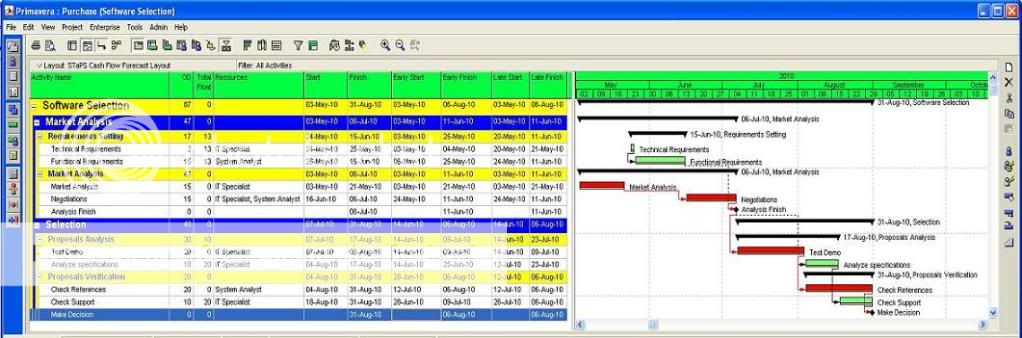
Thanks for the xer and correct me if I’m wrong. I downloaded the files that you shared and do the exercise. I suspect that the screenshot that you posted is level the resource using “Preserved scheduled early and late dates” options that its why it not showing the correct float. It forced primavera to retain early date which is the basis of calculating float. As shown below.

Note: I change the resource name to match on the screen shot that you used.
Here is the explanation using that option:
If you mark the Preserve Scheduled Early and Late Dates checkbox, the project’s current early dates are retained before levelling. In addition, when you preserve these dates, the module only forward-levels the schedule, which means that the early dates of activities from the start to the finish of the project are scheduled.
To review the levelled early dates, I show the Start and Finish dates to compare Early Start and Early Finish date as shown on the figure above.
If you clear the Preserve Scheduled Early and Late Dates checkbox, the module also performs backward levelling. Backward levelling schedules activities to occur as late as possible without delaying the project finish. The module reverses the levelling process, beginning at the project’s late finish and working towards the beginning of the project. If insufficient resources are available to schedule an activity on its late dates, the activity is advanced to an earlier date. When the schedule is levelled forward and backward (by clearing the checkbox to preserve scheduled early and late dates), the project’s early and late start/finish dates are updated as shown below.

On this exercise P6 clearly show that resource levelling facility is correct.
Best Regards,
Rodel - 0RDRafael Davila ·Rodel,
I do not have P6 so the answer must come from Vladimir. But here we are required to schedule using early dates and get results for float showing early dates.
Total float is calculated by subtracting the early finish date from the late finish date (start dates can be used instead). We are required to display early schedule and the difference between early and late dates is how float is computed, not sure if what you are displaying with the second option is the difference between late dates prior and late dates after leveling which can be different.
Best regards,
Rafael - 0RMRodel Marasigan ·I agree Rafael, that is why Preserve schedule early and late date should not be used when levelling resources. It is used only for analysis and comparing the movement of dates after the levelling. If proper levelling is done, the correct float will be given.
See belowcomparison:
Using Preserve schedule early and late date option:
Early and late date did not update and remain as original compare to start and finish date.
Proper levelling without using any option. Early and Late dates are updated as shown on Start & Finish dates.
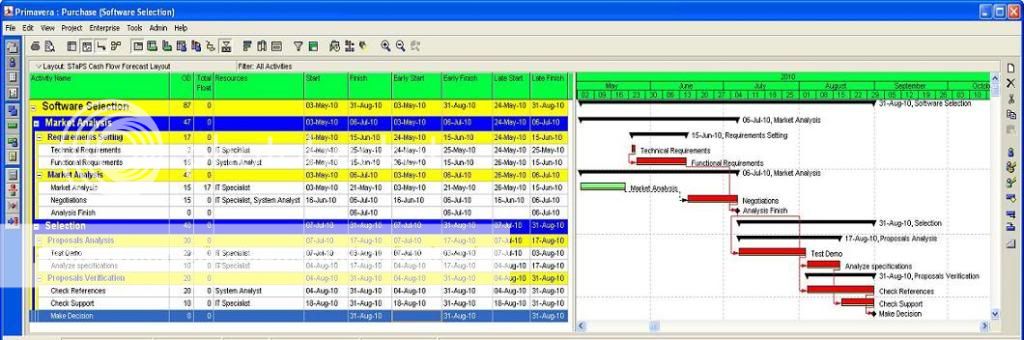
Best Regards,
Rodel - 0RDRafael Davila ·Vladimir,
Here we as a Contractor are frequently required to change software as if a change of underwear and we are supposed to know the hidden traps of the foreign to our company and imposed software, or even worst, outsource an integral part of our management by using an external scheduler. Even if we on the run can spot that P6 resource leveling depends on us to bypass default setting to my eyes is a design horror.
If the resource leveling routine cannot be set to extend project duration by not allowing over-allocation then it will prevent the contractor to show when an Owner caused delay is delaying the job because of resource availability as this will have the effect to allow for unlimited resources when the unavailable resources should extend project duration. When the delay is hidden by the schedule resource leveling it will create an illusion that everything is OK and this may create problems. It is self serving to the interest of the Owner at the expense of the Contractor.
This is another reason why I always have been critical about Primavera as I always perceived the company as biased in favor of the Owner, always at the expense of the Contractor.
Best regards,
Rafael - 0VLVladimir Liberzon ·Rafael,
you did not appreciate that P6 creates poor schedule that you can submit to the Client but shows you (secretly?) that the very first activity of this schedule has total float (look at the Rodel schedule). And if you will adjust the schedule manually (or using Spider Project) you will own this float and use the best schedule for yourself and P6 schedule for your Client.
Everything has its good sides.
Best Regards,
Vladimir - 0RDRafael Davila ·Vladimir,
Is a difference of 3 weeks in 15 as per Spider Project resource leveling algorithm, is just a 20% overrun. Maybe contractors are granted for a 20% overrun before liquidated damages are applied. Perhaps the issue is in the inability of the scheduler to set up the hidden settings, perhaps is not in the software. We can make Spider as bad as P6 and use a substandard leveling algorithm, like the one we have for comparison purposes.

Why do you insist in calling the Substandard option as Standard? Call it by its meaning, Substandard.
Best Regards,
Rafael - 0RMRodel Marasigan ·Hi Rafael,
I think this is more on ability of the planner on how they can decide on what is the best for their project by doing different what if scenario.
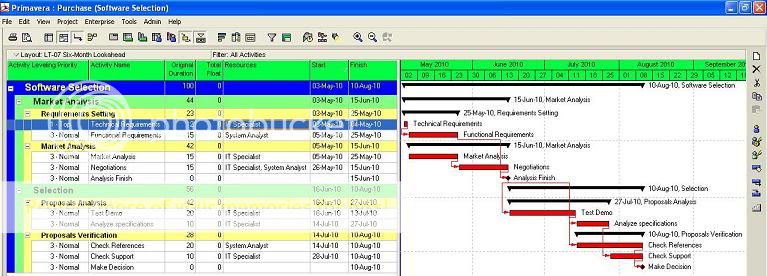
As per your example I did the same in P6. I change the leveling priorities and it have the same output as per your example below.
- 0VLVladimir Liberzon ·Hi Rafael,
when we first launched Lite version of Spider Project we decided that our users will require only Optimization and Previous version support levelling algorithms and excluded Standard option.
But many people asked us to keep Standard option as well.
They created Standard schedules for their Clients but used optimization for themselves.
So we added Standard option to the Lite version.
By Standard we mean the approaches supported by other packages (P3, P6, Open Plan). The approach was explained by Rodel in his previous message - play with different criteria and select the best result. When resource competition is not high some standard levelling priority may give the solution that is optimal. Since standard scheduling is faster the planner may select to use this selected standard option.
Rodel opened my eyes that P6 uses something similar.
When you level your project first time you get some schedule that is far from optimal. But if you level again using the same levelling priority you may get better schedule, on the third run you may get even better (or worse) schedule. So wise planner will level the project many times and will select what schedule to submit to the customer and what to keep for himself. There is only one problem - with each run he will get different schedule, and after entering actual information he shall repeat the trick and still may get the schedules that are not similar to the initial. I am not sure that your Client and suppliers will be happy if the planned order of works will change frequently. And besides in large projects you will still be far from optimal decision.
When I discussed this example at IPMA congress in Paris in 1996 Open Plan representative proudly told me that they found the decision - if to run levelling twice in a row using Scheduled Float criterion they get the optimal solution for this example.
So the advise for P6 users - never run the levelling once using certain levelling criteria. If you have done it only once then after entering actuals you may get quite different schedule when you will plan next project period even if the same levelling priority is applyed.
And previous Rodel advise - discard default levelling options.
This discussion was very useful to me. I did not look at P6 levelling for a long time and did not test it thoroughly.
Best Regards,
Vladimir - 0RMRodel Marasigan ·Hi Vladimir,
That’s what I did. I schedule the project first and change the leveling priority as shown on the figure that I posted (see 1st column). I change task "Technical Requirements" as 1-Top and the rest are 3-normal then level again. I also change back the leveling priority to 3-Normal for all and I goes back to the original result that I posted for comparison (Post #160 & #158)
Best Regards,
Rodel - 0RDRafael Davila ·Vladimir and Rodel,
We previously tested a sample job in which the scheduler using other software figured it out by whatever methodology a priority set that would yield similar results but the trick of running several runs in sequence is new to me.
I still wonder if in complex jobs, with thousands of activities and many trades working on the job it is practical or even possible to manually prioritize among thousands of activities and get optimal and second if the trick of running in sequence the resource leveling routine will work and in how many runs.
P6 might work for those who are comfortable with playing with prioritization and running multiple resource leveling runs, for us it is not a practical solution. It is quite a burden on us when we are forced to use software as bad as P6, software we do not know.
We were SureTrak users before switching to Spider Project and we were forced several times to use MS Project and P3, about P6 not yet and sure it will happen. At one job we were quoting, different web based software was required, it was not P6 web. This one we perceived it as breaking into our privacy as all we do was to be stored at their website servers even if not formally released, we were not even in possession of the files and if a claim in court was to be raised we had no guarantee the files were not manipulated by the agency.
Best regards,
Rafael - 0VLVladimir Liberzon ·Rodel,
applying manual priorities is the same as levelling projects manually. If the the number of activities is small it is possible, for large projects you will not know what priorities to change.
I don’t think that such what if estimates are practical in the real schedules.
Best Regards,
Vladimir - 0RMRodel Marasigan ·Vladimir,
Correct me if I’m wrong. A planner is applying manual priority to those activities that running parallel and decides which one have a better priority if leveling the resource. I don’t think too many parallel activities that have same resource at the same time if the schedules are using a proper logic.
Best Regards,
Rodel - 0RDRafael Davila ·Vladimir,
As you know a few months ago we switched to Spider Project and believe me it has not been like a daily change of underwear, or twice when an accident. We still got some way to go until we feel fully comfortable on our use of Spider Project. Therefore I would like you to comment on our approach to keep some control of the leveling.
We do our basic resource leveling using “standard” algorithm or “advanced” and in this way we can keep prioritization. If the schedule revision does not yet extend project duration we choose either one. At time we combine the scheduling algorithms with ”soft logic” we toggle on and off either at the links table (the eawsy way) or by using formulas and even by using Reference Books functionality where we can manipulate table values. If still the job is predicted to be late after the exercise then we choose “optimum”. Unfortunately once in need to exclusively use “optimum” is because it is so behind we end up using the option until the end of the job. This happens in about 25% of our jobs, even when frequently is because of correction to the drawings by others we never get back full EOT.
Best regards,
Rafael - 0VLVladimir Liberzon ·Rodel,
construction projects consist of thousands activities and use at least several dozens resources.
Your decision on activity priorities will change the schedule, next decision will change the schedule, etc. Can you imagine the number of choices? But the problem is much more complicated - these decisions are made one after another, but matters their combination. It is impossible to try them all.
Just imagine that I will send you the schedule consisting of 6000 activities and approximately 70 assigned resources and suggest to find the best schedule. What time do you expect to spend searching for this solution? And I am not sure that the result of your efforts will be successful.
Best Regards,
Vladimir - 0RMRodel Marasigan ·Hi Vladimir,
I agree that deciding which activities will have a better priority on activities running parallel will be a tedious task if a planner not doesn’t know which one is which and the logic is not properly applied on the schedule but those options that we did are just an example to match the example presented. A planner can use other leveling priorities like Activity ID, Total Float, Free float, Durations, Early Start and etc... that will help the planner to have a good result. I believed that option is created for a better purpose and not just a display.
Best Regards,
Rodel - 0VLVladimir Liberzon ·Yes, you are right, but these priorities still produce poor schedules. Even for the project that we scheduled none of them produce good result. But for my surprise if to run levelling several times using the same priority the schedule will change each time and even become optimal (for this particular example). But unstable schedule create different problems.
This approach - selecting the priority among activity fields we call Standard. But in Spider Project you can also select Optimization and may be sure that the schedule is close to optimum.
And manual levelling is exhausting exersize in any case - even when the schedule is properly created. And I don’t think that this is the way to find the best solution in the large schedules.
Best Regards,
Vladimir - 0RMRodel Marasigan ·Hi Vladimir,
Correct me please if I’m wrong. I found on our exercise schedule that activity id was not in properly order. “Market Analysis” has an activity id of 1010 while the “Technical Requirements” 1020. When I change the “Technical Requirements” activity id to 1010, “Market Analysis” to 1020 and change the Activity leveling priority as 3-Normal for all task and level again it has the same result as the post # 164 by Rafael. I assumed that the default leveling priority for P6 is activity id where most of the application may be doing the same. My understanding on computer is garbage in garbage out. Meaning it will not necessary decide on their own without any basis. I’m just wondering what will be the basis of leveling priority for Spider Project when running an optimal result, would it be same. (see below)

Best Regards,
Rodel - 0VLVladimir Liberzon ·Rodel,
activity ID does not play any role in Spider levelling.
We recommend our users to make their activity IDs meaning what is activity type, where it is, who is performing, etc - not numeric but text based. There is no such thing as proper order of activity IDs.
It would be strange if changing activity code will change the schedule. For manual prioritization we use Priority field.
So P6 default activity levelling priority is Activity ID. Thank you for the information. I did not know this.
Best Regards,
Vladimir
- 0VLVladimir Liberzon ·Rodel,
I can send you funny example of MSP levelling if you are interested and will send me your E-mail.
Usually PM packages use some default levelling algorithm and may suggest to select other priority fields like P6, Open Plan, Spider (in Standard option) do.
You discovered that P6 default levelling priority is Activity ID, in P3 it was Late Start, Total Float.
MS project describes one algorithm in its Help but uses another. Both are too primitive and produce poor schedules.
Best Regards,
Vladimir

Log in or join to reply
ProjectControls.com is free to join. Members can post questions, reply, vote and follow discussions.
Existing members: your original username and password still work. Forgot password?