Skip to content

Negative and High Total float in P6 Schedule

Nisha JosephMember for 8 years 11 months
Created
8
3
0

I have a schedule in P6, with Negative floats (-20d)and High Total Float (in 3 digits). There are only 2 constrainsts I have applied.  As per Fuse score, the high float and negative float is impacting the most. The constraint score is green. Its almost 1800 line item schedule. How can I go about resolving this. Appreciate a quick response, this being urgent for me to deliver.

8 replies

Oldest first
  1. 0
    Zoltan Palffy ·

    filter for start constraint

    filter for start constraint and finish constraint

    if you only have 2 and they are the correct dates then you are behind schedule to meet these constraints,

  2. 0
    Santosh Bhat ·

    Why is Fuse suddenly the

    Why is Fuse suddenly the arbitrator of "quality"...*sigh*


    Anyway, there's a simple way to check for things within P6 itself, once you know how to use the Group and Sorting dialog to set the conditions you're wanting to invesitgate:

    Using P6 Activity Counts to review your schedule | Australasian Project Planning (austprojplan.com.au)

  3. 0
    Rafael Davila ·

    Retained Logic and Progress

    Retained Logic and Progress Override in Primavera P6

    • The retained logic and progress override setting can drastically affect a schedule depending on which is used, so understanding the details of each is key.
    • Similar to Retained Logic, but the actual dates are used to calculate the forward and backward pass and treat the actual dates similar to constraints. The result can be an unrealistic amount of negative float.

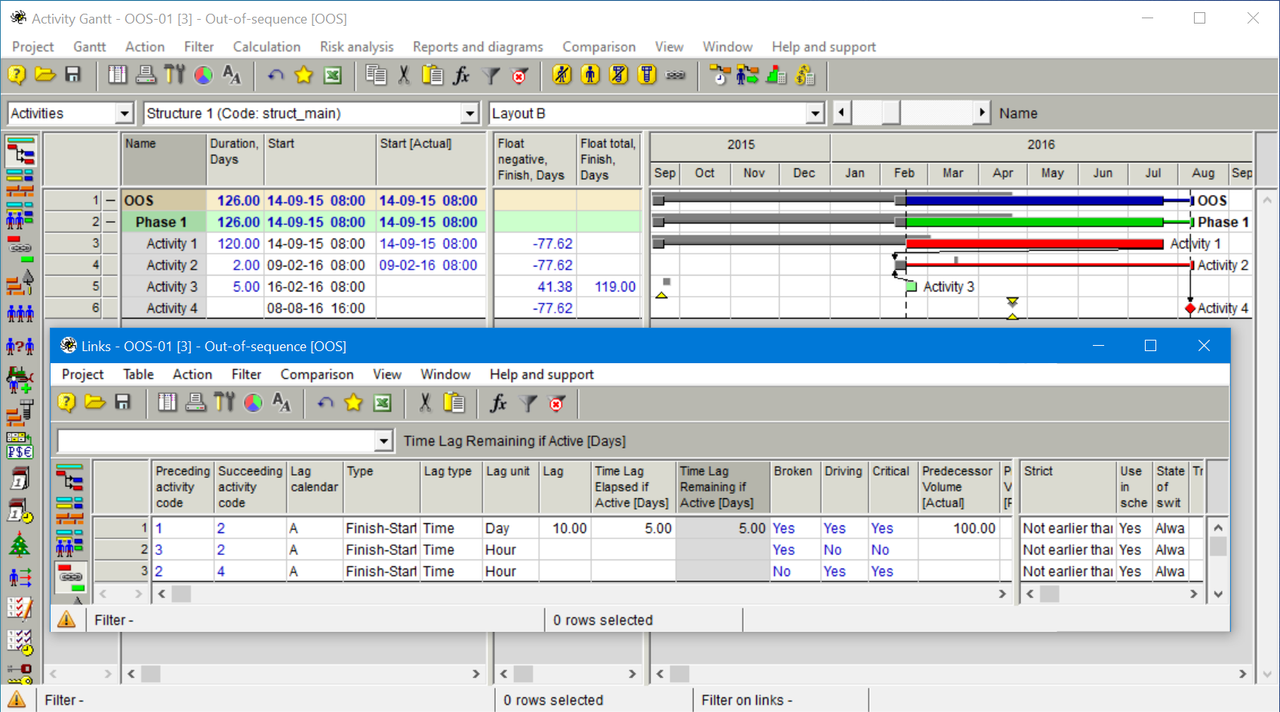
    Note that out of sequence progress for a particular activity can be due to more than one of its predecessors as shown in the following example where we have two predecessor links to Activity 2 are broken links. Listing the out-of-sequence activities is not good enough.  Unless the out-of-sequence activity only has a single predecessor you still have to identify, investigate and fix all the broken link(s).

    Image-045

    While most references mention logic corrections it might also be that some predecessor was not correctly updated. 

    • Suspects can be long duration procurement and delivery activities that missed to be updated during some update.
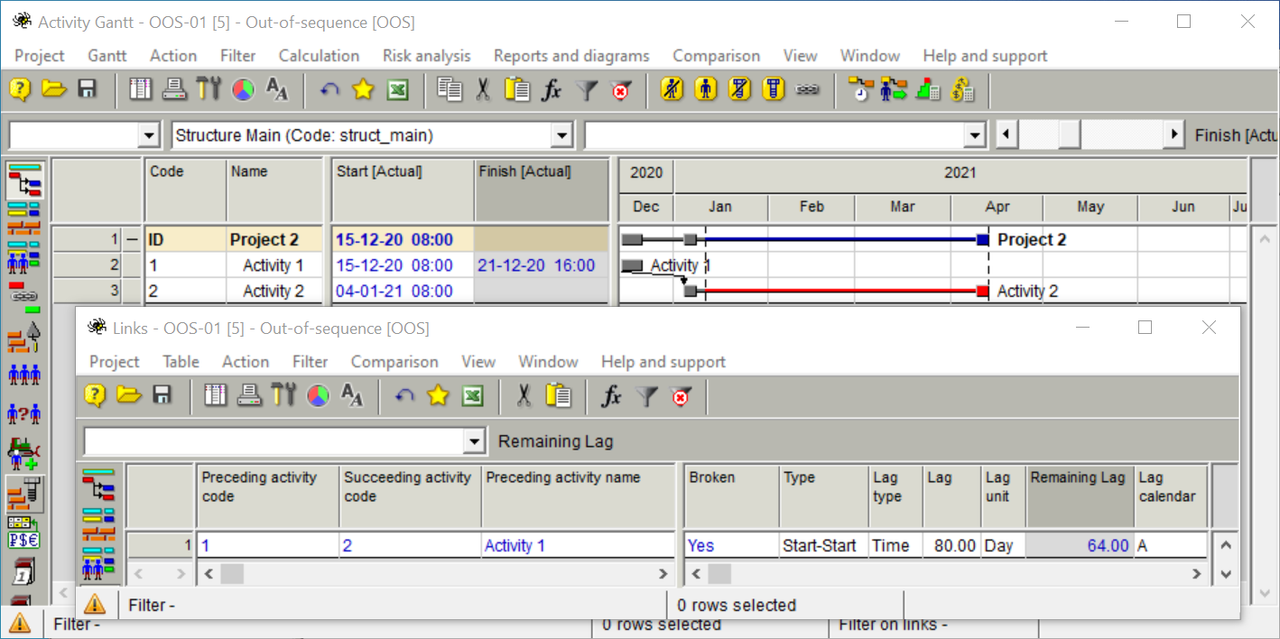
    • Remaining lag can also be out of sequence even if predecessor finished as planned but successor started earlier than predicted by logic with lag.  In the following example a possible fix would be to adjust lag to 0 up to 16 days (=80-64).

    Image-047

    Resource leveling can be another cause for increase in negative float, though usually not as dramatic as out-of-sequence progress.

  4. 0
    Rafael Davila ·

    Fuse suddenly the arbitrator

    Fuse suddenly the arbitrator of "quality" ....

    If a single good schedule does not pass the quality check makes the test a joke.

    Pretending that some arbitrary numbers will make unnecessary for the experienced reviewer is a joke. 

    Too much color coding and too much emphasis on fancy charts rather than thorough analysis make the quality check a joke.

    Too many things are missing such as checking for out-of-sequence on progressed schedules.

    Granting a "good quality" status to schedules that would not pass a more thorough test is unacceptable.

    This is keyboard monkey at its maximum expression.

  5. 0
    Nisha Joseph ·

    The negative float was due to

    The negative float was due to the Project "Must Finish by" in the enterprise Tab. Hadn't noticed that. Solved negative float. Now grouping and sorting the "High Float" to resolve the high floats. Thanks all for the direction.

  6. 0
    Rafael Davila ·

    The Inner Workings of

    The Inner Workings of P6

    Introduced with Version 3.5, P6 has a calculation option called, “Actual Dates.” If the Actual Dates option is selected, then the predecessor’s late finish is set to the time unit before the actual start of the out-of-sequence successor. This assignment has the potential of creating negative float without date constraints.

    Primavera’s Float Path Calculation: Review and Analysis of Applications

    There is a misconception that the existence of activities showing negative float in a construction schedule imparts added significance to those activities, requiring special consideration when measuring delays. This is unfounded and ignores the basic principles of CPM scheduling and schedule analysis, such as the principle stating that only delays to the critical path, which is the longest path in the schedule network, will result in project delay [10].

  7. 0
    Zoltan Palffy ·

    always check the MUST Fininsh

    always check the MUST Fininsh by date at the project level first this is where the backward pass will begin

  8. 0
    Rafael Davila ·

    Do not forget that using

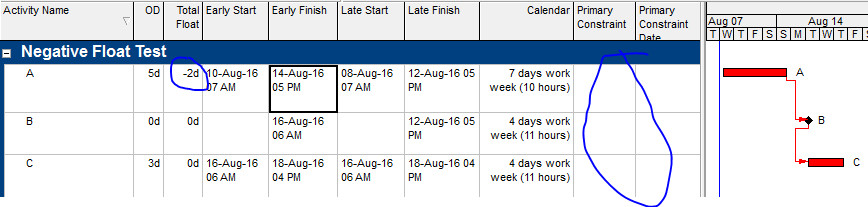
    Do not forget that using multiple calendars in P6 without the use of constraints may generate negative float.

    The story behind the negative float in P6

    5 – Using multiple calendars

    This is obviously a very old bug in P6 that hasn’t been fixed for ages now, if you used multiple different calendars with different hours in the schedule, that may generate a negative float, especially if there are milestones in the schedule, it seems that the late date of the milestone jump to the last working hour of the previous working day in the calendar.

    Negative-Float-Test

Log in or join to reply

ProjectControls.com is free to join. Members can post questions, reply, vote and follow discussions.

Existing members: your original username and password still work. Forgot password?