
Managing resources (people) absence in Spider
- Created
- 67
- 11
Dear all,
I am looking at resources in Spider and have a question how to simulate resources absence.
As I can see, every resource needs to have a calendar, which, in turn, depends on a Week object and exceptions.
I am now considering the situation of named resources.
Question 1
As in practice each resource has his own absence schedule (due to individually booked vacations ), does it mean, that I will have to create:
- separate exception for every vacation of every resource?
- Separate calendar of every resource?
So, in case I have 10 resources, each of them will have approx 5 vacations spread over the year (in addition to public holidays), that means, that for the project of 1 year I will have to create 50 exceptions and 10 calendars just to cover resources vacations.
Is it correct?
Question 2
How to handle situation, when resource is only made available for a some time (shorter, then expected duration of a project)
In MS Project one can set resource availability periods, (which is by default set to From N/A To N/A), but in Spider I found only how to set exceptions, not availability.
Regards.
Evgeny
67 replies
Oldest first- 0RDRafael Davila ·
You said - If you have 100
You said - If you have 100 brick layers and each of them is going on vacation 5 times a year, you would have to have 1000 entries is the time resource production to show this. This will probably difficult to manage, especially as you can’t assign some sensible name to time resource production entries.
With regard to setting individual vacations time you need to enter start and finish of vacations for every vacation exception and assign the exception to each resource, at some point you got to tell the computer.
You can model each Vacations as a hammock activity driven by two milestones without need to resource load the vacations activity and therefore without need to use resource production that shall match calendar exceptions, without need to use resource loading to drive the vacation activities with all the complications it can create.
The following figure shows how you can do it. You can do it by fixing the milestones using a SNET constraint. You can change manually the constraint dates or you can change them using reference books to transfer the exception data.

If you want to explore the option for updating using reference books you can download the file and instructions from the following links.
http://www.mediafire.com/?805gvmtoavm4w40,bz24iiuqoutlt4ghttp://www.mediafire.com/download/bz24iiuqoutlt4g/RD012.001.sprj
http://www.mediafire.com/download/805gvmtoavm4w40/Instructions_for_Vacations_Schedule.txt
http://www.mediafire.com/?t1nrxd33v823brb,exys4rqox41s112
http://www.mediafire.com/download/exys4rqox41s112/ACT01.001.sdoc
http://www.mediafire.com/download/t1nrxd33v823brb/CE01.001.sdoc
Keep in mind using reference books you can transfer to other jobs from the Vacations Schedule the calendar exceptions as well as the vacation activities as needed. You will need to create an exception for every vacation period without using Recurrence Periods as this method will only transfer a single start and a single finish date for each exception.As you will notice I have no problem with creating cell formulas within a single table my problem is when creating cell formulas with other tables. If there would be a graphical way to select cell references from within the current table as well as from within other tables I would be using direct formulas instead of using reference books to consolidate two tables.
Remember that to execute multiple formulas a script can be very handy.
You also said - So I am just wondering, how in reality the absence (vacation) of unnamed resources is managed? (for named resources this can be done via calendar exceptions).
Because every unnamed resource will share a common calendar you might need to create several unnamed resource for each calendar and use skills to assign them to activities. For unnamed resources we use a single calendar as here it is the rule that over 90% employees take vacations during x-mass recess as per agreement with the unions, it is party time. In other industries it is common for it to be per named resource.
Best Regards,
Rafael
- 0SDStephen Devaux ·
Rafael, this is great
Rafael, this is great stuff.
You can then relate the reason(s) for each delay to any drag and drag cost caused thereby. And then this can be collected and modeled in Pareto charts, showing the causes of delay over the past three months in descending order of drag cost: the cost of delays due to unavailability of hobbits was $525,000, while the cost of delays due to unavailability of goblins was $200,000, so let's hire two more hobbits.
This is a huge aspect of the Total Project Control methodology (specifically when related to resources, it's called the Cost of Levelling with Unresolved Bottlenecks (the CLUB), which in turn is triggered by drag cost). And, of course, Spider is currently the only package to be able to provide this sort of functionality, as it is the only one that computes drag (and, I assume, (if the data is properly entered) drag cost.
Fraternally in project management,
Steve the Bajan
- 0EZEvgeny Z. ·
Rafael,reference books, is
Rafael,
reference books, is something, which I still have o learn in Spider, so will have to deepen myself in your example.
At the moment I must say I don’t quite understand it.
1) It does not have any resources, so it is difficult to see on which way it models resources vacation.
2) Separately to this, your example seem to suggest, that you need 3 activities (2 milestones and 1 hammock) and 4 manually set constraints (2 for each milestone) to model 1 single vacation. Isn’t it too bulky?
RE
“Because every unnamed resource will share a common calendar you might need to create several unnamed resource for each calendar and use skills to assign them to activities. For unnamed resources we use a single calendar as here it is the rule that over 90% employees take vacations during x-mass recess as per agreement with the unions, it is party time. In other industries it is common for it to be per named resource.”
Just checking my understanding: for your example you will create 2 resources to cover brick layers
BrickLayer_no_x-mass (with x-mass period in as an exception in the calendar)
BrickLayer_x-mass (without x-mass in the exeption calendar)
Each of the resources will have a BrickLayer skill.
The BrickLayer_no_x-mass represents 10% of brick layers and BrickLayer_x-mass 90% of brick layers
Is it how you suggest to model this?
- 0RDRafael Davila ·
Evgeny, You said - It does
Evgeny,
You said - It does not have any resources, so it is difficult to see on which way it models resources vacation.
Think out of the box, resources are not available during vacations, do not force the vacation activity to use unavailable resources, it is not the way CPM is designed to work. It might be better to model vacation activities without using resources but the known vacation start and finish dates.
You said - your example seem to suggest, that you need 3 activities (2 milestones and 1 hammock) and 4 manually set constraints (2 for each milestone) to model 1 single vacation. Isn’t it too bulky?
Yes it is bulky indeed, even if you can hide the milestones using a Non-Main WBS Structure.
Each milestones need only one constraint, a single SNET constraint is needed. You have the option to manually set the constraint or transfer them to the corresponding cells either using cell formulas which is too confusing to me when looking for external tables, or use Reference Books.
If I have to model vacation activities instead of merely looking at the exceptions table I would prefer the cells formula option but as said before the syntax I do not understand. With this option any changes in vacation dates executed via calendar exceptions can be updated by executing all formulas using a script and a single click of the mouse.
Not all exceptions are vacations, not all correspond to the same vacation, so anything else than looking at the exceptions table and come comment field to identify and filter vacations will require some CPM modeling.
Another method that occurs to me might be to create a single duration type activity for every vacation exception, to set the SNET constraint in a similar way and set the duration by a formula. Perhaps might be convenient to use a 24/7 calendar as to be able to use simple formulae that do not depend on activity calendar. I will explore this and will let you know. This is the first time I am trying to model vacation activities and believe we might still find a better way within how CPM models are designed, we shall not give up easily.

http://www.mediafire.com/download/ihzva3p5a1i7dim/RD012.002.sprj
As in the previous model, updating vacations on this model will require either:
- Cell Formulas among two tables I do not know how to do because of difficult syntax I cannot clearly see on Spider Help.
- Use of Reference Books, Formulas within Reference Books, to transfer vacations duration to Activity Table as computed from formula on Calendar Exception Table and to transfer vacations start to Activity Table corresponding SNET constraint from exception Start on Calendar Exception Table.
- Manual updating of the vacation activities at both tables, which I did with the assistance of a formula on Calendar Exceptions table to compute vacations duration. Then manually copied Start and duration from CE Table into Activity Table and re-scheduled the job.
I am assuming you are looking for a way to synchronize vacations exceptions and the vacation activities through a software procedure rather than all manual. That you have a common pool of resources for a portfolio of multiple jobs. That you want to be able to see exceptions that represent vacations as activities all on a single separate job as well as to see some of the vacation activities on other jobs. Therefore it cannot be by direct use of resource assignments on many vacation activities. That you are looking for a procedure to transfer any changes in exception dates other than using double data entry.
- Your idea for creating calendar exception activities makes so much sense to me that I wonder if a new activity type "Calendar Exception" can be implemented. It shall inherit duration, start and finish from the associated calendar exception, will not be moved by predecessors therefore to avoid confusion predecessor links shall not be allowed. If the associated calendar exception is deleted then the software will not allow you to re-schedule until you fix the issue.
I have a few other special activity types in mind such as the SureTrak Topic Activity and something equivalent to P6 WBS activity that have not passed Vladimir test. I believe some of those might add extra compatibility with other software when you import/export files.
- P6: A WBS Summary Activity type represents a group of activities that share a common work breakdown structure (WBS) level. A WBS Summary Activity can group tasks that are not related in a logical sense of a task dependency where one task must wait for another, it is enough for the tasks to be under a common WBS. The duration of a WBS summary activity extends from the start of the earliest activity in a group to the finish of the latest activity. A hammock activity can group tasks which are not related in the hierarchical sense of a Work Breakdown Structure. Therefore a Hammock is not equivalent to a WBS summary activity. I have problems with software allowing dummy links to WBS Summary Activities.
- SureTrak: When you create an outline of activities,you create a hierarchy of topics and activities. You enter each level of the outline as if it were an activity. Then, when you indent an activity (“demote” the activity in the hierarchy), SureTrak changes the activity above it to a Topic Activity. Similar to MSP Summary Activities can be linked with active links.
- You can create relationships between any activities that aren’t topics, whether they are subordinate to the same topic or different topics. You cannot create relationships between a topic and any of its subordinates. Topics can only have finish to start relationships. The finish of a topic is always deter-mined by the durations of its subordinate topics and activities. You can constrain only the start of topics. Here I welcome active links between Topic Activities.
- MSP: When you delete a Summary Task, Project 2007 will automatically delete its subtasks. To delete a summary task and retain its subtasks, you need to first outdent the subtasks to the same level as the summary task. Placing tasks in a hierarchical order does not automatically create task dependencies. To create task dependencies, the tasks must be linked. After you rearrange the linked tasks in your outlined schedule, the task dependencies that you set previously may no longer be relevant, and you may need to update them. Similar to SureTrak Topic Activity MSP Summary Task can be linked one to another. Here also I welcome active links between Topic Activities. SureTrak Topic Activities are equivalent to MSP Summary Tasks.
About The BrickLayer_no_x-mass. Bricklayers with no vacations? If vacations when?
Best Regards,
Rafael

- 0EZEvgeny Z. ·
Rafael,Having considered all
Rafael,
Having considered all of this I somehow think, that one of the the best ways to model vacation of unnamed resources is to create a high priority task and to assign to it an amount of resources, which take vacation in this period. Once you run resource leveling, it will reallocate resources from the real tasks, thus taking into account resources vacations.
And so far the best way I found in Spider to assign a high priority to a task is to set an unachievable Finish NLT constraint, as I described here:
http://www.planningplanet.com/forums/spider-project/531725/resource-leveling-and-activity-priorities
Regards.
Evgeny
- 0RDRafael Davila ·
Evgeny, The best way to model
Evgeny,
The best way to model vacations is how all CPM software do it, by using calendar exceptions. It applies to all resources no matter if named or unnamed. The problem is when you do not know when the named or unnamed resource will take vacations.
A way to handle unknown vacations on long duration activities with many such unnamed resources would be to assign some extra resources and reduce workload to less than 100% to account for the impact of resource vacations. If you are modeling resource cost then the added resources at a reduced workload shall balance the cost as well as the total resource hours. This is rarely done by us as we consider it excessive granularity.
Our hands down approach have been to use the CPM as a guide, we do not go into excessive granularity and allow individual supervisors to adjust crew size to make it within the estimated time without using overtime which locally is 2x while in the Mainland US it is 1.5. At times it comes out that because of improved methods, because of the use of more productive equipment, because of higher manpower productivity on site, the field supervisor do it on time at a reduced cost with less manpower. We do not pretend perfection in our schedules, we manage them, we know initial preparation is 10% and the remaining 90% is managing. Of course the impact of vacations in our schedule is low because we know in advance most vacations will be on x-mass recess. Still we are impacted in a lesser way because of sick-leave and other reasons.
Best Regards,
Rafael
- 0EZEvgeny Z. ·
Rafail,RE<<The best way to
Rafail,
RE
<<
The best way to model vacations is how all CPM software do it, by using calendar exceptions. It applies to all resources no matter if named or unnamed.
>>
Call me stupid but I don't understand, how would you model with calendar exceptions the following
- you have 100 brick layers, which are all modeled by one resource BrickLayer with qnt 100
- 90% of them go on vacation over x-mas
- 50% of them go on vacation during Spring holiday.
- 40% of them go on vacation in June-July period.
In my view you can only do it with time resource production or with high priority task.
Am I missing something?
Regards.
Evgeny
- 0RDRafael Davila ·
How would you model with
How would you model with calendar exceptions the following
- you have 100 brick layers, which are all modeled by one resource Bricklayer with qnt 100
- 90% of them go on vacation over Xmas
- 50% of them go on vacation during Spring holiday.
- 40% of them go on vacation in June-July period.
Cannot be done using a single resource as by definition a resource can have only one calendar otherwise it would be ambiguous.
If you mean
- 10 bricklayers with no vacations at all,
- 50 bricklayers with vacations on Xmas and Spring holiday
- + 40 bricklayers with vacations on Xmas and June-July period
you will need 3 Bricklayer Definitions, 3 calendars and 3 calendar exceptions.
- 10 Bricklayers A with assigned Calendar A [calendar no vacations].
- 50 Briclayers B with assigned Calendar B [calendar with Xmas and Spring Holiday Vacations]
- 40 Bricklayers C with assigned Calendar C [calendar with Xmas and June-July period]
If other combinations are within your needs then it might be you need more calendar and resource definitions as to distribute the vacations.
Then assign activity resources using resource skills for all Bricklayers. Activities will be assigned available Bricklayers from the Pool of Bricklayers Skill.
It can yield a better prediction even when always you will have to manage your schedule and make adjustments on the run.
Best Regards,
Rafael
- 0RDRafael Davila ·
You can download a sample
You can download a sample file from following link.
http://www.mediafire.com/download/hpsl5ed9p07b97u/RD015.001.sprj
The following screens are from the sample file. Please explore and make changes yourself to quantities, activity priorities and resource priorities. I selected the option for the Gantt to display unassigned resources, convenient for changing priorities directly from the table. Also included an activity that spans over a year for you to see that after some time all resources are available and idle.


Let me know if you need some assistance.
Best Regards,
Rafael
- 0RDRafael Davila ·
The following Spider Report
The following Spider Report provides you with a detailed weekly assignment of resources by activity.
- 0EZEvgeny Z. ·
Rafael,Thanks for your
Rafael,
Thanks for your example. I played around with it.
Specific comments to your example:
- I think you made a mistake and assigned all 3 resources to the same calendar (with no exceptions)
- You have Christmas 2012-2013 exception, but the Data Date is in June 2013, so this exception does not affect schedule.
Generic comments to your method:
- The set of calendars and resources will become progressively complex, when more than 3 vacations needs to be modeled.
- If you add one vacation, not only will you have to add resources, but you will also have to rearrange existing ones.
- I think you use extremely powerful mega premium feature of Spider Project (automatic resource assignment based on skills) to model quite a simple situation.
- I noticed, that automatic resource assignment based on skills requires significant processing power even for such simple schedule.
Alternative suggestion:
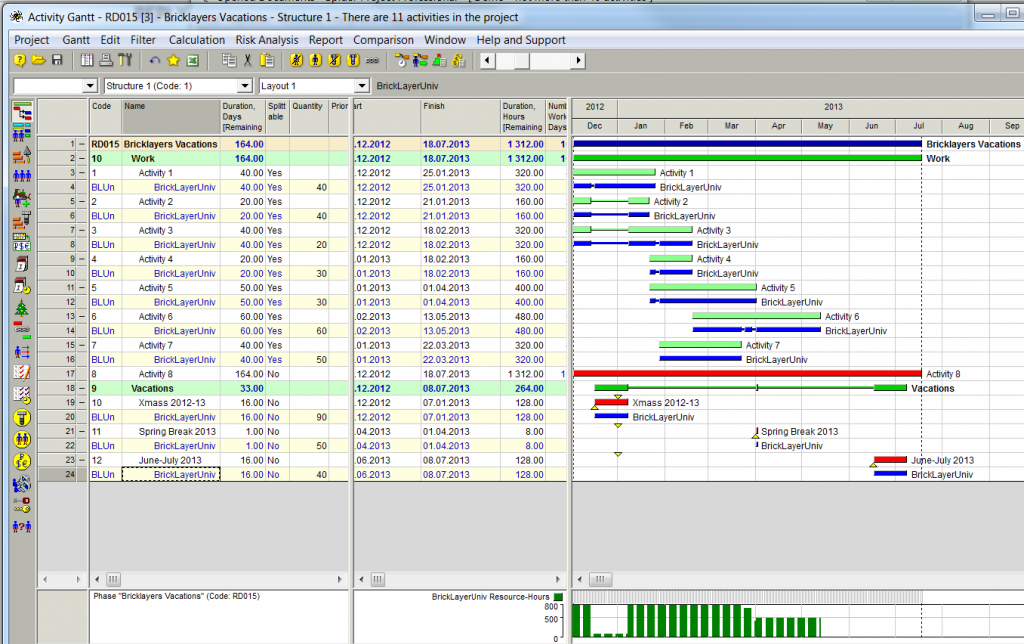
I modeled the same project using high priority task to model resource vacations.See below
What do you think of it?
You can download it here:
https://docs.google.com/file/d/0B1FBt_G3gCVqT253a2t4NFhHUGc/edit
- 0RDRafael Davila ·
Specific comments to your
Specific comments to your example:
- I think you made a mistake and assigned all 3 resources to the same calendar (with no exceptions)
- You are correct, fixed. http://www.mediafire.com/download/5m6whm7dejrl1t6/RD015.002.sprj
- You have Christmas 2012-2013 exception, but the Data Date is in June 2013, so this exception does not affect schedule.
- You are correct this exception do not affect schedule, I was thinking to use a DD at start of the year but forgot about it. I fixed it by adding a new calendar exception. You might notice I did not used any reoccurrence option as usually we start Xmas vacations not on fixed days but to cover two calendar weeks starting on a Monday. The same happens to some of our holidays, some are assigned fixed month dates and a recurrence period works for others such as Good Friday it is not about a fixed month date.
Generic comments to your method:
- The set of calendars and resources will become progressively complex, when more than 3 vacations needs to be modeled.
- Yes the computer is not a Crystal Ball you got to tell about the new vacations that can be all on new and different dates, that can be applied to different sets of bricklayers. When it becomes so complicated it is better to use only Named Resources.
- The granularity of following the vacations of every set of Bricklayers with common vacations is too much for me not to mention individual named resources. The same goes to the idea of modeling every single vacation as an activity. For Bricklayers I would rather use some average seasonal adjustments using resource production. For other trades such as a specialized design engineer there would be no option other than granularity as there would be no other resource with matching skills.
- If you add one vacation, not only will you have to add resources, but you will also have to rearrange existing ones.
- If you add new vacation to existing resources and there are no new resources there is no need to to add resources just add the new vacation as an exception, apply the exception to the corresponding calendars [new calendars might be needed] then you rearrange everything as usual by executing a resource level schedule run.
- I think you use extremely powerful mega premium feature of Spider Project (automatic resource assignment based on skills) to model quite a simple situation.
- It is not that simple, too many possible vacation combinations, otherwise everyone would have a perfect solution.
- I noticed, that automatic resource assignment based on skills requires significant processing power even for such simple schedule.
- Yes it adds time to the calculations. In addition because a powerful resource leveling algorithm Optimization Plus was selected, an algorithm that is far superior to standard algorithm some extra time is required also. In this case there is no difference but in more challenging jobs it makes a huge difference. Try changing resource leveling algorithm and you will notice the difference.
Alternative suggestion:
- I modeled the same project using high priority task to model resource vacations. See below
- What do you think of it?
- I will be looking at it tomorrow and will make my comments. In advance I can tell you that by looking at your figure during the month of March you have an over allocation of resources as Activities 5, 6 and 7 require 30, 60 and 50 bricklayers for a total of 140 while there are only 100 available. Check on this and let me know.
- Seems you are using variable quantities and not enough resources are being allocated. In order to view detailed resource assignments using variable quantities you must create a report similar to the following.
- http://www.mediafire.com/download/z1faaz7hk1ooys6/RD015.003.sdoc
- Your approach might work but looks like needs some fixing. Still I would use some average seasonal adjustments.
Best Regards,
Rafael
- I think you made a mistake and assigned all 3 resources to the same calendar (with no exceptions)
- 0EZEvgeny Z. ·
Rafael,you are correct, I use
Rafael,
you are correct, I use variable resource assignmnet, but my method would work also without it. I used it just to make it even more efficient.
Regards.
P.S. Roports is something, which I did not look at yet. How do you generate these *.sdoc files?
- 0RDRafael Davila ·
Evgeny, You said - I used
Evgeny,
You said - I used variable resource assignment, but my method would work also without it. I used it just to make it even more efficient.
- Variable resource assignments in this case will yield wrong results, instead of the quantity needed it assigns what is available without moving the activity to a time when they are available.
- In this case variable resource quantity assignments shall not be used.
- On Duration Type Activities Variable assignment means that something in between a given maximal and minimal amount will be considered enough and will be assigned, if minimal is not available then the activity will be delayed.
- The following figure shows the assignments.

- This mean I am adding another item to my current Spider Wish List.
-
Quantity & Workload displayed on partial assignments: When using partial assignment quantities/workload the displayed amount is misleading, better showing actual range of assignments or nothing unless a single value, if a single value shall be the assigned and the Maximal shall be displayed under a differently named field. Another option might be to display an asterisk along with the quantity amount when partial assignments are being used.
-
-
You said your method should also work and I agree just that we are no there yet. Then we can compare results with the Skills method.
-
Maybe in addition to my wish for Calendar Exception Activities another type Frozen Activities shall be included in my list. Activity that is frozen in time and entered via two of the following Start/Finish/Duration.
-
A useful two edged knife that shall be used with care but not banned.
-
Roports is something, which I did not look at yet. How do you generate these *.sdoc files?
- By selecting on menu Report/General Reports and Diagrams/Table Report. Note you must read them using Spider but at a single click they can be converted into Excel Files. Good for sharing but some functionality might be lost as these files like Reference Books can be used to transfer data directly to Spider Database as well as to other documents among other things. A more easier but more advanced functionality than the method used by other software to transfer data using Excel.
Variable resource assignments as well as reports shall be discussed on a separate thread several days after you start exploring it.
During this year my wish list have been drastically reduced, actually it is a small list whose majority of items I keep because of my stubbornness even when a some have been rejected as of not enough value to be implemented.
Best Regards,
Rafael
- 0EZEvgeny Z. ·
Rafael,You are correct. To be
Rafael,
You are correct. To be able to use variable resource assignment correctly these tasks should have been Productivity tasks.
Any way I changed it back and compared schedules with 2 methods and the result is almost the same (the difference is only 1 day, which I can’t troubleshoot at the moment).
You can see the results below.
RE
<<
Maybe in addition to my wish for Calendar Exception Activities another type Frozen Activities shall be included in my list. Activity that is frozen in time and entered via two of the following Start/Finish/Duration.
>>
You have it I think (almost). I use it to simulate vacation. This is a fixed duration task with Start NET constraint and with unachievable Finish NLT constraint.
https://docs.google.com/file/d/0B1FBt_G3gCVqSG1reVZRZXZ6bVE/edit
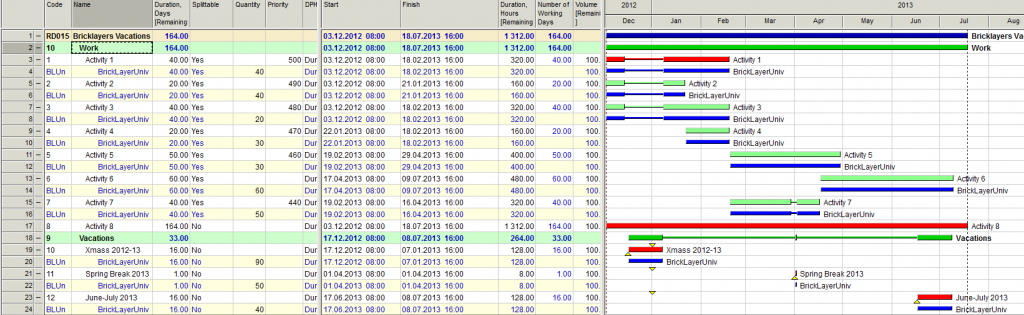
https://docs.google.com/file/d/0B1FBt_G3gCVqWGFoTnpKbXNPNEk/edit
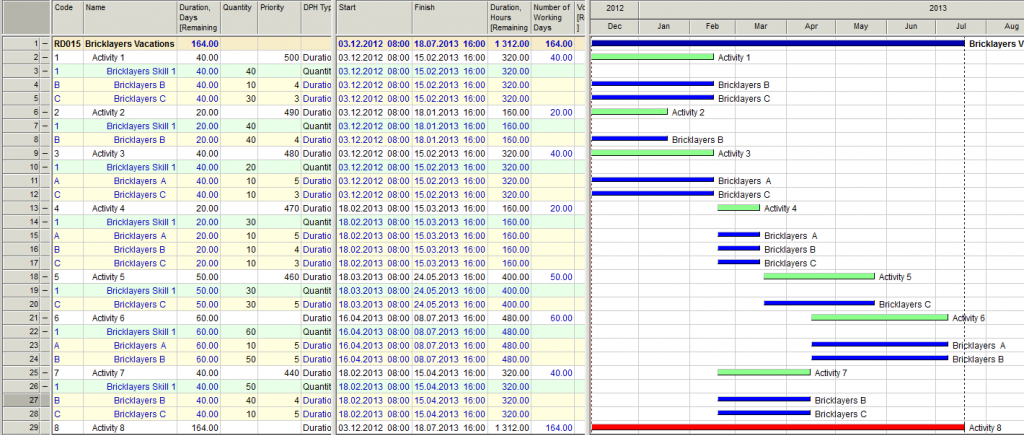
- 0RDRafael Davila ·
Evgeny, This looks great, but
Evgeny,
This looks great, but remember your first hunch, there might be a more efficient schedule. In this particular example activities are not linked, I assumed brick installation on different unrelated areas. This means you can assign all resources to each activity with a proportional reduction in time if activity duration depends on volume of work. In this way no single resource will be idle.
I tried a model using Skills in combination with variable quantities but for some reason I could not make it work, therefore I tried using Productivity Type activities resource loaded using variable Quantities but not Skills. As "Quantity" when using variable quantities means Maximal I changed the label of the title to Quantity [Maximal] as a reminder. I added some additional activity as for making the resource leveling algorithm to look for a solution that tries to minimize project duration and override priorities if these delay project duration.
The total duration of bricklaying activities was reduced to their minimum and no idle resources resulted from this model. The resource allocation worked as expected. But note the activities start ASAP even when no resources are still working on them and cannot finish until all resources execute the required volume of work. To me the Start of Activity 2 (and most others) is a bit weird as I would expect activity to start at the start of first production resource as well as to finish at the latest finish of any production resource, this means it should be modeled as having Start Flex instead of Start Float [in Spider named as Float to distinguish it from Finish Float]. The start of each production resource also does not makes sense to me.
http://www.mediafire.com/download/nv0lxeo0brbybqo/RD015.004.sprj

In more complex jobs it shall also do the work. Suggest trying different resource productivity on different activities due to difficulties particular of each activity or particular of any resource plus the addition of some additional successors.
Resource leveling is not just about making viable schedules as if you put all activities in tandem there will be no resource conflict and usually at a substantial cost in time, resource leveling is also about using the tool for better schedules, of shorter duration and with minimum idle resources. The excellent resource leveling algorithm in Spider Project is just one too but there are other tools unique in Spider you shall explore.
Take a look at the following file. Here I reduced maximal amounts as to allow more than a single activity be worked in parallel, note some times not all resources work in parallel on a single activity, for a better view as how many a report is of great value.
http://www.mediafire.com/download/x9bzze31pzl77pc/RD015.005.sprj
Best Regards,
Rafael
Log in or join to reply
ProjectControls.com is free to join. Members can post questions, reply, vote and follow discussions.
Existing members: your original username and password still work. Forgot password?