
P6 Calendar changes during the project
- Created
- 66
- 12
Hello
I have a couple of questions regarding the calendar within P6.
1) If you are working on a project which starts with only a day shift then so far into the project a night shift is introduced, do you need to reflect this night shift work in the calendar?
2) What difference does it make to the schedule if you change the calendar apart from changing the activity durations?
Thank you in advance
66 replies
Oldest first- 0AIAnoon Iimos ·
Vladimir, Construction
Vladimir, Construction activities are real and precise. For example: Pouring 1,000 cubic meters of concrete can become a completely different situation when using completely different methods or resources. How do you imagine pouring 1K m3 manually as compared against using pumpcrete and truck mixers? So for me, the imaginary examples that you were talking doesn't make any sense (sorry). As a good citizen of this planet, I believe that it is your responsibility to educate idiots (like me for example). The audience should benefit more from you, and not otherwise. So come on, please be fair and show real examples. - 0AIAnoon Iimos ·
Dear Vladimir, Isn't
Dear Vladimir, Isn't construction technology the main problem of project controls? I mean if you don't use the appropriate technology, then how do you expect that "project controls" only can become effective? From my example earlier (pouring 1K m3 of concrete), it is by common sense that will make you believe that it is impossible to do it manually, therefore you will need to use the best technology. If it is not a part of "Project Controls" for you, then what is it? BTW, my name is Anoon (as in Noon), as I only wake up at noon, and Iimos (in my language, it means beggar, or something you gave to a beggar, when you spell it with L or "Limos"). It is not project controls by the way. - 0RDRafael Davila ·
Raymund,If you assign
Raymund,
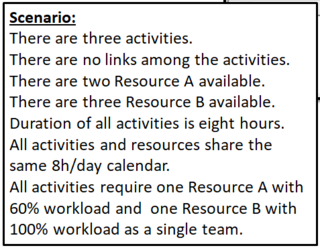
If you assign resource A1 to work 4.8 hours on one activity it is 60% workload but if you assign same resource to work his remaining 3.2 hours on another 8 hours activity this makes 40% workload, the requirement is to assign same resource 60% of his work time, not a combination of resources as it seems P6 is doing on the background. This is captured by most software if using named resources, most fail miserably if using generic resources. That P6 cannot properly level partial workloads can easily be shown with this sample scenario; if using named resources, no matter if using generic or named resources to same scenario the result must be the same.
Generic resources are commonly used instead of named resources because at time of scheduling you do not know the mane of each resource as well as because it is practical it should not matter if a specific resorce name is Pete or Alberto, it still makes one single resource.
What is the result if you use generic resources using P6?
What is the result if you use named resources using P6?
If P6 gets it wrong if using generic resources, P6 gets it wrong at the most frequently used methodology to assign resources.
- 0AIAnoon Iimos ·
Dear Vladimir, As you already
Dear Vladimir, As you already knew, I've never used Spider and I don't have P6 either. So how can I start a forum topic under Spider Project, which I knew nothing? Here, is somehow generic (planning/scheduling/programming). And I guess it is much safer for me here. Best regards - 0RDRafael Davila ·
Raymund,Please post the XER
Raymund,
Please post the XER file on a file hosting service so I can understand what you have done.
- It is impossible to verify it is same model by using screen captures if you do not have access to the software.
- Impossible if the original screen capture dissappears.
- If inadvertently using reduced availability and/or inadvertently using several other parameters different to the scenario requirements the model would not represent the same scenario.
- Among other parameters reduced availability can delay third activity as we all know.
- Involuntary errors do happen and must be ruled out.
I do not have P6 license but can read XER files using other software or using a text editor.
Best Regards,
Rafael
- 0RDRafael Davila ·
Raymund,Thank you very much
Raymund,
Thank you very much for your response.
Please sent it to the following e-mail address I use to prevent spam.
micu@1thecity.biz
I use temporary mail from temp-mail.org It is a service that allows to receive email at a temporary address that self-destructed after a certain time elapses. It will only be available for a limited time.
Within limited time anyone else who want to e-mail me their XER files can do so.
Best Regards,
Rafael
- 0RDRafael Davila ·
Raymund,Your e-mail was
Raymund,
Your e-mail was received but the e-mail server but did not allow me to open it nor download it. It is weird as I tried some test files for the temporary e-mail address and all worked fine; one test e-mail included a xer file as attachment so I am ruling out xer files are rejected by the system. An error message displays whenever I try to open your e-mail. I opted to close the temporary e-mail address, if need be a new temporary e-mail address can be created anytime.
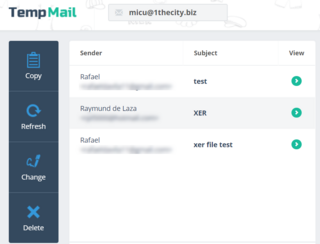
We will have to figure out other way, as we say at home “where there is a will, there is a way”.
I will try to contact TempMail to see if we can figure out what the error message means and will let you know.
Once again, thank you.
Rafael
- 0AIAnoon Iimos ·
With all due respect; In my
With all due respect; In my opinion, the problem simply hides within the Planner. This I guess happens when you keep on trying to make the impossible becomes possible and you might forget that software(s) are just tools that do not or cannot even recognize the fundamentals of Planning and Scheduling. I believe that it is not difficult to understand that: Logic-Driven Activities are totally different from Resource-Driven Dependencies, and I guess you don't even need a software to prove this fact. Hence, in my example earlier (pouring of 1,000 cubic meters of concrete), you can even plan it over your own brain (if any), that you got no other option but to use a certain number of equipment that can give you the exact amount of output, that you have precisely calculated. Again, just my unsolicited opinion. - 0RDRafael Davila ·
A TGoing back to your
A T
Going back to your original questions:
Do you need to reflect this night shift works in the calendar?
- The resource calendar is used to determine when the resource can work; the limits for that period are determined from the shift definition for that resource.
- You define work shifts as suggested by Oracle as per following link.
What difference does it make to the schedule if you change the calendar apart from changing the activity durations?
- The resource calendar is used to determine when the resource can work, if you change it you change when the resource can work.
There are several other serious issues though.
Primavera P6 cannot adequately model resource production rates [if at all] and therefore activity duration will be modeled as if different production rates among the different shifts do not matter. Try to model the scenarios under my post of Thu, 2018-11-01 16:10 if using P6 and see it by yourself.
Resource leveling when shifts are used is tricky, error prone and in some cases errors unavoidable as shown in the following reference.
- https://tensix.com/2018/05/using-multiple-calendars-in-primavera-p6/
- - “And there really is no good patch for meshing these differing shifts together. So avoid assigning linked activities a different shift calendar. Again, multiple calendars with identical shift start and end times are acceptable.”
Under certain circumstances shift resources will not be adequately leveled.
- https://docs.oracle.com/cd/E63417_01/client_help/en_US/helpmain.htm?toc.htm?define_resource_shifts.htm
- - “This note applies only when P6 Professional is connected to a P6 Professional database because leveling in P6 does not consider shifts.”
- - “The minimum resource availability for every shift must satisfy the minimum demand for the resource so that the resource can be leveled properly. Limits defined outside the boundaries of the shift definition are ignored.”
There might be issues with partial workloads when using a single shift, when using multiple shifts the same problems can be expected.
- In my posting of Mon, 2018-11-05 09:23 slide no 6, such issues are illustrated using a sample scenario if using Microsoft Project.
- Because renewable resources are assigned as unit of effort but not quantity it is possible P6 will yield results similar to Microsoft Project. Currently I have no access to P6, I had it years ago, I have not been able to discard it does not happen if using P6. For the moment this question I see to remain open.
Best Regards,
Rafael
- 0RDRafael Davila ·
A TChanging the workweek is
A T
Changing the workweek is by itself a change in calendar related to how shift definition works.
What happens if the shift definition needs to temporarily be outside the boundaries of the resource calendar-workweek? - Say resource calendar-workweek is from 6am to 4 pm and the shift definition needs to be from 2 pm to 9 pm during a specific period?
How P6 handles such scenario? - I am not sure the shift definition will override calendar workweek. Maybe you will need to expand the resource calendar-workweek, a calendar change, and from there use several shift definitions, this should not be a big deal.
Your question about calendars and shifts is of much relevance, the devil is in the details.
Thank you for such an interesting question,
Rafael
Log in or join to reply
ProjectControls.com is free to join. Members can post questions, reply, vote and follow discussions.
Existing members: your original username and password still work. Forgot password?