
Resource Overloads Bar and Resource Dependencies
- Created
- 75
- 8
Resource Overloads Bar and Resource Overloads Reports:
- Resource Overloads Bar always misses to display material resources overloads.
- Resource Overloads Bar always misses to display financial resources overloads.
- Resource Overload Reports always get it right with regard to common renewable resources overloads.
- Overloads Reports always misses to display material/consumable resources overloads.
- Overloads Reports always misses to display financial resources overloads.
- All overloads are relevant, all shall be displayed in a transparent way. The report name "Resource Overloads Report" can misled you to believe all types of resource overloads are covered.
- Diagrams as well as tabular reports can display any type of resource overloads. The way the Resource Overloads Report is organized makes it easier to get into the details of renewable resources. Why not display materials/consumable resources as well as financial resources overloads in the same way? The devil is in the details!
The value of overloads reports shall not be underestimated. These reports are more reliable than overload bars/diagrams. A short duration overload of any resource makes the schedule not feasible, this you will not miss under overload reports but easy to be missed if looking at the overloads bar. When checking unleveled schedules or leveled schedules from external software this functionality can be invaluable.
Resource Dependencies:
- No consumable resources dependencies are displayed. Analogous to renewable resource dependencies they are temporal relationships.
- No financial resources dependencies are displayed. Analogous to renewable resource dependencies they are temporal relationships.
- If activity splitting by the resource leveling is allowed the links among the segments should be shown. Arguably each of the split segments has their own duration and float values and resource dependencies.
- All resource dependencies are relevant, all shall be displayed, otherwise why show some.
In summary: I would like the following:
For Resource Overloads:
- Overloads Bar is eliminated as it can be misleading or error prone while the more functional Overload Reports is enough.
- Overload Reports for Materials/Consumable Resources be made available.
- Overload Reports for Financial Resources be made available.
- This adds two items while eliminates one item from the Reports and Diagrams menu, for a net increase of a single menu item.
For Resource Dependencies:
- The links table should display and identify all resource type dependencies, not only renewable resource type dependencies but also materials/consumable resource dependencies as well as financial resource dependencies.
- In case of activity splitting by resource leveling engine double links should be able to make it clearer.
- No need to add a new field as Resource Dependency field can be used to this purpose, display "no" if a hard link while for resource links “resource", "materials", or "financial” labels can be used. Resource label to mean renewable resources, materials label to mean consumable resources and financial resources to mean cost expenditures.
75 replies
Oldest first- 0RDRafael Davila ·
The following scenario will
The following scenario will showcase the difference between the diagams and the pre-defined overloads report.
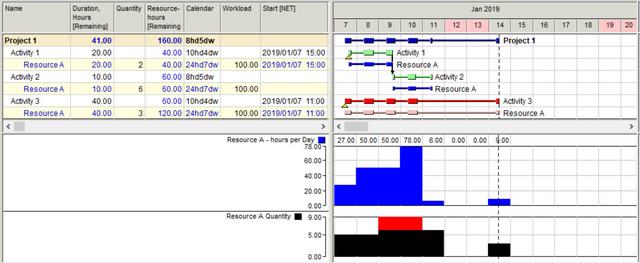
The above diagram does not provide enough detail about the overload duration.
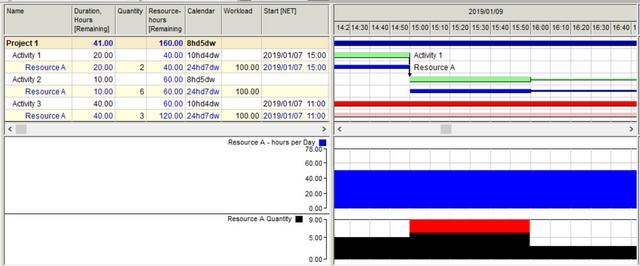
The above diagram is better but error prone and time consuming.
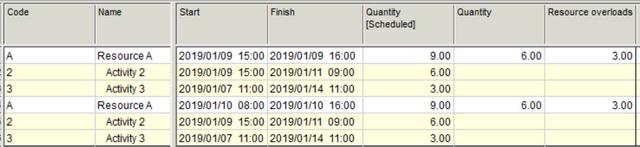
The above report give us the details up to the minutes, this is best report. There were two overload events, first lasted 1 hour and second 8 hours.
This report I want to be available for materials and financial resources.
BTW I am looking for the formula to calculate resource overload duration using resource calendar.
- 0RDRafael Davila ·
The following short videos
The following short videos showcase why I say Resource Overloads Bar can be misleading.
The ability to find out overloads using the overloads bar is sensitive to the time scale.
Even if the timescale is widened it still can be misleading as when multiple resources, each with their own overload events, each event with their own time span it is difficult if not impossible to figure it out where to click on the bar to hit each and every overload event.
- 0VLVladimir Liberzon ·
Rafael,did you press Resource
Rafael,
did you press Resource Peak Workload button?
Resource overload bar shows resource overloads after resource peak workloads are calculated.
You can set automatic calculation of peak resource workloads together with project scheduling in the scheduling/leveling options
- 0RDRafael Davila ·
did you press Resource Peak
did you press Resource Peak Workload button?
- After selecting automatic calculation of peak resource workloads the bar works as expected, not sure about the Resource Peak Workload button.
- Anyway it is still tricky; perhaps automatic calculation of peak resource workloads should be the default option or maybe could be toggled on for simple scheduling and off for resource leveling scheduling.
- Also if when resource leveling there is a warning about not enough resources to level the schedule changing the bar display can be a fixed visual warning this happened.
I might change my opinion about the bar as it will be a visual indicator of any overload, no matter what resource.
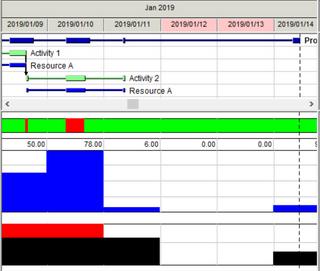
Thank you for the warning.
Best Regards,
Rafael
- 0VLVladimir Liberzon ·
Resource overload bar is the
Resource overload bar is the indicator of any resource overload.
Pressing right mouse button on the red area you will get the report on what resources were overloaded at that moment.
Resource peak workload calculation takes time and it is up to the user if to do it together with scheduling.
The warning of unsufficient resource quantity is shown when some activity requires more resource units that are available.
Resource peak workload shows the maximal number of resource required at any time, not only resource overloads.
- 0RDRafael Davila ·
I never trusted how resource
I never trusted how resource dependencies are shown, perhaps enough for the software to level the schedule but not enough to show all dependencies.
Before leveling there are some overloads.
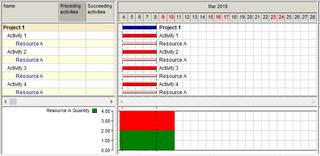
After leveling the so called Resource Dependencies can be shown.
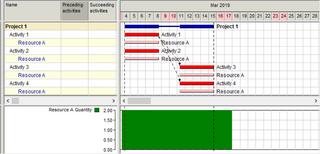
The Resource Dependencies shown can be misleading. Activities 3 and 4 are delayed not only because of resources on Activity 1 but also because of resources on Activity 2.
- Resource dependencies are internal calculations that might be better if not shown.
The overloads report list all activities causing the overloads, this report is never misleading.
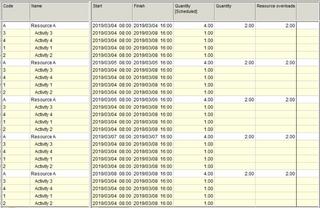
For the Resource Overloads Report to include materials/consumable resources as well as financial resources overloads is of much value, for me a big deal.
- 0VLVladimir Liberzon ·
Rafael,you remember that in
Rafael,
you remember that in Spider Project Resources are only rebewable resources.
Cost flow can be shown in the separate report where all cost "overloads" are shown like in this example
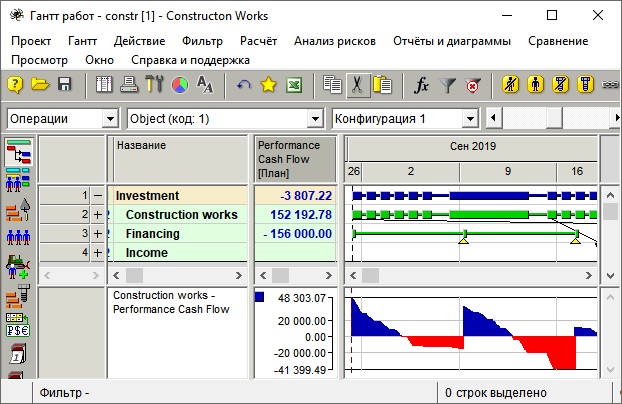
We do not special bar for materials "overloads" though material flow may be shown for any specific materials.
Resource dependencies are the result of resource constrained schedule analysis done after leveling. Resource dependency shows why an activity is delayed more than logical dependencies require. Besides they may be useful when Spider Project schedule is exported to another tool. One of the export options is exporting all dependencies including resource dependencies. In this case the schedule calcuated by external tool will be the same as the leveled schedule in Spider Project. We think that resource dependencies are useful for these two purposes: schedule analysis and schedule export. And once again by resources we always mean renewable resources.
You are right that it could be useful to show resource dependencies for portions of splitted activity.
Material dependencies are more complex. Next activity may start not only when another activity that consumed the same resource was finished but if its consumption rate became lower for some reason. In any case it is another task.
- 0RDRafael Davila ·
But what about
But what about materials/consumable and financial resource overloads?
As most construction schedules have materials/consumable and financial resource constraints I consider it a joke the claim these other software are good enough to efficiently handle resources.
The bar is against Spider itself.
In a prior post I said that the Resource Dependencies can be misleading and these are internal calculations that might be better if not shown. A 180 deg. turn from my request to display even more. Maybe the resource leveling algorithm does not make use of temporal links but temporal dates as I believe MSP does. If this is so why show something that is incomplete or not real?
- 0RDRafael Davila ·
But why not transfer delays
But why not transfer delays caused by leveling of consumable as well as financial leveling?
I know most external software will not even recognize the existence of consumable and financial constraints but they are still relevant.
It is important for consistency and transparency that those receiving the Spider Project Schedule transfer get the delays caused by leveling of consumable as well as financial resources leveling. Maybe visibility will be available if consumable and financial resources are transferred as non-leveling regular resources along with their corresponding dependencies.
They might not be able to dream leveling consumable or financial resources but will be able to see what they are missing.
- 0VLVladimir Liberzon ·
Rafael,they do not model
Rafael,
they do not model financing and supplies and delays are usually caused by delays of funding and supply.
And links may be complex because Spider Project schedule activities so that materials appear exactly at the moment when they were totally consumed. The link may lead to the middle of succeding activity.I am not sure that negative costs and materials can be exported to other tools.
- 0RDRafael Davila ·
Maybe there is still a way to
Maybe there is still a way to show these multiple interruptions. Maybe an unorthodox idea such as creating temporary calendars and exceptions to represent the resource dependency can do the trick if there is a way to transfer such exceptions. Just a crazy idea in the hope something could come out of it. Never give up.
I have no problem whatsoever with how Spider works resource leveling. But when transferring resource leveled schedules to other software I have problems, I am looking for some workaround with the understanding these resource leveled schedules are a snapshot.
I believe Spider might have the required functionality to calculate the splits as calendar exceptions down to the seconds.

More challenging might be to transfer interruptions among different shifts on same activity.
For years I have been frustrated by how little functionality is on P6 that makes it impossible to mimic snapshots of more functional software such as Spider Project.
Even if some resource dependencies cannot be transferred to less functional software having access to them within Spider Project will be useful.
- 0AIAnoon Iimos ·
Resources overloads only
Resources overloads only occurs when there are several activities having assigned with the same resources are happening at the same time. Try using FS0 only and you will never get resource overloads. For "resource dependencies", for me, it means availability of resources. A resource cannot be dependent on itself, but an activity or task is always dependent to a resource. So why not just call it: Activity Dependencies? And besides, you were just assigning resources to activities. So I guess instead of worrying too much on automatic resource leveling, why not just focus on activities sequencing? And after all, when you update the schedule using "progress override" or "retained logic", I guess resource leveling do not matter at all. - 0BLBogdan Leonte ·
Rafael,I have to agree with
Rafael,
I have to agree with Vladimir, in the sense that drawing links between financiar and material constraints could be difficult to realize and somewhat abigous to read; however if I may suggest, as it is now, Spider draws resource links between activities, maybe it could be made in such a way as to draw resource dependencies between resource assignments or maybe an option to have both: in the Gantt settings there is an option called Resource dependencies, perhaps a sub-option called Draw resource dependencies at assignment level would prove more reliable when showing them; even perhaps draw them in the Resource Gantt diagram.
The functionality will imply only drawing the resource links at the assignement level, while maintaining them between activities in the links table, this way the export resource dependencies as links will not be affected.
Best regards,
Bogdan - 0VLVladimir Liberzon ·
It is not possible to export
It is not possible to export assignment dependencies because they do not exist in other packages.
So the users have a choice if to export all dependencies including resource dependencies, or logical dependencies only.
In the first case their package will keep Spider schedule, in the second case it could not be guaranteed.
- 0BLBogdan Leonte ·
It seems I haven't made
It seems I haven't made myself clear.
From what Rafael wrote I derived the ideea to keep resource dependencies as links between activities in the links table but to have on option to display (draw) these resource dependencies on the Graphic part of the Activity Gantt from resource asignment to resource assigments, Spider identifies these "links" (delays) in a tabular form in the column "Reason for delay".For me, the resource dependencies between activities and the column Reason of delay is enough to drill down the schedule; what I would like in the Schedule report, if it is possible, to mention the amount of delay and the other activities that use the resource, for example:
Activity "Activity 3" (Code: 3) is delayed due to the lack of Resource "Resource A" (Code: A) from Activity "Activity 2" (Code: 2), for 24 hours, 3 days using calendar 8hd5wd.
Activity "Activity 3" (Code: 3) is delayed due to the lack of Resource "Resource A" (Code: A) from Activity "Activity 1" (Code: 1), for 4 hours, 0.5 days using calendar 8hd5wd.
Where the calendar 8hd5wd is the calendar is the calendar of the activity which is delayed.
I think this information would be very useful.
Best regards,
Bogdan - 0VLVladimir Liberzon ·
Anoon,Resource overloads may
Anoon,
Resource overloads may happen in any schedule including those with only FS0 dependencies.
Activities have logical dependencies but may be delayed when required resource is busy on another activity.
Analyzing resource constrained schedules we show why an activity is delayed if it is delayed more than logical links require. So we create and show resource dependencies that show what activities used the required resource and caused activity delay.
Activity sequencing is determining activity logical dependencies that must be followed. Resource leveling considers both these dependencies and availability of assigned resources and creates feasible schedule. PM software vendors automate this process and try to create the best possible (shortest) schedule. Manual leveling is possible but is very time consuming and rarely provides good results.
- 0VLVladimir Liberzon ·
Bogdan,the problem with
Bogdan,
the problem with multiple resource dependencies: they may create an impression that all preceeding activities shall be finished for the current activity start. But they are of OR type. Resource dependencies are just the indicators that show where to pay attention. They are also useful for exporting leveled schedules to other projects.
- 0RDRafael Davila ·
Resource dependencies are
Resource dependencies are always ambiguous.
Before leveling: Please note there are no links among activities.
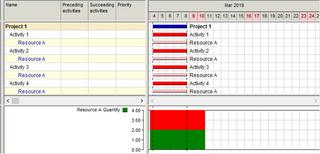
After leveling:
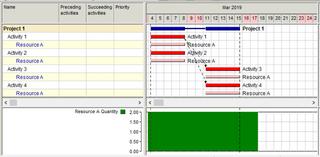
To created resource dependencies adds ambiguity and can be misleading. It was the use of resource by Activities 1 and 2 that delayed Activities 4 and 4.
To say the delay reason for Activity 3 and Activity 4 is availability of resource A by sept 9 is not ambiguous. Unfortunately some are missing, activity 4 was delayed and no delay reason is shown.
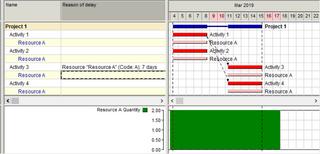
I understand the main purpose of creating resource dependencies is to be able to create a snapshot of the leveled schedule that does not depends on resource leveling, that uses not all but some of the dependencies as to keep it aligned. The same can be done in other ways such as if using date constraints. Such model can be transferred to other software that would yield different leveled schedule if these links are not transferred. It will not tell the whole story about delay reason but will still be very useful.
I use the date constraints method to freeze resource leveling done by other software, this can be used to verify if the resource leveling is feasible. Please be aware not all software yield reliable resource leveling output, not common but happens.
http://www.planningplanet.com/forums/asta-powerproject/576477/asta-pp-resource-usage-plan
I would like to see delay reason shows delay as it currently does and not miss any resource, including materials and financial and that all delayed activities due to resource leveling are included. This without any mention of resource dependencies as this would be ambiguous. The delay duration or perhaps a date should be enough for the scheduler to pinpoint and investigate complex delay reasons.
- 0RDRafael Davila ·
Vladimir,dates do not show
Vladimir,
dates do not show why an activity is delayed
Of course not, same as delay duration does not tell why an activity is delayed. Duration is based on some calendar while a date of delay start can be as useful. I can live with only the delay duration. I am happy with how delay reason is supposed to work but there are some misses, to my surprise some delayed activities show no delay reason this should be esy to fix but I would like to see when delay reason was due to materials of financial constraints.
For the purpose of creating the snapshot schedule better keep the compromise, just keep reminding users that there is a pragmatic compromise.
Best Regards,
Rafael
- 0RDRafael Davila ·
Yes - There is resource link
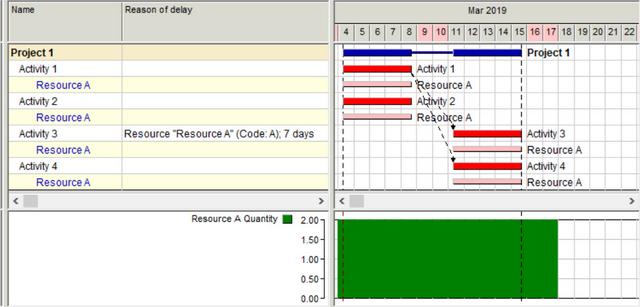
Yes - There is resource link from activity 1 to activity 4.
But Reason of delay column for Activity 4 is empty. I expect it to show Resource A 7 days without specifiyng if because of Activity 1 or 2, both caused the overload prior to leveling. In other words same reason as that shown for Activity 3.
- 0AIAnoon Iimos ·
Hi Vladimir, Yes of course,
Hi Vladimir, Yes of course, resource-overloads happen even when using only FS0 for activities, as it is a fact that a typical construction schedule have multiple WBS which may be reasonably done at the same time (or WBS with activities that have Start-to-Start relationships), interior works for a high rise building for example. At first perhaps the preparation of a certain construction schedule maybe too ambitious considering all possible theories as regards activity-logic links and forgetting the fact that again, most (if not all) schedules are of course "resource constrained". For me, this is the first mistake that typically happens in construction scheduling. And in addition, contract requirements for durations for example have no real basis on how it was derived (or without resources-considerations). And of course the contractor have no choice but just to follow the contract requirements. And the problem is further aggravated by the requirement to use "Retained Logic Only". Isn't it? - 0VLVladimir Liberzon ·
we have not these problems
we have not these problems here.
If the change of construction sequence is reasonable and does not endanger reaching contractual milestones successfully Owners do not object. But contractors are responsible for meeting major milestone dates and so they shall not agree with dates that are not achievable.
- 0RDRafael Davila ·
In the following scenario
In the following scenario "Reason of delay" misses to mention there are two driving links, this is misleading. Better say reason of delay is a predecessor link, then by looking at other reports the scheduler should be able to identify all activity links that caused the delay.
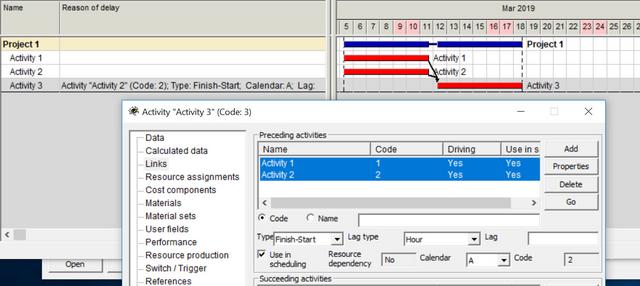
Date constraints should also be included as these can delay an activity.
- 0RDRafael Davila ·
All activities are placed
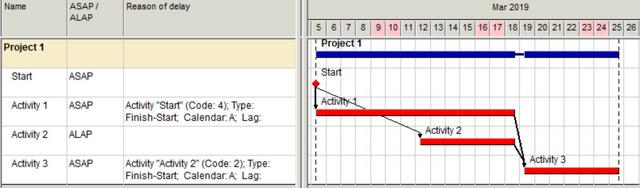
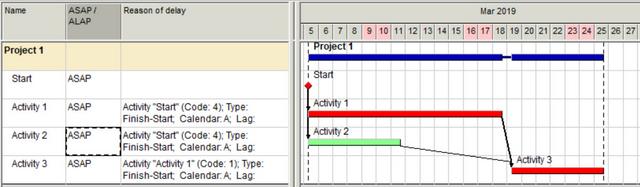
All activities are placed somewhere in the schedule, if the “Reason of delay” is empty, something is missing.
What can be a “Reason of delay”?
- Actual Start.
- Active Driving link(s) [can be more than one].
- Active Resource dependency(s) [can be more than one].
- Active Start [NET] Date Constraint.
- Data Date, activities not started with no active driving links, no active driving resources and no active driving Date Constraints will be placed at data date.
- Concurrent delay reasons might occur.
Am I missing something?
- 0
Marcus Possi ·
Hi Rafael, could we include,
Hi Rafael,
could we include, "not 24hd7dw Calendars"?
What can be a “Reason of delay”?
- Actual Start.
- Active Driving link(s) [can be more than one].
- Active Resource dependency(s) [can be more than one].
- Active Start [NET] Date Constraint.
- Data Date, activities not started with no active driving links, no active driving resources and no active driving Date Constraints will be placed at data date.
- Concurrent delay reasons might occur.
- Not "24hd7dw Calendars" applied to resources or activities.
- 0AIAnoon Iimos ·
In any case, inconsistent
In any case, inconsistent productivity rates can be a cause of delay. Even truck mixers stuck in traffic can cause major delays (just imagine when you had just started pouring bored piles and succeeding mixers were stuck in traffic). These delays cannot be seen in schedules at first, but when you update your schedule, you need to reflect what actually happened. So again and again your schedule always need adjustments. That's why "retained logic only" is never a "best practice". - 0RDRafael Davila ·
Marcus,Calendars will always
Marcus,
Calendars will always be considered in the calculations of "links" early dates but ultimately the delay is on the driving link. It is the driving "link" [logic-link/resource-link/date-constraint ...] what gives meaning to reason of delay. If you tell me the delay reason is some calendar and nothing more I will be lost, but if you give me the driving "link", whatever it is, I will get it, "link" calendar will be known as well as activity and resource assignment calendars. Calendars can be omitted as a reason of delay without loss of meaning.
Maybe the statement - "Data Date, activities not started with no active driving links, no active driving resources and no active driving Date Constraints will be placed at data date" should be changed to - "Data Date, activities not started with no active driving links, no active driving resources and no active driving Date Constraints will be placed ASAP after data date."
Maybe ALAP should also be considered a possible "Reason of delay".
Figuring out "Reason of delay" is not easy, this field has huge potential to be of high value.
- 0
Rafael,Considering what you
Rafael,
Considering what you said, I must agree with you, "calendars" are natural object atributes, and shuold not be considered a delay generator during the natural scheduling process, in the same way we could say that the ALAP modeling condition would also be a planning attribute, not a top reason of a delay.
Anyway, the "report of the reason of delays", is really very useful for planners.
What can be a “Reason of delay”?
- Actual Start. ... due to "real" execution performance, or external risk factors
- Active Resource dependency(s) [can be more than one]. ...due to "real" constraint limits reasons
- Active Start [NET] Date Constraint.... due to enviroment (resources, contracts, external risk factors) real conditions
- Data Date, activities not started with no active driving links, no active driving resources and no active driving Date Constraints will be placed at data date. ... due to real execution performance, or external risk factors.
Am I right when a say that all the considered "delay reasons" could be detached as, any re-scheduling caused by : actual execution performance, external risk factors not mapped, and project's constraint limits?
These ones bellow should be considered a composition of the others above.
- Concurrent delay reasons might occur. ..
- Active Driving link(s) [can be more than one]. ...
- 0AIAnoon Iimos ·
Vladimir, Everything in real
Vladimir, Everything in real construction is uncertain. Nobody knows when a riser pipe for "pumpcrete" will be clogged or the tower crane will breakdown (during concrete pouring for example); or condemning a just recently poured bored pile (because of inconsistent concrete pouring and suspecting cavities). And of course some original logics will be violated, depending on real situation on site. If you intend to pour a slab monolithically for example, then if anything happens during concrete pouring, then you must be prepared to provide for correct construction joints which may need application of epoxy or water-stop or whatever for example. And of course these are all violations of original logics. @ Rafael: "What really drives schedule logics"? It is not your plan or schedule, but real site conditions and of course people on the grounds. So forget about using "retained logic only". - 0AIAnoon Iimos ·
LOL...simply "free float" and
LOL...simply "free float" and yes ALAP. The problem with samples is that you don't know exactly what you were trying to represent (but CPM theory). Try using real example for piping: Cut; Fit; Weld (FS only). Say Act. 2 is Fit. Then you will realize that your example is not applicable in real world. - 0RDRafael Davila ·
Marcus - "we could say that
Marcus - "we could say that the ALAP modeling condition would also be a planning attribute, not a top reason of a delay"
This might answer a question I had on my mind about showing delay reason if not for ALAP. Your reasoning about it being an attribute at first sight looks good.
I recall an old article on 3 scheduling gurus complaining about how difficult it is to understand what is driving schedule logic, this "Reason of delay" field can help a lot.
- 0VLVladimir Liberzon ·
Anoon,I don't understand what
Anoon,
I don't understand what are you trying to prove.
Of course there are uncertainties and of course they shall be taken into account when contingency reserves are calculated.
Nobody here suggest to use "Retained Logic Only".
But life is more complex than you proposed, FS only does not work in most projects and particular in the pipeline construction projects that you used as an example.
- 0AIAnoon Iimos ·
If there is float, then it
If there is float, then it means there is no delay. ALAP simply means zero float, but still no delay. Hence, "reason of delay" is blank. I guess a schedule perse cannot depict "reasons of delay" as "delays" are based on facts. Otherwise, if you have "negative floats", then the "reasons of delays" would be obvious (activities with negative floats). Now, this is the problem: How do you determine resources with negative floats? Or how do you calculate floats for resources? - 0VLVladimir Liberzon ·
Anoon,if an activity does not
Anoon,
if an activity does not start at its early start time then it is delayed for some reason. Activity delay does not necessarily means project delay. And negative float also does not mean that an activity was delayed. Maybe target date was too close or some of the previous activities took longer than expected.
I don't like and approve negative floats. Floats are used for schedule analysis and if an activity is critical in the current schedule it has zero float even if the project is late or some time constraints were not met. Spider Project calculates (but not uses) negative floats also (as a separate field) but just for the reference and for people who are used to this.
Activity resource constrained floats and resource assignment floats are not the same. Look at slides 56 and 57 of my presentation at recent Construction CPM Conference:
http://www.spiderproject.com/images/img/pdf/Construction%20CPM%20Conference%202019/Beyond%20CPM.pdf
- 0AIAnoon Iimos ·
Vladimir, No, the activity is
Vladimir, No, the activity is not delayed even if not able to start on "early date", because you have ALAP. If you have started beyond ALAP, then surely you are delayed and of course you will have "negative floats". By the way, the very first time you create a schedule, of course there must be no "negative floats" (nobody wants a late schedule). Negative floats are only based on facts (or it will only exist once you start updating your schedule). That's why I would like to reiterate what I said earlier: Schedules perse cannot depict the reasons of delay (until you have facts). So again, forget about using "retained logic only".:-) - 0VLVladimir Liberzon ·
Anoon,looking at the Gantt
Anoon,
looking at the Gantt Chart you may notice that some activities do not start at the early start day and may be interested why. One of the potential reason - an activity start was set as ALAP, other reasons may include the lack of required resources, materials, costs. This is what we call Delay. It does not consider due dates and so negative float does not matter.
- 0AIAnoon Iimos ·
Vladimir, Normally and
Vladimir, Normally and firstly, you always create schedules using "ASAP", of course to have buffers or floats. And the last thing you want is to run your schedule on "ALAP" and consume all your floats. You never do ALAP unless there is valid reason (say your resources will not be able to start ASAP or as early scheduled, but perhaps within the "free float" or as late as possible or ALAP, which simply means zero float). And creating or projecting "resource assignment" is somehow a fact, which for me is the "valid reason", but not "ALAP perse". So for me, "reasons of delays" should always be based on facts. As regards "negative floats", these will only appear if your project (or certain activities), completion dates were constrained. For me, "negative floats" are not bad, but of course "constraints" are really bad in scheduling. However, in real world scheduling, you can never avoid constraints, "contract completion dates" for example. Negative float will show the exact amount of delay in terms of time, and of course it is a warning, as negative float simply means delay. Now, what I'm trying to say? Who's saying that "Resource-Constrained Scheduling" is easy? - 0VLVladimir Liberzon ·
Anoon,ALAP (zero free float)
Anoon,
ALAP (zero free float) is used when you need something to be done "Just in time".
Example: it does not make sense to deliver materials long before they are required.
Negative float is an information that helps to analyze project status but is useless for project network analysis. Even if my project is late I still need to know schedule critical path and activity floats in the current schedule calculated creating forward and backward paths from achievable dates. By Critical Path I mean Resource Critical Path, traditional Critical Path is its particular case if project resources are not limited.
- 0AIAnoon Iimos ·
In my humble opinion, to use
In my humble opinion, to use "ALAP" in a schedule, first you need to decide. Which perhaps brings me to conclude that: "Resource Constrained Scheduling" cannot be done automatically or you cannot just rely on the software to do the "resource leveling". Most samples or presentations that I've seen regarding "resource leveling" only uses unnamed activities and resources which never represent specific or realistic activities, but simply projecting CPM theory (again and again). So I guess people in the fields will never understand the theory of "software generated resource leveling". A construction superintendent for example has two teams or crews to do the pipeline, which he can able to place each crew in any segment along the pipeline, simply based on his own personal decision. Do you think the superintendent needs the software to determine exactly where to place his crews in order to optimize the time schedule? - 0VLVladimir Liberzon ·
Anoon,it is obvious that it
Anoon,
it is obvious that it is not possible to show real life schedules in the forum discussions. So discussing scheduling problems people use examples.
Now imagine that you got following real life task:
Determine what numbers of people (of different specialities), machines and equipment you will need at the remote sites and what spreads to create for building 730 km pipeline to certain date and with other time constraints like the need to build certin parts of it at predefined small time windows?
Using more resources than necessary means additional expenses, using less resources than necessary means finish delay and potential penalties. Missing time windows mean 6 months delays.
We did this creating project model consisting of 9000 activities and optimized resource requirements using resource leveling and risk simulation. Can you suggest any other way? I don't think that superintendents look for many months ahead deciding who shall do what and in what order.
As you certainly know resources are always restricted. And the software can estimate much more options for finding the best way to do the job. But it may be useful only if it takes into account all existing constraints like do the people that make decisions. Superintendents will rely on the schedules created by the software if it takes into account everything they do.
We met disbelief on construction sites many times but later, after system implementation, the same people told us that now they don't understand how did they work earlier.
- 0AIAnoon Iimos ·
Vladimir, My understanding
Vladimir, My understanding of "resource leveling" is simply this (please correct me if I'm wrong): Perhaps there are several activities within the schedule that were assigned with exactly the same crew or resources and happened to occur or were scheduled to be done at the same time. In other words, there are activities in the schedule competing or requiring exactly the same resources at the same time. Now, what you gonna do if you got only one crew and there are two or more activities needing the crew at the same time? Of course "human decision" would be necessary, if which activity would be prioritized. Otherwise, the software I guess will simply select the activity randomly or perhaps based on floats. And of course the schedule can possibly turned out to be physically or literally out of sequence, and the software of course do not know that. - 0VLVladimir Liberzon ·
Anoon,when several activities
Anoon,
when several activities require the same resource at the same time it is necessary to decide what activities to delay. Wrong decision may lead to the schedules that are longer than necessary. That is why the software looks for the decisions that minimize overall project duration. Some algorithms are based on activity floats but it is not sufficient for finding the best solution. Spider Project uses sophisticated optimization algorithms that usually create shorter schedules than created for the same projects by other software. Look at this discussion http://www.planningplanet.com/forums/planning-scheduling-programming-discussion/574396/comparison-resource-levelling-algorithms-di
So right decisions shall be based on the consequences to overall project duration and even if you assign scarce resources to activities with largest float it does not guarantee the best schedule. It is necessary to look much further than to activities competing for the same resources at current moment. That is why we need computers - to help us to take right decisions and not only to print nice reports.
- 0AIAnoon Iimos ·
Vladimir, I'm not arguing
Vladimir, I'm not arguing about the importance of computers or software. Of course the "right software" is a necessity in todays construction. However, for decision making, I believe that you cannot just simply rely on a software output (regardless how reliable a software is - or simply GIGO). Let me cite real examples as follows: You got a pipeline project where you were required to use three types of pipes as: RC Pipes, Steel Pipes, and FRP or GRP Pipes. And you got one specific crew for each type of pipe. However, you had only one "special crew" in-charge of Pipe Fitting which can be used or common to all pipes as mentioned (just for example). Say you have started the three segments (three types of pipes) at the same time and assigned with each corresponding crew. And the "one special crew" was assigned to all the segments at the same time as well. Considering all the segments (all types of pipes), were equally critical as scheduled, how can the software select which segment would be prioritize (or delayed) with respect to the "special crew" assignment? Considering no "human decision" has been made yet (or you just let the software decide first). - 0AIAnoon Iimos ·
Vladimir, I'm not arguing
Vladimir, I'm not arguing about the importance of computers or software. Of course the "right software" is a necessity in todays construction. However, for decision making, I believe that you cannot just simply rely on a software output (regardless how reliable a software is - or simply GIGO). Let me cite real examples as follows: You got a pipeline project where you were required to use three types of pipes as: RC Pipes, Steel Pipes, and FRP or GRP Pipes. And you got one specific crew for each type of pipe. However, you had only one "special crew" in-charge of Pipe Fitting which can be used or common to all pipes as mentioned (just for example). Say you have started the three segments (three types of pipes) at the same time and assigned with each corresponding crew. And the "one special crew" was assigned to all the segments at the same time as well. Considering all the segments (all types of pipes), were equally critical as scheduled, how can the software select which segment would be prioritize (or delayed) with respect to the "special crew" assignment? Considering no "human decision" has been made yet (or you just let the software decide first). - 0AIAnoon Iimos ·
Vladimir, I'm not arguing
Vladimir, I'm not arguing about the importance of computers or software. Of course the "right software" is a necessity in todays construction. However, for decision making, I believe that you cannot just simply rely on a software output (regardless how reliable a software is - or simply GIGO). Let me cite real examples as follows: You got a pipeline project where you were required to use three types of pipes as: RC Pipes, Steel Pipes, and FRP or GRP Pipes. And you got one specific crew for each type of pipe. However, you had only one "special crew" in-charge of Pipe Fitting which can be used or common to all pipes as mentioned (just for example). Say you have started the three segments (three types of pipes) at the same time and assigned with each corresponding crew. And the "one special crew" was assigned to all the segments at the same time as well. Considering all the segments (all types of pipes), were equally critical as scheduled, how can the software select which segment would be prioritize (or delayed) with respect to the "special crew" assignment? Considering no "human decision" has been made yet (or you just let the software decide first).
Log in or join to reply
ProjectControls.com is free to join. Members can post questions, reply, vote and follow discussions.
Existing members: your original username and password still work. Forgot password?